The Short Version
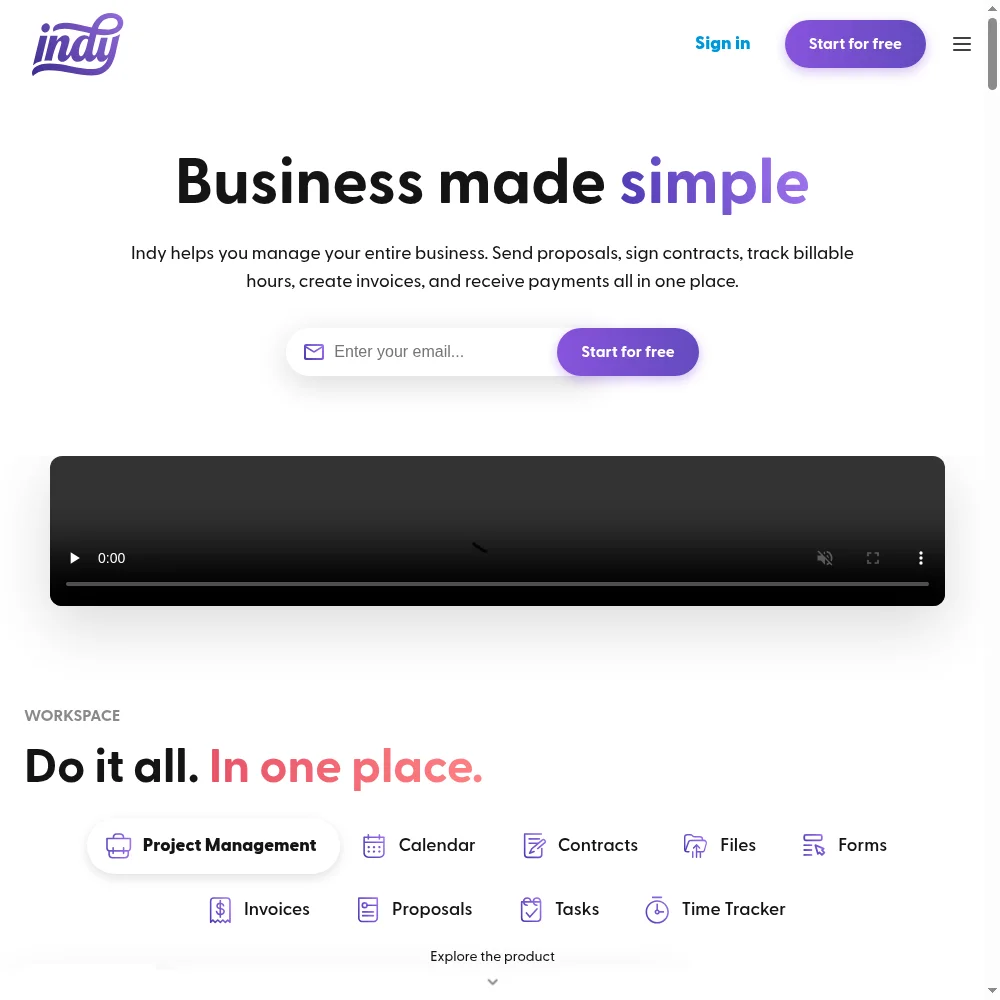
Indy is the budget option in the crowded freelance business management category. Where Bonsai and HoneyBook charge $30–50/month and pitch themselves as all-singing business operating systems, Indy strips the feature list down to what most solopreneurs actually use day to day: send a proposal, sign a contract, track time, invoice the client, get paid. It does all of that for free (with limits) or for $25/month (unlimited).
The product is web-based only — no native mobile app, which is a real friction point for freelancers who live on their phones. The interface is clean and fast, and the setup takes about ten minutes. Stripe and PayPal are built in for payments, Google Calendar sync works, and the Pro tier adds Zapier, white labeling, and a branded client portal. If you’re a one-person shop billing a handful of clients, Indy covers the basics without forcing you to learn a complex tool.
The honest caveat is that “budget” correlates with “shallow.” The time tracker receives the most consistent criticism from real users — it’s manual, clunky, and prone to input errors. Accounting is invoice-level only, with no expense tracking, receipt capture, or tax reporting. And the Trustpilot record is worth noting: while Capterra shows 4.7/5 across 103 reviews, Trustpilot sits at 2.0/5, a gap that usually points to billing or customer-service friction rather than product quality. Indy is a starting point, not a destination.
Who This Is For (and Who Should Skip)
Indy has a clear bullseye, and it’s narrow.
- ✅ New freelancers on a tight budget
The free plan lets you send 3 proposals, contracts, and invoices per month — enough to start billing clients before you’ve spent a dollar. - ✅ Solopreneurs who want one tool instead of five
If you’re currently juggling a Stripe invoice, a DocuSign contract, and a Google Calendar, Indy replaces all three at a lower total cost. - ✅ Freelancers who prefer web tools over desktop apps
Indy is fast and responsive in the browser. If you’re always on a laptop, you won’t miss a native app. - ❌ Growing agencies or teams
Indy is single-user only. There’s no multi-seat plan, no team permissions, and no shared workspace. Once you hire a contractor or partner, you’ll outgrow it fast. - ❌ Anyone who needs serious accounting or expense tracking
Indy generates invoices and accepts payments, but it doesn’t do books. If you need P&L, expense categorization, or sales tax, you’ll want QuickBooks or FreshBooks alongside it. - ❌ Mobile-first freelancers
There is no native iOS or Android app. The mobile web experience works, but users repeatedly ask for a real app — and years later, it still hasn’t shipped.
Score Breakdown
What Actually Matters: Features, Reviewed
Indy markets dozens of features across its tools page. Most of our testing time went to four that actually determine whether a freelancer stays or cancels.
💰 Invoicing and payments that just work
This is the feature that justifies the subscription. Indy’s invoice builder is clean: add line items, set tax, choose currency, attach a contract, and send via email or a shareable link. Stripe and PayPal are both integrated, so clients can pay with a card, bank transfer, or PayPal balance without you setting up a separate merchant account. Recurring invoice series are available on Pro, which handles retainer clients well. The multi-currency support was specifically called out by one reviewer as solving a years-long headache. The limitation is that there’s no automatic late-fee charging and no payment plan splitting — if a client asks to pay in installments, you’re doing it manually.
📝 Proposals and contracts with e-signature
Indy includes proposal templates and contract templates out of the box, and both support e-signature. The proposal builder lets you scope deliverables, pricing, and timeline, then send it for client approval. Contracts are similarly straightforward — pick a template, customize the clauses, send for signature. This is not Bonsai’s deeply customizable contract engine, and you won’t find clause libraries or conditional logic, but for a standard freelance agreement it’s more than adequate. Templates are saveable on the Pro plan, which removes the copy-paste-from-Google-Docs workflow that plagues free-tier users.
⏱️ The time tracker — where Indy loses points
I want to be specific about this because it’s the most consistent complaint in the user reviews. Indy’s time tracker is manual: you start a timer, it runs, you stop it. There’s no automatic detection of idle time, no desktop app, no browser extension, and no integration with project management tools beyond Zapier. Multiple reviewers describe scrolling through timer entries to correct mistakes, and one specifically noted that the manual entry flow “can lead to mistakes with input which then gives false reporting on time.” If you bill by the hour and need accurate timesheets, you’ll likely keep Toggl or Clockify running alongside Indy and just import the hours into invoices. The time tracker is present, but it’s not a reason to buy.
🚀 The free plan and the 2-year pricing trap
Indy’s free plan is genuinely useful: 3 clients, 3 invoices, 3 contracts, and 3 proposals per month, plus unlimited projects, tasks, forms, and time tracking. That’s enough for someone doing 1–2 small projects a month to run their entire business without paying. The Pro plan unlocks unlimited everything plus the client portal, white labeling, Zapier, and 1TB of storage. The catch is the pricing structure: the advertised $12.50/month requires a two-year upfront commitment of $300. Month-to-month is $25/month, and the one-year rate is $18.75/month ($225/year). The 30-day money-back guarantee is solid, but the auto-renewal model has drawn complaints on Trustpilot, so set a calendar reminder if you sign up for an annual or biennial plan.
What Real Users Actually Say
I read through verified reviews on Capterra (4.7/5 across 103 reviews) and cross-referenced with G2 (4.8/5, 62 reviews) and Trustpilot. The software-review sites are glowing; the consumer-trust site is not. Here’s the honest picture.
The Good
“I love how all-in-one Indy is. Instead of having to purchase or pay subscriptions for multiple software solutions, I can just use Indy and have access to a CRM, invoicing and payment platform, time tracking tool, contract manager/creator, and more. I also like that I don’t have to learn multiple software platforms and bounce between them. This is a huge time savings when I am trying to meet a project deadline.”
– Consultant, verified review on Capterra (February 2023)
“I really love how I can invoice my clients in their currency, and offer them different payment methods. This sounds so easy but has been a tremendous challenge for me to solve!”
– Jennifer L., Owner, verified review on Capterra (July 2022)
The Complaints
“The only piece that I think needs some rethinking would be the manual time tracker. It is a lot of scrolling and can lead to mistakes with input which then gives false reporting on time.”
– Verified user review, as compiled across G2 and Capterra feedback
“It ran a bit slow at times. There were times I was trying to use it and it wouldn’t work necessarily right. I wish there was a mobile app for Indy. It would be way easier to manage things for my business.”
– Multiple verified reviews on Capterra (2022–2024)
User feedback sourced from G2 and Capterra reviews.
Pricing: Every Plan, Laid Bare
Indy has a deliberately simple pricing structure: one free plan and one paid plan (the Pro Bundle), available on three billing cycles. There are no tiered feature locks beyond Free vs. Pro, and no per-seat fees. Here is the verified pricing from the official pricing page (USD).
| Plan | Price | What You Get |
|---|---|---|
| Free | $0, no credit card required | 3 clients, 3 contracts, 3 proposals, 3 invoices per month. Unlimited projects, tasks, forms, time tracks, and calendar. 10GB file storage (max 200MB per file). Multiple payment methods via Stripe/PayPal. Chats. Monthly limits do not roll over. |
| Pro Bundle — Monthly | $25.00/month, billed monthly | Everything in Free, plus: unlimited clients, contracts, invoices, proposals. AI digital assistant. Branded client portal. Saveable templates. 1TB storage (max 1GB per file). Recurring invoice series. Zapier integration. Google Calendar sync. Embedded forms. White labeling. Gmail integration. Live chat support. |
| Pro Bundle — 1 Year | $18.75/month (billed $225.00 per year) | All Pro features, same as above. 25% discount vs. monthly billing. |
| Pro Bundle — 2 Year | $12.50/month (billed $300.00 every 2 years) | All Pro features, same as above. 50% discount vs. monthly billing. Requires $300 upfront commitment. |
The math matters here. At the 2-year rate, Indy Pro is $150/year — roughly a third of what HoneyBook charges and less than half of Bonsai’s monthly plan. That is genuinely hard to beat for the feature set. But the 2-year plan requires a $300 upfront payment, and the 30-day money-back guarantee only covers the first 30 days, not the remainder of the term. If you sign up for the two-year plan and decide you hate Indy after month four, you’re out the full $300. The monthly plan at $25 is still cheaper than most competitors, but it erodes the value proposition considerably. My advice: start with the free plan, then do the 7-day Pro trial. If you know you’ll stick around, the annual plan at $225 is the sweet spot — cheap enough to not think twice, short enough that you’re not locked in for two years.
The Unfiltered Pros & Cons
Pros
- ✓ Best price in the category — free plan is genuinely usable, Pro starts at $12.50/mo
- ✓ All core freelancer tools in one place: proposals, contracts, invoices, time, CRM
- ✓ Clean, fast web interface with a 10-minute setup
- ✓ Stripe and PayPal built in with multi-currency support
- ✓ 30-day money-back guarantee and a 7-day free Pro trial
Cons
- ✗ No native mobile app — mobile web only, and users have asked for one for years
- ✗ The manual time tracker is clunky and error-prone, per repeated user feedback
- ✗ Accounting is invoice-level only; no expenses, receipts, or tax tools
- ✗ Single-user only — no team seats, no agency plans, no permissions
- ✗ Trustpilot rating of 2.0 suggests billing/auto-renewal friction despite strong Capterra scores
Final Verdict
Indy does something rare: it bundles invoicing, contracts, proposals, time tracking, and a client portal into one tool at a price that undercuts nearly every competitor. The free plan is genuinely usable for someone just starting out, and the Pro bundle is $25/month or less depending on your billing cycle. But "affordable" is doing a lot of work here — the time tracker is clunky, there's no native mobile app, the accounting is superficial, and the spread between Indy's glowing Capterra score (4.7) and its rough Trustpilot score (2.0) tells you that satisfaction is highly dependent on your expectations.
If you’re a solo freelancer who needs to send proposals, sign contracts, invoice clients, and accept payments without paying for a bloated suite, Indy is the best value on the market. The free plan alone will carry you through your first few clients, and upgrading to Pro at $18.75/month on the annual plan is an easy decision once you’re billing consistently. The interface is clean, the payments work, and you won’t spend an afternoon configuring workflows.
But be clear-eyed about what Indy is not. It is not an accounting system, not a team tool, and not a project management powerhouse. The time tracker will probably make you reach for Toggl. The client portal is functional but not polished. And the gap between Capterra’s 4.7 and Trustpilot’s 2.0 is a real signal — read the billing complaints before you commit to the two-year plan. For a beginner or a low-volume freelancer, Indy earns 3.9. For anyone past the startup phase, plan your exit from day one.
Frequently Asked Questions
Is Indy really free?
Yes. The Free plan includes 3 proposals, 3 contracts, 3 invoices, and 3 clients per month, plus unlimited projects, tasks, forms, and time tracking. You don’t need a credit card to start. The limits reset each month and don’t roll over.
How much is Indy Pro after the free trial?
The Pro Bundle is $25/month billed monthly, $18.75/month billed annually ($225/year), or $12.50/month billed every two years ($300 upfront). The 7-day free trial gives you full Pro access before you commit.
Does Indy have a mobile app?
No. Indy is web-based only and works in a mobile browser, but there is no native iOS or Android app. Users have repeatedly requested one, and the vendor has acknowledged it as a feature request, but it has not shipped as of 2026.
What payment methods does Indy support?
Indy integrates with Stripe and PayPal, so clients can pay by credit card, bank transfer, or PayPal balance. Multi-currency invoicing is supported. Payment processing fees are charged by Stripe or PayPal, not by Indy.
About the Author