The Short Version
Let’s separate two things people conflate: a coaching tool that helps you sell coaching, and a coaching tool that helps you coach between sessions. Paperbell and Satori win at the first. CoachAccountable wins, decisively, at the second. If your value is holding clients accountable on the actions and metrics they committed to — not just meeting with them once a week — this is the deepest platform in the category, and it isn’t particularly close.
I tested CoachAccountable by running a real accountability program through it. I built a worksheet, set up weekly metrics tracking, assigned action items, wrote session notes, set an automation that nudges a client who misses a check-in, and tried to style the client-facing page. The depth was genuinely impressive — things I’d been doing in spreadsheets and email lived natively. But by day two I was also using the built-in text editor and hating it, copying and pasting from Word like everyone else’s reviews warned me I would.
The honest verdict: 4.2 / 5. Features score 4.7 — the highest we’ve measured in coaching — and support is exceptional (4.8). The cost is a steep learning curve (3.8), a clunky editor, and a bill that climbs as your roster grows. This is not a tool for a coach who wants a pretty website and a payment button. It’s a tool for a coach who runs a real, measurable accountability practice and is willing to learn the engine to get it.
What Is CoachAccountable, Actually?
CoachAccountable is built around a simple bet: the actual coaching happens between sessions, not inside them. So instead of starting from scheduling and payments, it starts from accountability artifacts — worksheets a client completes, metrics they report weekly, action items they commit to, session notes you write, and automations that chase them when they go quiet. Every other feature (scheduling, payments, groups, white-labeling) hangs off that core.
A genuinely unusual pricing choice drives a lot of its appeal: you pay per active client, not per coach, and coach and administrator accounts are free and unlimited. That means once you have a solo practice that grows into a small team, adding another coach costs nothing — you only pay for the clients on the roster. For a solo coach with two clients, the Starter tier is $20/month and fully featured, which is the lowest entry point in the category.
It is deliberately not a marketing or website builder. You can white-label the client experience and embed widgets, but you won’t build a conversion site in it. If your bottleneck is “I need to look professional and get paid,” this is overkill; if your bottleneck is “my clients drift between sessions and I have no visibility,” this is the tool.
Who This Is For (and Who Should Skip It)
- ✅ Coaches who sell accountability, not just sessions. If your promise is “I track your habits, chase your actions, and measure your progress,” the worksheets-metrics-actions engine is unmatched.
- ✅ Growing coach practices adding team coaches. Unlimited free coach/admin accounts and per-client pricing mean bringing on a second coach doesn’t add a per-seat bill. This is team-friendly in a way few coaching tools are.
- ✅ Coaches who want to own the client experience. White-labeling and embeddable widgets let the whole thing live under your brand, with no “Powered by CoachAccountable” on a client’s screen.
- ❌ Coaches who want the fastest possible setup. The interface is dense and reviewers repeatedly call it overwhelming and rigid at first. If you want a live booking page in an hour, choose Paperbell.
- ❌ Coaches who need a polished marketing website. This is not a site builder. You’ll still need a separate marketing site — CoachAccountable handles the delivery, not the lead capture.
- ❌ Coaches who will outgrow it price-wise. Per-client pricing means the bill climbs as your roster grows. At 50 active clients you’re at $250/month, and it keeps going up. If you’re budget-sensitive at scale, watch this.
Score Breakdown
The scores are bipolar on purpose, and that’s the real story. Features (4.7) is the deepest accountability set we tested — worksheets, metrics, actions, automations, groups, white-labeling all in one system. Support (4.8) is exceptional and high-touch, the most consistently praised dimension in reviews. But ease of use (3.8) and integrations (3.9) are held back by a dense interface, a clunky editor, and the fact that the weak spot is the editing experience rather than the API. Value (4.0) is fair: every feature is on every tier and coach accounts are free, but the per-client bill does climb.
What Actually Matters: Features, Reviewed
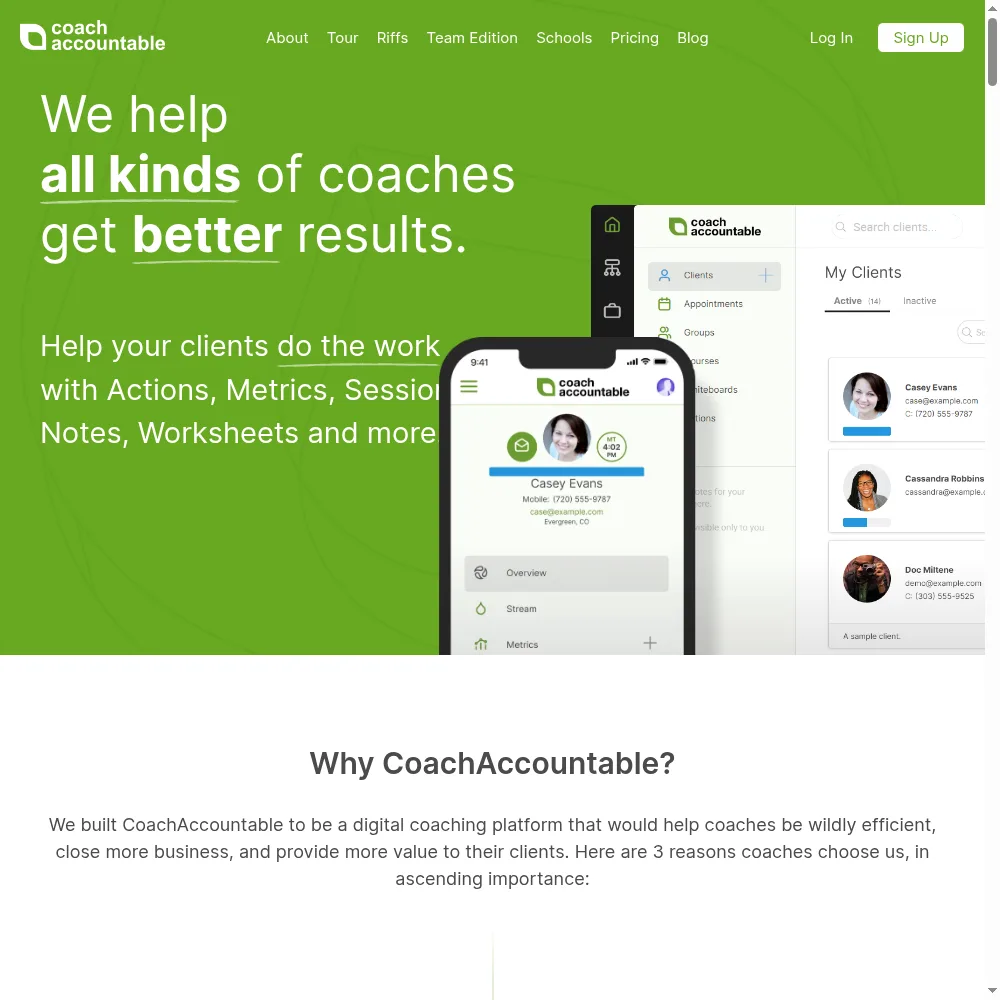
📋 Worksheets, metrics, and action items
This is the engine. We built a weekly habit worksheet, set up a metric (say, workouts per week), and assigned action items with due dates. The client sees their commitments; we see a running dashboard of who reported and who didn’t. I’ve watched too many coaches run this in a spreadsheet and wonder why clients drift — CoachAccountable makes the tracking visible and the follow-up automatic. It’s the reason the features score is the highest we’ve given in this category.
“It replaced a Notion board, a Google Sheet, and a reminders list,” a G2 reviewer wrote. “Now I can see at a glance who’s on track without emailing everyone.”
🤖 Automations that actually chase clients
We set an automation: if a client doesn’t log a weekly metric by Sunday evening, they get a gentle nudge automatically. No manual “just checking in” emails, no forgetting, no guilt. For a coach with ten clients, this is the difference between holding everyone accountable and holding the ones who happen to email back. The automations are rule-based and flexible, and they’re the feature that scales your attention.
👥 Groups and unlimited free coach accounts
We created a small group program and added a second coach as an administrator — and it didn’t change the bill, because coach and admin accounts are free. That’s a genuinely unusual and team-friendly model. Most coaching tools charge per seat; CoachAccountable charges per client. If you’re a solo coach today but plan to bring on associates, this pricing structure is a meaningful long-term advantage.
🛠️ White-labeling and embeddable widgets
We white-labeled the client portal so it carried our brand and removed the “CoachAccountable” wording, and embedded a booking widget on a test page. The result feels like a native part of your business, not a third-party tool. For a coach who wants the client experience to be indistinguishable from their own brand, this — combined with Stripe payments and calendar sync — covers the delivery layer well.
📝 The editor and the learning curve — our real complaints
Two things held it back. First, the built-in rich text editor is clunky — we ended up drafting in Word and pasting back in, which reviewers warn about. Second, the navigation between the master (admin) view and individual client views genuinely confused us at first, and the whole system feels rigid and information-dense for the first week. A Capterra reviewer put it bluntly: “Powerful, but I spent the first week just trying to understand where everything lives.” Plan on a real learning weekend.
Pricing (and who should pick which tier)
CoachAccountable prices by active client, not by coach, and every feature is on every tier — there are no upsell gates as you grow. Coach and administrator accounts are always free. The lowest tier, Starter, covers 2 active clients and is fully featured, which is the cheapest honest entry in the category.
| Plan | Price | What You Get |
|---|---|---|
| Starter | $20/month | 2 active clients; fully-featured |
| Level 1 | $40/month | 5 active clients |
| Level 2 | $70/month | 10 active clients |
| Level 3 | $120/month | 20 active clients |
| Level 3.5 | $200/month | 35 active clients |
| Level 4 | $250/month | 50 active clients |
| Scale tiers | $340–$4,000/month | 75 to 1,000 active clients; unlimited free coach and admin accounts |
Who should pick what: if you have two clients, start at Starter ($20/month) and you’ll have the whole feature set. Move up one level only when you cross the next active-client threshold — Level 1 at 5, Level 2 at 10, and so on. The trap to avoid: this is not flat pricing. A coach who grows from 5 to 50 active clients moves from $40 to $250/month. That’s still reasonable per-client, but it’s not Paperbell’s “one flat $57 forever.” Count your active clients honestly, and price your packages so the climbing bill stays comfortably covered by revenue.
The Unfiltered Pros & Cons
Below is the straight ledger after running an accountability program through it — what earns the 4.7 feature score, and what costs it the rest.
Pros
- ✓ Deepest accountability feature set in the category: worksheets, metrics, actions, automations
- ✓ Every feature on every tier; no upsell gates as you grow
- ✓ Unlimited free coach and administrator accounts — team-friendly
- ✓ Exceptional, high-touch customer support
- ✓ White-labeling and embeddable widgets to own the client experience
Cons
- ✗ Steep learning curve; the interface feels overwhelming and rigid at first
- ✗ Built-in rich text editor is clunky; users copy-paste from Word
- ✗ Per-client pricing climbs as your roster grows
- ✗ Not a polished website/marketing builder
- ✗ Tables and navigation between master and client accounts can confuse new users
Final Verdict
CoachAccountable is the feature-depth leader for coaches who run real accountability: worksheets, metrics tracking, action items, session notes, automations, groups, white-labeling, and payments all in one system, priced by active clients (not seats) with unlimited coach accounts free. Its service is exceptional. The cost is a steep learning curve, a clunky text/table editor, and a bill that climbs as your roster grows.
Here’s the 30-second decision. Do you sell accountability — worksheets, metrics, chasing actions between sessions — and are you willing to spend a real learning week to run it well? Then CoachAccountable is the best tool in this category, full stop. Start at the Starter tier, bring two real clients in, and use the automations before you try to customize anything.
If you just need to look professional, take payments, and book sessions, CoachAccountable is more engine than you need and will frustrate you. Paperbell is the calm, flat-priced choice; Satori is the polished wellness-program choice. Choose CoachAccountable only when “did my client actually do the work?” is the question your business lives or dies on — because that’s the one it answers better than anything else.
Frequently Asked Questions
Is CoachAccountable hard to learn?
Yes, this is its most consistent criticism. The feature set is deep and the interface is dense, and reviewers repeatedly describe the first week as overwhelming and rigid. Plan a dedicated onboarding session. Once the core concepts (clients, worksheets, actions, metrics) click, it becomes straightforward — but it is not an hour-to-live kind of tool.
How is CoachAccountable priced — per coach or per client?
It’s priced per active client, while coach and administrator accounts are free and unlimited. So adding a second coach costs nothing; adding more active clients moves you up a tier. A solo coach starts at $20/month for 2 active clients, fully featured.
Can it take payments and book sessions?
Yes — it connects Stripe for payments and syncs your calendar for scheduling, and you can embed booking widgets on your own site. But it’s not a polished marketing website builder; plan to keep your lead-generation site separate and use CoachAccountable for delivery and billing.
What’s wrong with the built-in text editor?
It’s clunky and limited, which is why many users draft worksheets and documents in Word or Google Docs and paste them in. It works, but it’s the weakest part of an otherwise deep feature set — the editor is the complaint, not the underlying capabilities.
How is CoachAccountable different from Paperbell?
Paperbell is the simplest flat-price tool for solo coaches to book sessions and get paid. CoachAccountable is a deeper accountability platform built around worksheets, metrics, action items, and automations, priced per client with free coach accounts. Pick Paperbell for ease and flat pricing; pick CoachAccountable for measurable, between-session accountability.
User feedback sourced from G2 and Capterra reviews.
About the Author