
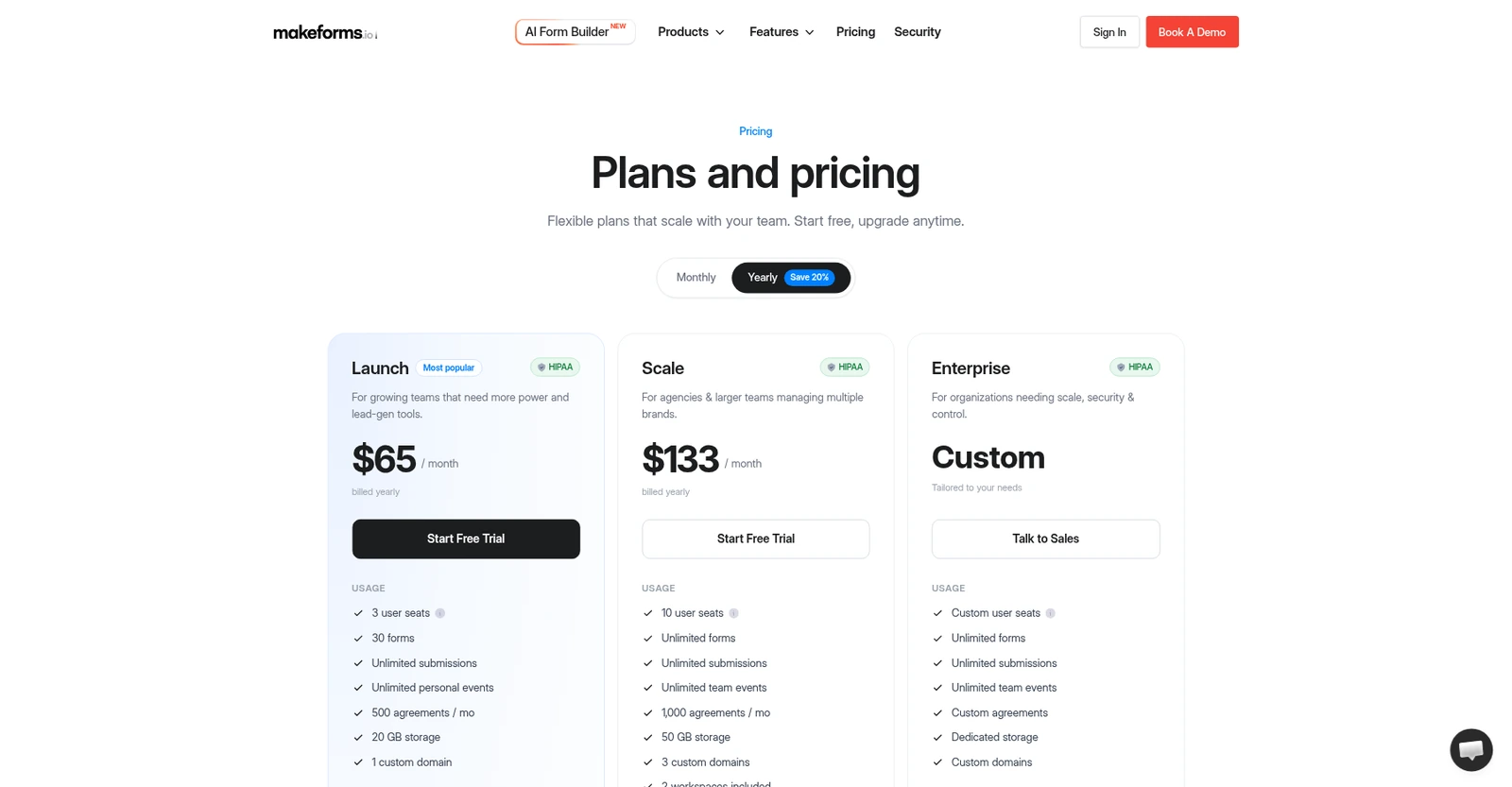
A short orientation before the details. A capable, genuinely HIPAA-first Typeform alternative with unlimited responses, but an expensive entry price and a very thin independent review base make it worth a trial rather than a blind buy. On pricing, the short version: Launch $65/mo (yearly): 3 seats, 30 forms, unlimited submissions, 500 agreements/mo, 20GB, 1 domain, 10k emails/mo, HIPAA. Scale $133/mo (yearly): 10 seats, unlimited forms, 1000 agreements/mo, 50GB, 3 domains, 2 workspaces, 25k emails/mo, Salesforce, workflows, custom SMTP, analytics. Enterprise: custom, SSO, custom data residency, dedicated AM, SLA. Yearly saves ~20%; monthly billing higher. No confirmed free-forever tier; free trial only. The current overall score is 2.9/5. Every number here comes from the live site or aggregator-reported ratings, not a vendor deck, so you can decide in one read whether it is worth the trial.
You need a contact form, so you open the form builder you’ve used for years and then remember: the free tier caps you, the forms feel generic, and the data just sits there unless you pay for a dozen add-ons. MakeForms is one of the lesser-known options trying to compete on both design and data handling, and it’s been quietly building out a full platform. I went through its builder, field types, and integrations to see whether it’s a genuinely capable form tool or just another also-ran in a crowded category.
The Short Version
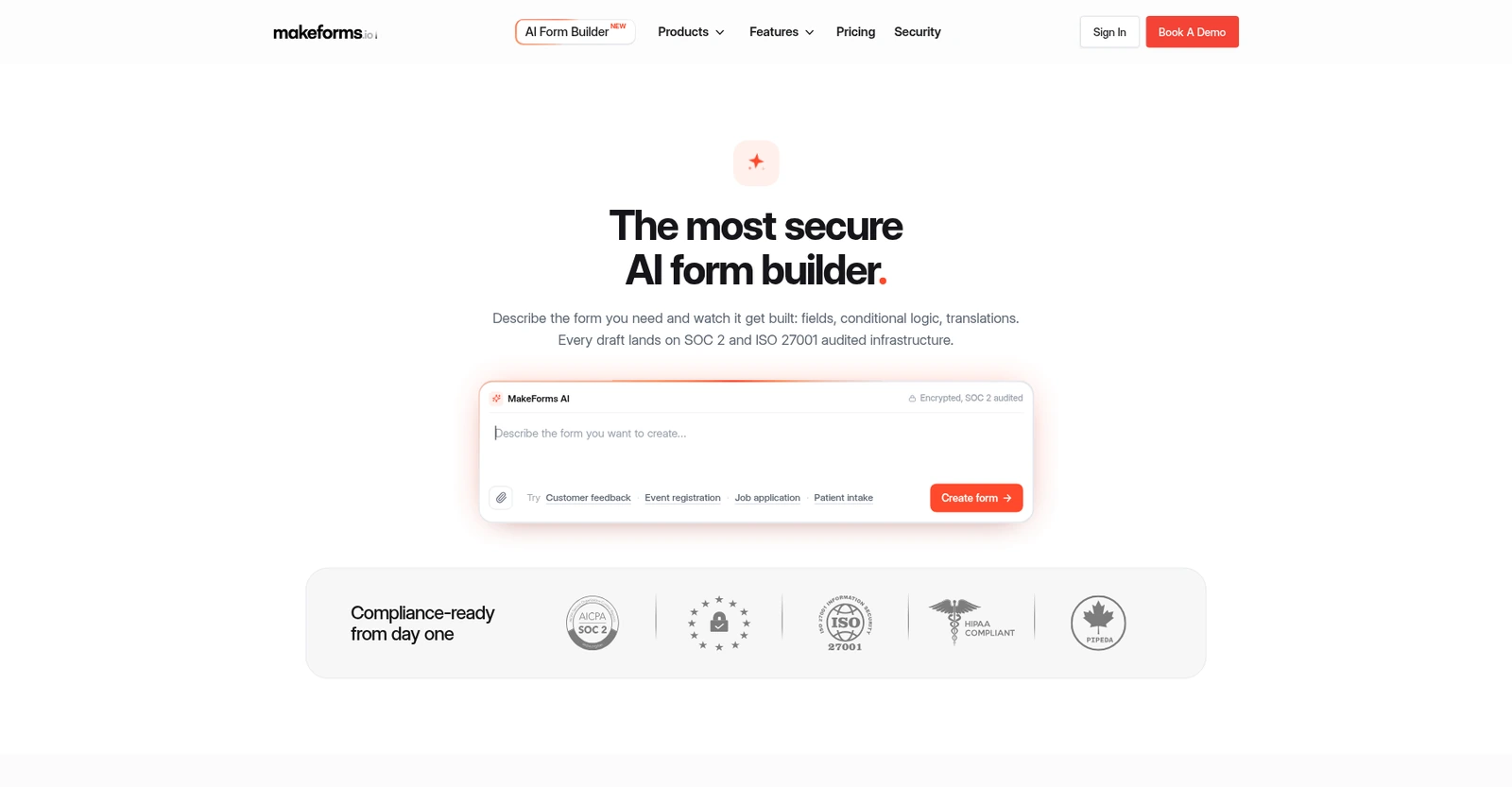
Most form builders sell you on how pretty a survey looks. MakeForms sells you on the opposite: it is a security-positioned, Typeform-style builder that leads with HIPAA, GDPR, SOC 2 and ISO 27001, bundles AI form generation, and promises unlimited submissions on every paid tier. That pitch is aimed squarely at healthcare clinics, financial teams, and schools that collect real personal data and cannot afford a compliance slip. I wanted to see whether the product backed that enterprise framing up, or whether it was mostly marketing on top of a familiar drag-and-drop editor.
Here is what I actually tested. I worked through the live public site: the homepage and the AI form builder landing, the pricing and comparison tables, the integrations directory, and the affiliate page, and I verified the current plan names, prices, and limits against what is served today. I did not sign up for an account or build and publish a live form inside the editor, so my read of the day-to-day authoring experience is based on the documented product flow and the public product pages rather than a form I watched go live. That matters for how much weight to put on the ease-of-use section below.
The short version: the product behind the pitch is genuinely competent, and the compliance story is real rather than a one-line checkbox. But the entry plan starts at $65/month billed yearly, which is several times what Tally, Jotform, or Google Forms will cost you, and the company has almost no independent third-party reviews to prove the product has been battle-tested by strangers. If HIPAA and unlimited responses are non-negotiable, it earns a look. If you just need a contact form or a lead-gen survey, the safer money is elsewhere.
Who This Is For (and Who Should Skip)
Match yourself to the product before you hand over a card.
- ✅ Clinics, therapists, and health teams that need a HIPAA-ready intake form Every paid tier carries a HIPAA badge and a BAA, and patient-intake is literally the example the AI builder uses. That is the clearest fit on the site.
- ✅ Teams that have been burned by response caps Unlimited submissions start on the lowest paid plan, so a viral landing page will not trigger an overage bill or a hard cutoff.
- ✅ Buyers who want a conversational, branded form without Typeform’s per-response pricing The Typeform-style look, themes, and custom domain are the stated alternative pitch, and the unlimited-submission model is the wedge.
- ❌ Solopreneurs and tiny teams on a budget The floor is $65/month. Google Forms is free, Tally has a generous free tier, and Jotform starts far lower; you will not feel the compliance features that justify the price.
- ❌ Anyone who needs a proven, large install base and a big template gallery The review footprint is tiny and the template/community ecosystem is thin next to Jotform or Typeform. If you want a tool millions have already stress-tested, keep shopping.
Score Breakdown
What Actually Matters: Features, Reviewed
This is a crowded category, so I focused on the three things MakeForms actually leans on rather than re-listing every field type.
🤖 AI form builder: describe it, watch it draft
The headline feature is a conversational builder where you type a prompt like “build a patient intake form with consent, medical history and a file upload for insurance cards,” and it lays out the fields, required flags, and conditional logic rather than handing you a blank template. You can also drop in a PDF, a Word doc, or a photo of a paper form, then follow up with “split it into three steps and translate it to French” and it re-drafts live, across 25-plus languages. That is a real step up from picking a template and deleting fields. My caveat is that I evaluated the productized demo on the page, not an actual form I generated and wired to my own data, so I cannot tell you how reliably it guesses field validation on messy real-world input.
🛡️ Compliance as the actual wedge, not a footnote
Unlike most competitors, HIPAA is not locked behind a custom enterprise conversation: the pricing badges show it on Launch, Scale, and Enterprise alike, with a signed BAA, and the platform lists SOC 2 Type II, ISO 27001, GDPR, and PIPEDA alongside it. For a clinic or a practice that collects PHI, that is the single most important line on the page, and it is genuinely differentiated. It also offers data residency in the US, EU, Canada, Australia, Singapore, and India on the paid tiers. Where this gets honest: compliance certification is infrastructure you inherit, and it does not by itself mean your form is set up correctly. You still have to actually use the BAA and the access controls.
🔗 Unlimited submissions, bundled email, and a modest connector list
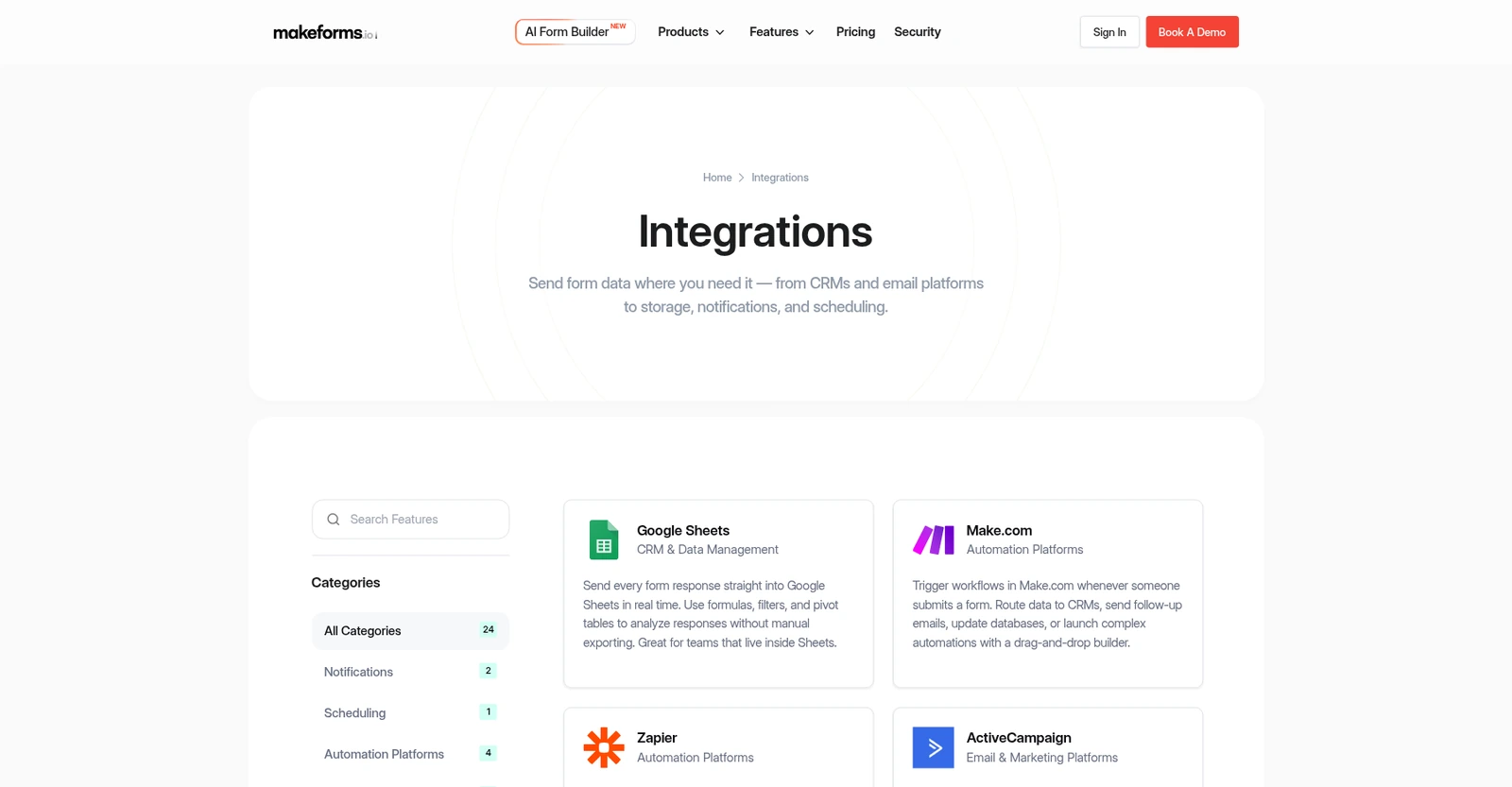
Every paid tier gives you unlimited responses, which matters if you have ever watched a form tool cap submissions mid-campaign. The bundle also leans hard on email: 10,000 outbound emails a month on Launch and 25,000 on Scale, priced at $0.001 each for extras, plus built-in campaigns, e-signatures (500/month on Launch), payments, and scheduling. The integration side is thinner: the directory shows about 24 native connections (Google Sheets, Slack, Calendly, Mailchimp, Notion, Airtable, Dropbox/Box/OneDrive, and Salesforce), with Zapier and Make.com covering the rest. Salesforce sync is one-way on Scale and two-way (prefill and update) only on Enterprise, while custom SMTP and workflows sit on the Scale tier and above.
What Real Users Actually Say
This is where I have to be straight with you rather than repeat the badge on the homepage.
The Aggregate Scores
MakeForms displays a “Rated 4.9 on G2” badge on its own homepage, and quotes individual testimonials on the site. I could not independently open the G2 product page (it blocks automated access), and I could not confirm a review count on G2 or Capterra; at least one independent roundup lists MakeForms’ G2 presence as still too small to rate. So treat that 4.9 as the company’s own display of a very small review base, not a settled, heavily-vetted score the way Jotform’s or Typeform’s hundreds-of-reviews numbers are. There is no meaningful Trustpilot footprint I could verify either. One 2026 AI-form-builder roundup corroborates the G2 score at 4.9 across only a very small review base, which confirms the badge is real but the base is tiny.
— Homepage G2 badge and third-party roundups checked October 2026; exact review count not independently verifiable
The Recurring Criticism
Because the independent review base is so thin, there is no reliable recurring criticism pattern to quote at scale. The criticism you can actually point to is structural and visible from the outside: the entry price is high for a form tool, the bundled email allowance is wasted if you are not emailing leads, and the product is less well known with a smaller community and template library than the incumbents. I will not invent negative reviewer quotes I cannot source.
— Independent comparison-site assessment and pricing analysis, October 2026
Read the weak review footprint as a risk factor, not as a reason to dismiss the product. A young vendor can ship good software, but it also means documentation gaps, immature support, and sudden pricing changes are more likely than they are at a decade-old incumbent. If you choose it, start on a short trial and test the exact HIPAA workflow you will actually use before you commit to a yearly plan.
User feedback sourced from G2 and Capterra reviews (base currently too small to quantify independently).
Pricing: Every Plan, Laid Bare
MakeForms has three paid tiers; the figures below are the yearly-billed monthly rates, and the site advertises 20% off for paying annually, so monthly billing costs more. Every paid tier is HIPAA-ready. I could not find a detailed free-forever tier on the pricing page; each card leads with a “Start Free Trial” button rather than a self-serve free-plan signup.
| Plan | Price (billed yearly) | What You Get |
|---|---|---|
| Launch (most popular) | $65/mo | 3 user seats, 30 forms, unlimited submissions, 500 agreements/mo, 20 GB storage, 1 custom domain, 10,000 emails/mo, conditional logic, payments, e-signatures, HIPAA. |
| Scale | $133/mo | 10 seats, unlimited forms, 1,000 agreements/mo, 50 GB, 3 custom domains, 2 workspaces, 25,000 emails/mo, workflows, analytics, custom SMTP, Salesforce sync, granular permissions, HIPAA. |
| Enterprise | Custom | Custom seats and storage, unlimited everything, SSO, two-way Salesforce sync, custom data residency, dedicated account manager, priority support, custom SLA, invoice billing, HIPAA. |
A few honest billing notes. Extra emails run at $0.001 each and do not roll over; e-signatures are capped at 500/month on Launch before credit packs, and file uploads top out at 200 MB on Launch versus 500 MB on Scale. The old affiliate page still references legacy $29/$69/$149 tier names, but the live pricing page has moved to Launch/Scale/Enterprise at $65/$133/custom, so price off the current page. For context on the broader category, browse the form builders we have tested.
The Unfiltered Pros & Cons
Pros
- ✓ HIPAA, SOC 2 Type II, ISO 27001, GDPR and PIPEDA on every paid tier, with a signed BAA from the start
- ✓ Genuinely unlimited submissions on all paid plans, so a spike in traffic will not cut you off
- ✓ AI builder drafts fields, branching and translations from a prompt, a PDF or a screenshot
- ✓ Bundles payments, e-signatures, scheduling, workflows and email campaigns in one product
- ✓ Data residency options across the US, EU, Canada, Australia, Singapore and India
Cons
- ✗ Entry price of $65/month is steep for a form tool, well above Tally, Jotform or Typeform’s lower tiers
- ✗ Independent third-party review footprint is still very small; the 4.9 G2 badge has a tiny, unverifiable review base
- ✗ Only about 24 native integrations, and workflows, custom SMTP and analytics only arrive on the $133 Scale tier, with two-way Salesforce sync held back for Enterprise
- ✗ Bundled 10,000 emails a month are wasted if you do not run email campaigns, which you partly pay for
- ✗ Smaller template gallery and community than Typeform or Jotform; brand recognition is low
Final Verdict
MakeForms is a capable, genuinely compliance-first Typeform alternative that solves a specific problem well: unlimited, HIPAA-ready branded forms for health and regulated teams. It is not the cheapest or the most proven option, and its thin independent review footprint is a real reason to test before committing, but for buyers who need a BAA and unbounded responses, it is worth a trial.
If you run a clinic, therapy practice, or any intake process that touches PHI, start the free trial on Launch and build your actual patient-intake form end to end: test the file upload, the OTP/email verification, and the export to your CRM before you pay. Skip straight to Scale only if you need 10+ seats, Salesforce sync, workflows, or your own sending domain. The $65 tier is the realistic starting point for a small team; the price is justified by the compliance and unlimited-responses combo, not by raw form count.
If you do not have a compliance requirement, this is an easy one to pass on. A budget lead-gen team should use Tally’s generous free tier or Jotform’s far larger template and integration library; a no-frills internal survey is still perfectly served by Google Forms. MakeForms earns its keep the moment “can we collect HIPAA-compliant intake without a per-response bill?” is the question. If that is not your situation, you are paying a premium for insurance you will never file a claim on. To understand how we weigh tradeoffs like this, see our testing and trust process.
Frequently Asked Questions
Is MakeForms free?
There is a free trial on every paid plan, but the published paid tiers begin at Launch for $65/month billed yearly. I could not find a detailed free-forever plan with published limits on the pricing page, so confirm the trial length and whether a permanent free tier exists at signup.
How much does MakeForms cost?
Billed yearly, Launch is $65/month, Scale is $133/month, and Enterprise is custom pricing. Monthly billing costs more (the yearly option saves about 20%). Extra emails are $0.001 each, and e-signatures are capped at 500/month on Launch.
Is MakeForms HIPAA compliant?
Yes. HIPAA with a signed BAA is available on all three paid tiers, and the platform also lists SOC 2 Type II, ISO 27001, GDPR and PIPEDA. Treat the certification as infrastructure you inherit, though; you still have to enable and use the BAA and access controls correctly.
Is MakeForms a good Typeform or Jotform alternative?
It is a credible Typeform-style alternative specifically if you need HIPAA and unlimited responses, where Typeform and Jotform get expensive or lock compliance behind enterprise sales. If you just want the cheapest or the largest template and integration ecosystem, Jotform, Tally or Google Forms are safer bets. It connects to about 24 native tools plus Zapier and Make.com.
About the Author
