The Short Version
HEY is the one product on this list that isn’t an email client. It’s an email service, made by 37signals (the Basecamp company), and it’s deliberately built as the anti-Gmail. No ad tracking, no selling your data, no algorithmic feed. Instead of plugging in your existing mailbox, you get a brand-new @hey.com address and a set of strong opinions about how email should work.
The centerpiece is Screener: the first time anyone emails you, they don’t land in your inbox, you decide whether to let them in. Newsletters get routed into a separate Feed, and handled mail drops into Paper Trail. People who buy into the philosophy tend to love it hard. People who just want a faster Gmail find the re-learning annoying. The single biggest catch is non-negotiable: there’s no IMAP, so you can’t bring your current Gmail address.
Who This Is For (And Who Should Skip)
✓ People fed up with Gmail tracking them. HEY’s whole model is flat pricing instead of selling your attention or data.
✓ Anyone happy to start fresh with a clean @hey.com address. You get 100GB of storage and a calm, opinionated workflow.
✓ People drowning in newsletters and cold outreach. Screener plus Feed keep the actual inbox reserved for real humans.
✗ Anyone who needs to keep their existing Gmail or work address. No IMAP means you cannot connect an outside account.
✗ People who want a traditional email client. Look at Spark or Superhuman instead, HEY rebuilds the whole model.
✗ Teams that need deep collaboration or integrations. HEY for Work is light; Missive or Front is the serious team pick.
Score Breakdown
What Actually Matters: Features, Reviewed
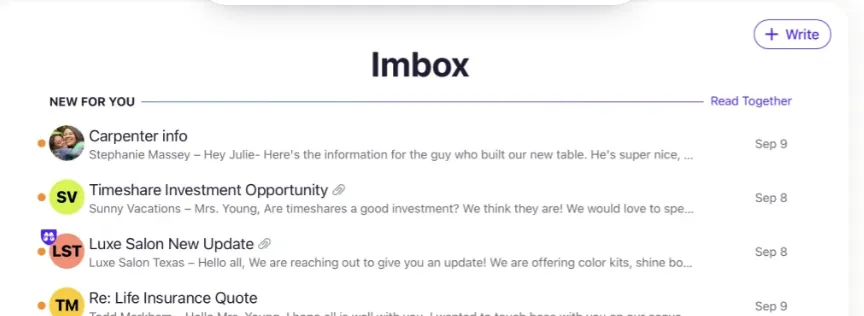
🚪 Screener — the anti-spam philosophy in one feature
A first-time sender never reaches your inbox. HEY asks you to screen them in or out, and only people you approve can ever mail you directly again. Reviewers consistently call this the killer feature. As one long-time Capterra user put it, “Having the ability to screen emails in or out before they actually reach your inbox is a really, really nice feature. That alone made it worth it for me for 2+ years.” The trade-off is a busy first week while you approve everyone legitimate.
📰 Feed — newsletters quarantined on purpose
Marketing mail and subscriptions skip the inbox entirely and collect in a scrollable Feed, the way an RSS reader would. You batch-read them on your own schedule instead of letting every sale blast fragment your workday. Once it’s trained, the inbox contains only mail from actual people, which is the core promise of the product.
📄 Paper Trail — handled mail clears itself
Mail you’re done with moves into Paper Trail, a searchable archive, instead of sitting in the inbox nagging you. You stop doing the manual “archive everything” ritual twice a day. It sounds small, but reviewers repeatedly describe the end state as feeling calm rather than behind.
📅 HEY Calendar and privacy basics
A built-in calendar and tracking-pixel blocking come included, so scheduling and basic privacy don’t require add-ons. The calendar is competent but clearly lighter than Google Calendar, and there’s no deep third-party ecosystem around it. It’s built to keep you inside HEY, not to replace a power-user calendar stack.
🚫 No IMAP and rough formatting edges — the real limits
The walled-garden design is the dealbreaker for many: no IMAP means your existing Gmail, Outlook, or work account cannot be connected, you commit to a @hey.com address. On top of that, the rendering isn’t flawless. Capterra reviewers note that “certain formatting is lost when viewing emails,” and that replies flow back into the inbox, “doubling the amount of emails” there, which undercuts the tidy-inbox pitch for heavy threads. If you can’t accept both, HEY isn’t for you.
Pricing (and who should pick which tier)
HEY keeps pricing deliberately simple, one personal plan and one team/custom-domain plan. A 30-day trial lets you live in the workflow before the flat annual fee:
| Plan | Price | What You Get |
|---|---|---|
| HEY for You | $99/yr (~$8.25/mo) | A @hey.com address, 100GB storage, Screener, Feed, Paper Trail, HEY Calendar, apps on every platform |
| HEY for Domains / Work | $12/user/mo | Everything in personal plus a custom domain, multiple users, thread sharing, and private team comments |
Honest math: HEY for You works out to about $8.25/month at $99/year. Google One / a paid Gmail runs roughly $6/month, and Spark’s tier is free. You’re not paying for storage, you’re paying for the no-tracking model and the Screener workflow. HEY for Work at $12/user/month is competitive for small teams, but its collaboration is intentionally shallow next to Missive or Front.
The Unfiltered Pros & Cons
Pros
- ✓ Screener blocks first-time senders cold; reviewers say it alone was worth it for years.
- ✓ Feed keeps newsletters out of the inbox so only real mail reaches you.
- ✓ Paper Trail auto-archives handled mail with no manual filing.
- ✓ No ad tracking and no selling your data, with a fresh @hey.com address and 100GB storage.
- ✓ Built by 37signals, with a genuinely good support team.
Cons
- ✗ No IMAP at all, you cannot connect your existing Gmail or Outlook and must adopt a @hey.com address.
- ✗ Steep learning curve; the whole workflow forces you to change how you do email.
- ✗ Almost no third-party integrations, it is a walled garden.
- ✗ Formatting gets mangled: reviewers note "certain formatting is lost when viewing emails."
- ✗ Replies re-enter the inbox, "doubling the amount of emails," which fights the zero-inbox promise.
Final Verdict
HEY is an opinionated email service, not a client: Screener and Feed genuinely calm your inbox, but you must move to a @hey.com address (no IMAP) and relearn how email works.
Thirty-second decision: Are you willing to move to a new @hey.com address and relearn email in exchange for zero tracking and an inbox that only contains real people? Take the 30-day trial and route your actual mail through it; if the calm sticks after two weeks, $99/year is easy to justify. If you must keep your current address (no IMAP), depend on integrations, or live in long formatted threads, the friction will outweigh the philosophy and you should stay with Spark, Superhuman, or Missive.
Frequently Asked Questions
What’s the difference between HEY and Gmail?
Gmail is a free, ad-supported service that scans and tracks your mail; HEY charges a flat $99/year and sells no data or ads. More importantly, HEY rebuilds the workflow with Screener, Feed, and Paper Trail instead of a single chronological inbox.
Can I connect my existing Gmail or Outlook to HEY?
No. HEY does not support IMAP, so you use a new @hey.com address rather than plugging in an outside mailbox. There’s no way to mirror your current inbox into it.
Does HEY have a free plan?
There’s no permanent free tier. You get a 30-day free trial, after which HEY for You is $99/year.
What’s the difference between HEY for You and HEY for Work?
HEY for You is the $99/year personal plan on a @hey.com address. HEY for Work (Domains) is $12/user/month and adds a custom domain, multiple users, thread sharing, and private team comments.
What annoys HEY users the most?
Two recurring Capterra complaints: formatting gets stripped (“certain formatting is lost when viewing emails”), and every reply is added back into the inbox, “doubling the amount of emails.” Combined with the no-IMAP restriction, that’s the main reason some users trial it and go back to a conventional client.
User feedback sourced from G2 and Capterra reviews.
About the Author