The Short Version
Let’s be clear about what Spark is and isn’t. It’s not Superhuman. Superhuman chases raw speed; Spark chases “good enough for free.” Its whole pitch is that you get a genuinely capable email client at zero cost, and you only open your wallet if the AI features actually earn it. Two features do the heavy lifting and both ship in the free tier: Priority Inbox (it sorts incoming mail into People, Newsletters, and Pinned) and Gatekeeper (first-time senders have to clear a manual approval before anything lands in your inbox).
In 2026 Spark added Spark +AI—compose help, thread summaries, AI meeting notes, and translation. The catch is that the full AI experience sits behind the Plus tier at $10/month. So the real question isn’t “is Spark good?” (it is) but “does the AI justify $99 a year?” After two weeks of use, our answer: most people won’t need to upgrade.
Who This Is For (And Who Should Skip)
✓ Anyone who wants a free Gmail replacement. The free tier already gives you Priority Inbox, Gatekeeper, and cross-platform sync—enough for most people without touching a credit card.
✓ People who switch between Mac, Windows, iPhone, and Android. Snoozes, read states, and archives stay consistent across all of them, which is the reason Spark’s sync gets called out constantly on G2.
✓ People who want AI without paying Superhuman prices. Plus is $10/month—less than half of what Superhuman charges.
✗ Speed freaks who live in their inbox all day. Superhuman is still faster. Some Spark users now report noticeable lag opening messages.
✗ Support teams that need a real shared inbox. Spark’s team features are thin. Point a customer-facing team at Front or Missive instead.
✗ Sales teams that need CRM depth. HubSpot only appears on Pro; Salesforce isn’t there at all.
Score Breakdown
What Actually Matters: Features, Reviewed
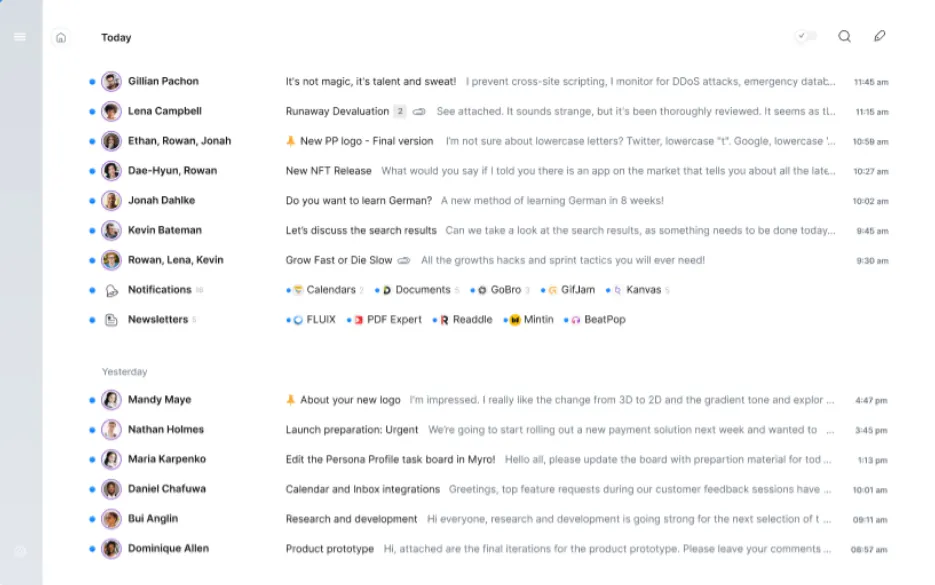
📥 Priority Inbox — free, and the reason to start here
Spark splits your inbox into three columns: People (actual humans), Newsletters (subscriptions), and Pinned (messages you’ve flagged). G2 and Capterra reviews converge on the same point: it separates personal mail, newsletters, and tool notifications automatically, so the inbox stays clean without manual sorting. Give it a few days to learn your patterns and it stops needing tweaks.
🚪 Gatekeeper — the hidden spam blocker
Anyone emailing you for the first time doesn’t land in your inbox. Spark pauses and asks “Approve?” Once you say yes, that sender flows straight in from then on. Real users on G2 and Capterra call this out as one of the most consistently praised parts of Spark: marketing and junk from unknown senders gets held at the door instead of cluttering your day.
🤖 Spark +AI — the paid hook, with mixed reviews
Plus unlocks Compose +AI (drafts for you), +AI Summary (collapses long threads), +AI Templates, +AI Meeting Notes (40 per month), and +AI Translate. The long-thread summary is genuinely useful. But real users have flagged two recurring frustrations: one said the AI “turned that off and it did nothing“—they couldn’t actually switch it off—and another found that “AI-generated responses felt generic,” which lines up with our own take that the output is serviceable but rarely surprising.
🔄 Cross-platform sync — smooth, but slower after updates
Spark runs on Mac, Windows, iOS, Android, and the web. Snooze a message on your Mac and it snoozes on your iPhone; the same goes for read and archive states. Users praise this consistency heavily. The downside: several reviewers feel newer builds have dragged. One user put it plainly: they had to “wait 2 seconds for email to open.” If instant responsiveness is non-negotiable, Superhuman still wins.
👥 Team features — present, not deep
Pro adds a shared inbox and Read Statuses. That covers a lightweight team that wants to see who’s handled what. But compare it to the competition and it falls short: Front ships a full ticketing system, routing rules, and SLA management; Missive has native internal chat and task assignment. Spark’s team layer is “shared inbox + read statuses”—fine for a small crew, thin for a 20-person support desk.
🔗 Integrations — solid, not exhaustive
Spark connects to Slack, Zoom, Dropbox, and HubSpot (Pro only). That covers the everyday stack. What’s missing is telling: no Salesforce, no Linear. Sales teams that live in Salesforce will want Superhuman Business or Front; most solo users won’t notice the gap.
Pricing (and who should pick which tier)
Spark has no free trial to gate—it’s free to start, and you upgrade only when you need it. Three tiers, paid annually or monthly:
| Plan | Price | What You Get |
|---|---|---|
| Free | $0 | Priority Inbox, Gatekeeper, cross-platform sync, limited Spark +AI |
| Plus | $10/mo or $99/yr | Everything in Free + full Spark +AI, AI Assistant, 40 AI Meeting Notes, custom templates, productivity integrations |
| Pro | $20/mo or $199/yr | Everything in Plus + unlimited AI Meeting Notes, Read Statuses, advanced team collaboration, HubSpot integration |
Honest math: the free tier costs $0 and covers the vast majority of users. Plus runs $99/year, which is roughly a third of Superhuman Starter’s $300/year. Pro jumps to $199/year and is where team features and unlimited meeting notes unlock. If you only occasionally dip into AI, the free tier is enough; if you’re writing +AI Summaries and generating meeting notes every single day, Plus starts to make sense.
The Unfiltered Pros & Cons
Pros
- ✓ Free tier already ships Priority Inbox and Gatekeeper—users praise Gatekeeper for holding back marketing and junk.
- ✓ Cross-platform sync is consistently smooth across Mac, Windows, iOS, and Android.
- ✓ Smart Inbox auto-sorting keeps the inbox clean at no cost.
- ✓ AI features cost half of what Superhuman charges for the equivalent.
- ✓ Clean interface that works without a setup ramp.
Cons
- ✗ Newer builds feel slower—one Capterra reviewer said they had to "wait 2 seconds for email to open."
- ✗ AI draws the most fire: one user "turned that off and it did nothing," and another found "AI-generated responses felt generic."
- ✗ Privacy trade-off: some mail is processed through Readdle's servers, which sensitive-data users should weigh.
- ✗ Team features are thin—no full ticketing system or SLA management.
- ✗ Integrations are limited (no Salesforce or Linear), and free-tier support is slow.
Final Verdict
The strongest free email client around—Priority Inbox, Gatekeeper, and cross-platform sync at $0—with AI locked behind a $10/month Plus tier that divides users.
Thirty-second decision: Start with the free tier—no credit card, no time pressure. If you find yourself using +AI Summary and AI Meeting Notes every day, upgrade to Plus at $99/year; that’s still cheaper than almost any AI-equipped rival. If you’re chasing raw speed, need a full support-team shared inbox, or require Salesforce integration, look at Superhuman, Front, or Missive instead.
Frequently Asked Questions
What’s the difference between Spark’s free and paid tiers?
The free tier includes Priority Inbox, Gatekeeper, and cross-platform sync. Plus unlocks the full Spark +AI suite (Compose +AI, +AI Summary, 40 AI Meeting Notes per month) and custom templates. Pro adds unlimited meeting notes, Read Statuses, and the HubSpot integration.
Does Spark support Windows?
Yes. Spark runs on Mac, Windows, iOS, Android, and the web, and actions like snooze and archive stay in sync across all of them.
How does Spark’s AI compare to Superhuman’s?
The feature sets overlap—summaries, compose help, translation—but Spark charges $10/month versus Superhuman’s $25. Superhuman’s AI feels a touch sharper in our testing, but the gap is small enough that the price difference usually settles the argument.
Is Spark worth paying for?
If you genuinely use the AI features daily, Plus at $99/year earns it back. If you only touch AI now and then, the free tier is enough and you shouldn’t upgrade.
Is Spark’s AI actually good?
This is the most common complaint on G2 and Capterra. Two threads dominate: users say the AI can’t be turned off—one reviewer “turned that off and it did nothing“—and that generated replies feel too generic, with one noting “AI-generated responses felt generic.” If you’re not counting on AI to be a core part of your workflow, the free tier covers the rest of Spark’s value without spending the $10/month.
User feedback sourced from G2 and Capterra reviews.
About the Author