The Short Version
Let’s clear up the confusion first: Missive is not Superhuman. If you’ve read a dozen “best email client” articles that lump them together, they’re wrong. Superhuman is built for one person triaging a fast inbox. Missive is built for a team answering a shared one.
We run a small support and sales team. For years we used Gmail with a shared inbox label, then moved to a help-desk tool that turned every email into a formal ticket — which made customers feel like they were filing a warranty claim. Missive sits in the awkward, useful middle: it still looks like email, but your team can comment, @mention, draft together, and assign right inside the thread.
The honest verdict: it’s the best shared-inbox experience we’ve used that still feels like email, not a CRM. But it has two real weak spots — search gets slow on large history, and there’s no calendar. Whether those matter depends on how your team works.
What Is Missive, Actually?
Missive is a Montreal-built email client (Philippe Lehoux is the CEO) whose whole pitch is in its name: a missive is a letter, and Missive treats every incoming email as something a team handles together rather than something one person answers alone.
Open any email and you’ll see the customer’s message on top — and a chat panel underneath where your teammates can debate it, draft the reply together live, and hand it off. No more forwarding the thread to Slack with “what do I tell them?” No more “did someone already reply to this?” collision.
It also pulls in channels Gmail can’t: SMS, WhatsApp, Facebook/Instagram, and live chat — all as threaded conversations in the same interface. If your support team currently juggles Gmail + WhatsApp Web + a help desk tab, that alone is worth the price of admission.
Who This Is For (and Who Should Skip It)
- ✅ Small support or sales teams (5–25 people). This is the sweet spot. You have a shared inbox, you’d rather keep conversations human than ticketed, and you want to see who’s working on what without a standup.
- ✅ Teams across email + chat channels. If customers reach you on WhatsApp and email, Missive unifies them. Most shared-inbox tools treat chat as an afterthought.
- ✅ People who want AI drafting without giving up control. It supports multiple AI providers (OpenAI, Anthropic, Gemini) and lets you bring your own key — so you’re not locked into one vendor’s markup.
- ❌ Solo users or one-person operations. If you just want a fast personal inbox, Superhuman or even Gmail is cheaper and simpler. Missive’s collaboration features are wasted on one person.
- ❌ Enterprises that need rigid ticket workflows. Reviewers on G2 note Missive is intentionally “too flexible” for large teams that require formal statuses, SLA dashboards, and hierarchy. Help Scout or Zendesk fits that better.
- ❌ Teams that live in a calendar. There is no built-in calendar. If email + calendar fusion is your whole workflow, this will be annoying.
Score Breakdown
What Actually Matters: Features, Reviewed
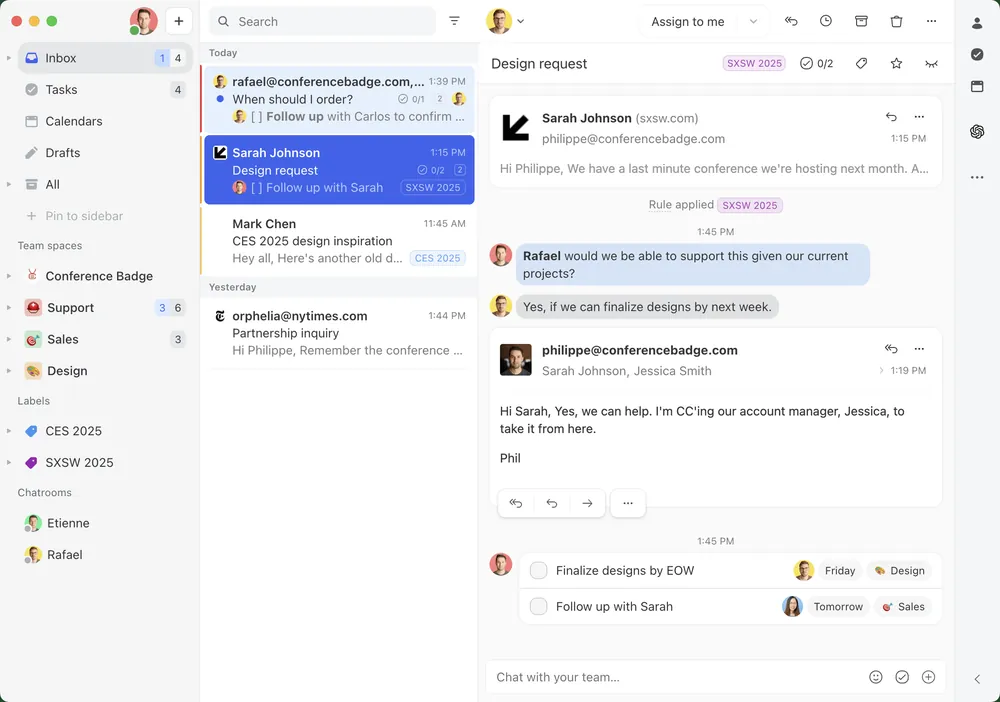
💬 The internal chat inside every email
This is the feature everything else builds on. When a customer emails something tricky, you @mention a teammate right under their message, you both watch it, and one of you drafts the reply. We stopped using Slack for internal email discussions entirely. The customer never sees it — it’s private to your team.
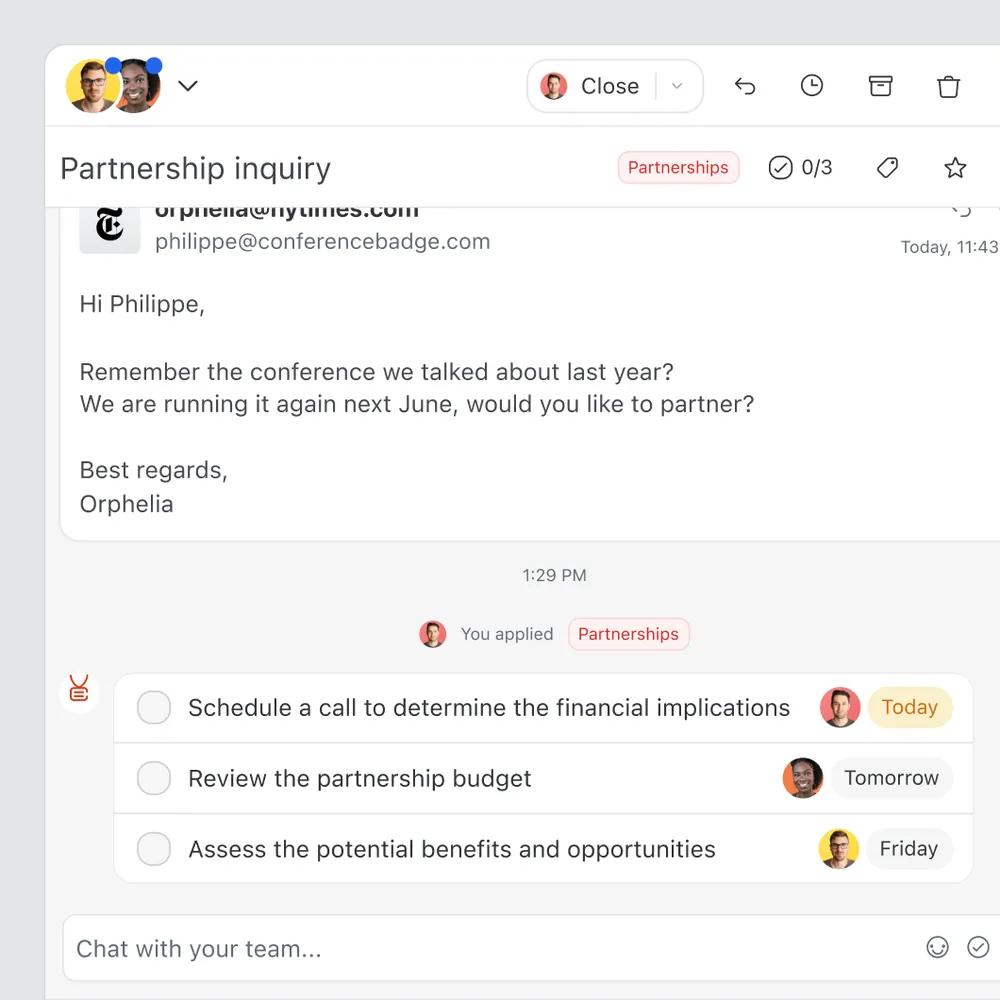
✏️ Live collaborative drafting
Two people can edit the same reply at once and watch each other type. Sounds gimmicky; on a technical support reply, it meant our support lead could fix a wrong answer in real time while our junior rep was typing it. That’s worth the license by itself.
🤖 AI Assistant (built-in, not your own key)
Missive’s AI Assistant is built right in. It reads the full thread, your past conversations, and your calendar, then drafts a reply in your voice. It also summarizes long threads and translates. It drafts — it never sends. We set it once to rewrite in our brand voice, and after one calibration prompt it was genuinely usable. It’s included in the Productive tier.
🔀 Rules engine (the part that saves the most time)
Automatically route emails to the right person, assign them, add tags, and snooze follow-ups. We set a rule: anything from a known VIP goes straight to the founder with a red tag. Setup took 10 minutes and replaced what used to be a morning triage ritual.
🔍 The search — our one real complaint
G2 reviewers flagged this too, and we felt it. Once our synced history grew past a few thousand conversations, searching for an old thread got noticeably slow, and the filters aren’t as powerful as Gmail’s. Twice we ended up opening Gmail to track down a six-month-old email. For a team that archives everything, this is the reason we can’t give it a full 5.
Pricing (and who should pick which tier)
Missive has a 30-day free trial (Productive features included, no credit card required). After that, paid plans are per user, billed monthly or annually (annual saves ~20%).
| Plan | Price | What You Get |
|---|---|---|
| 30-day free trial | $0 | Productive features included, no credit card |
| Starter | $14/user/mo annual (~$18 monthly) | Up to 5 users, shared inboxes, unlimited history, SOC 2 |
| Productive | $24/user/mo annual (~$30 monthly) | Up to 50 users, rules, integrations, API, built-in AI Assistant |
| Business | $36/user/mo annual (~$45 monthly) | Unlimited users, advanced analytics, SAML SSO, IP restrictions |
One honest math note: at $24/seat, a 20-person team pays ~$480/month. That’s not cheap, and it’s the first question we got internally. It’s justified if the shared-inbox workflow replaces a help-desk seat — but if you’re under 5 people, the $14 Starter tier is all you need.
The Unfiltered Pros & Cons
Pros
- ✓ Team chat inside email — kills the forward-to-Slack loop
- ✓ Live co-drafting genuinely improves reply quality on tricky tickets
- ✓ Unifies email + WhatsApp + SMS + Instagram + Messenger + live chat
- ✓ Rules engine automates triage and assignment
- ✓ AI Assistant (Productive+) drafts, summarizes, and translates via Missive credits or your own OpenAI/Anthropic/Gemini key
Cons
- ✗ Search gets slow on large archives (G2's #1 complaint, confirmed)
- ✗ No built-in calendar at all
- ✗ Mobile app is functional but less polished than desktop
- ✗ No offline mode; $14-$36/user adds up on teams of 20+
- ✗ Not a fit for rigid ticket/enterprise workflows
Final Verdict
Missive makes email work for teams — internal chat, live co-drafting, and multi-channel inboxes in one tool. It's the best shared-inbox experience we've tested, though search slows on large archives and there's no calendar.
Here’s how to decide in 30 seconds. Are you a team answering a shared inbox, and do you want to keep it feeling like email rather than a support ticket system? Then start the 30-day free trial, plug in your real shared inbox, and give it two weeks. We kept ours.
If you’re a solo person who just wants a fast, beautiful personal inbox — go use Superhuman or Gmail. Missive will feel like overkill. It’s not built for you, and that’s fine.
Frequently Asked Questions
Is Missive better than Superhuman?
They solve different problems. Superhuman is for one person blazing through their own inbox. Missive is for a team handling a shared inbox together. If it’s just you, choose Superhuman. If it’s a team, choose Missive.
Does Missive have a free plan?
There’s a 30-day free trial (Productive features, no credit card). After that, paid plans start at $14/user/month.
Can it replace our help desk tool?
For small teams, yes — it handles shared inboxes, assignment, and internal chat more humanely than a ticket system. For large teams that need SLA dashboards and formal hierarchies, Zendesk or Help Scout is the better fit.
Does Missive work with Gmail and Outlook?
Yes. It syncs Gmail and Office 365 accounts, and also connects SMS, WhatsApp, and social channels.
Why is search so slow on our history?
This is the most common complaint on G2. Missive indexes locally as it syncs, so very large archives slow it down. We recommend keeping active teams under ~5,000 synced conversations or accepting that deep history search lives in Gmail.
User feedback sourced from G2 and Capterra reviews.
About the Author