The Short Version
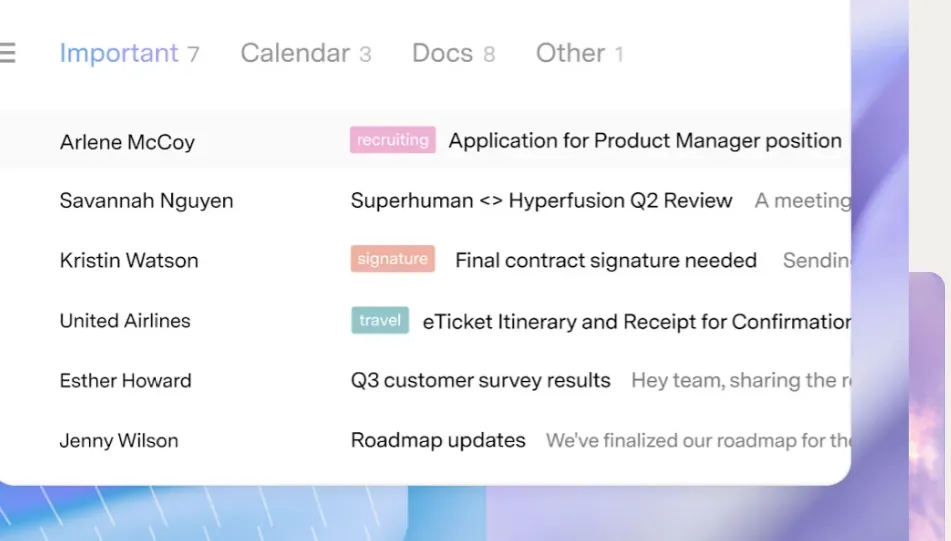
Let’s get one thing out of the way: Superhuman is not “just another email client.” It is the fastest email client you can use right now—full stop. Open an inbox with 10,000 messages and scrolling stays buttery. Over a hundred keyboard shortcuts flow so well you’ll forget your mouse exists. Split Inbox automatically separates team mail, VIPs, and tool notifications so your inbox stays clean without manual triage.
In 2026 it’s no longer a solo tool either. Shared Conversations, Team Comments, and CRM integrations (Salesforce, HubSpot, Pipedrive) mean small teams can run on it too. But at $25–$40 a month, it isn’t cheap. If you handle fewer than 50 emails a day, save your money. If you’re a heavy user, it pays for itself.
A quick note on the company: Grammarly announced its acquisition of Superhuman in July 2025, and that October the parent company rebranded as Superhuman. The email app is now officially called Superhuman Mail, sitting alongside Grammarly and Coda in the Superhuman Suite.
Who This Is For (And Who Should Skip)
✓ Keyboard-driven power users handling 100+ emails a day. This is its sweet spot on Mac, Windows, iOS, and Android; you want maximum speed and will spend a week learning the shortcuts.
✓ Teams already living in Slack, Notion, Linear, and Figma. The sidebar surfaces info from those tools without app-switching.
✓ Small teams that need lightweight collaboration. Shared Conversations and Team Comments cover most small-team needs.
✗ Anyone who wants a free or cheap client. There is no free plan and Starter is $25/month and up; if you need free, Spark is the better call.
✗ Anyone getting under 50 emails a day. The subscription won’t pay for itself at that volume.
✗ Large teams needing a full shared inbox, assignment, and internal chat. Use Missive or Front instead.
Score Breakdown
What Actually Matters: Features, Reviewed
⚡ Speed — the reason it exists
Superhuman preloads everything into a local index, so actions never wait on the network. Hit e to archive and the message vanishes instantly—no “saving” spinner. Every operation responds in under 100 milliseconds. G2 reviewers mention “fast” more than any other word, and after two weeks we agreed: nothing else comes close.
🗂 Split Inbox — the 2026 headline feature
Split Inbox automatically divides your inbox into tabs: Team (coworkers), VIP (people you’ve flagged), Tools (notifications from Google Docs, Notion, Asana, Figma, Jira, GitHub), and Everything else. Heavy users on G2 are nearly unanimous that it eliminates manual sorting. But the price draws fire—as one Capterra reviewer put it, “a bit expensive considering it is basically a front-end for Gmail.”
⌨ Keyboard shortcuts — once you learn them, the mouse retires
Over 100 shortcuts. We spent a week learning them and it was worth it: e archive, r reply, ⌘+Enter send, h snooze, g i jump to inbox, ⌘+k universal search across mail, contacts, calendar, and docs. The learning curve is real—G2 new users consistently say the first couple of weeks feel like “too much to memorize” and many only click after the 30-minute onboarding session.
🤖 AI — not a toy, it actually saves time
Superhuman’s AI is built in. In 2026 you get Auto Summarize for long threads, Instant Reply suggestions, Ask AI for thread-specific questions, Auto Labels, Auto Drafts (a draft is ready the moment an email arrives), and Auto Archive for marketing and cold emails. Real users praise the speed and clean design most, but some note that deeper CRM integrations are gated behind the Business tier—Starter users feel the integration list is “selective rather than comprehensive.”
👥 Team features — new in 2026, lightweight by design
Superhuman now offers Shared Conversations, Team Comments, Team Knowledge (a shared wiki), and Read Statuses. These are add-ons to a personal-first product, not a native collaboration suite. Missive still owns the full shared-inbox, task-assignment, internal-chat workflow. Superhuman’s team layer works for small teams; a 20+ person support team will outgrow it fast.
🔗 CRM & integrations — the strongest sidebar in the game
The sidebar shows Slack status, upcoming Calendar meetings, related Notion docs, Linear issues, Figma comments, GitHub PRs, and Calendly links—all without leaving your inbox. Business tier adds Salesforce, HubSpot, and Pipedrive panes so you can see deal stage and next meeting while composing. Sales users on Business say this is the single biggest reason they upgraded. The catch: those CRM panes only exist on Business ($33/mo), which feeds the “expensive” complaint.
Pricing (and who should pick which tier)
Superhuman offers a 7-day free trial. After that, two main tiers (Enterprise is custom-priced):
| Plan | Price | What You Get |
|---|---|---|
| Starter | $25/mo annual ($300/yr) or $30 monthly | Core features: Split Inbox, AI, shortcuts, snooze, integrations |
| Business | $33/mo annual ($396/yr) or $40 monthly | Everything in Starter + CRM integrations (Salesforce/HubSpot/Pipedrive), Shared Conversations, Team Comments |
| Enterprise | Custom pricing | Everything in Business + SSO, advanced security, dedicated customer success |
Honest math: one person on Starter pays $300/year. A five-person team on Business pays $33 × 5 × 12 = $1,980/year. For comparison, Missive Starter for five people runs $840/year. Superhuman’s team features are lightweight—if you need a real shared inbox with assignment and internal chat, Missive or Front is the better spend.
The Unfiltered Pros & Cons
Pros
- ✓ Blazing speed—zero lag even with 10,000+ emails; 'fast' is the most-cited word on G2.
- ✓ Split Inbox automatically separates team, VIP, and tool notifications with zero manual triage.
- ✓ Built-in AI (Auto Summarize, Instant Reply, Auto Drafts, Auto Archive) genuinely saves time.
- ✓ Strongest integrations sidebar in the market—Slack, Notion, Linear, Figma, GitHub, Calendly.
- ✓ 30-minute concierge onboarding and responsive human support.
Cons
- ✗ Expensive: $25–$40/month—one Capterra user called it 'a bit expensive considering it is basically a front-end for Gmail.'
- ✗ Steep shortcut learning curve; G2 new users say the first two weeks require the onboarding to click.
- ✗ Deep CRM integrations (Salesforce/HubSpot/Pipedrive) are gated behind the Business tier.
- ✗ Team features are lightweight; no full shared inbox, assignment, or internal chat for large teams.
- ✗ Now cross-platform, but the Windows and Android apps are newer and less polished than the long-mature Mac and iOS builds.
Final Verdict
The fastest email client ever made, with Split Inbox and best-in-class integrations—but at $25–$40/month it only pays off for heavy Mac users.
Thirty-second decision: Do you process 100+ emails a day and want the fastest inbox money can buy? Start the 7-day trial, do the concierge onboarding, and give it a week. If you get under 50 emails a day, need a free client, or want a full team shared inbox—skip it and use Spark, Missive, or Front instead.
Frequently Asked Questions
What’s the difference between Superhuman and Missive?
Superhuman is faster, has stronger Split Inbox, and deeper personal-tool integrations. Missive has a native shared inbox, task assignment, and internal chat. Solo power users pick Superhuman; teams pick Missive.
What platforms does Superhuman Mail support?
It now runs natively on Mac, Windows, iOS, and Android, plus a Chrome web app, on top of your existing Gmail or Outlook account. The Mac and iOS builds are the most mature; Windows and Android are newer.
Is the AI included in every plan?
Core AI (Auto Summarize, Instant Reply) is on Starter. Advanced AI (Auto Drafts, Auto Labels) and CRM integrations require Business.
Why is Superhuman so expensive? Is it worth it?
This is the single most common complaint on G2 and Capterra—one user called it “a bit expensive considering it is basically a front-end for Gmail.” Whether it’s worth it comes down to volume: heavy users (100+ emails/day) almost universally say the time saved justifies it; people under 50/day say it doesn’t.
Is there a free trial?
Yes—a 7-day free trial of Starter, which includes the 30-minute concierge onboarding session to help you configure shortcuts and Split Inbox.
User feedback sourced from G2 and Capterra reviews.
About the Author