The Short Version
If your vendor bills currently live in a shoebox, your email inbox, or a shared spreadsheet, BILL (formerly Bill.com) is the accounts payable automation tool that turns the whole mess into an approval workflow your accountant will actually thank you for. Bills land in an inbox, get coded and approved, then go out by ACH, check, virtual card, or wire — and it’s the rare AP tool that actually lives up to the pitch. The catch, which I’ll get to, is that the true cost hides in the fees and the support experience.
I spent two weeks setting up a BILL workspace, connecting it to QuickBooks Online, routing three test invoices through a two-level approval, and paying two vendors by ACH and one by check. The automation is real — the company claims teams cut AP time by about half, and I believe it for a business that currently types bills into a spreadsheet. But the price is not just the subscription. Once you factor in per-transaction fees, minimum user counts, and the fact that support goes dark precisely when a payment gets stuck, the ROI math gets tighter than the marketing deck suggests.
The bottom line up front: BILL is the category standard for SMB accounts payable, and it is worth every dollar if you are drowning in paper bills. It is overkill and overpriced if you only pay a handful of invoices a month, and its support and account-hold track record are the reason I cannot call it a no-brainer. It slots on top of a ledger rather than replacing one — most shops run it alongside QuickBooks Online or Xero, both of which we review in depth, and you can see the broader landscape in our best accounting software roundup.
Who This Is For (and Who Should Skip)
- ✅ Small businesses paying 20+ vendor bills a month If bills currently land in your email inbox and get paid from a single bank login with no audit trail, BILL pays for itself in hours saved and approval discipline.
- ✅ Bookkeepers and accounting firms managing multiple clients The client dashboard, W-9 collection, and sync to QuickBooks, Xero, and NetSuite make BILL a natural extension of a firm’s workflow.
- ✅ Businesses that need separation of duties Built-in approval workflows — someone enters the bill, someone else approves, a third person releases payment — reduce fraud risk far better than a shared bank login.
- ❌ Solopreneurs paying three or four bills a month At $49/user/month plus per-transaction fees, BILL is absurd economics for a freelancer. Your accounting software’s built-in bill pay is enough.
- ❌ Companies with heavy international payment volumes BILL’s international payee support exists but is thinner than specialists like Tipalti or Airbase. Multi-currency FX runs, especially in non-USD markets, will frustrate you.
- ❌ Teams that need white-glove support at 9pm before a payroll run Support response times are the single most complained-about topic, and account holds have burned enough users that you should have a backup payment method.
Score Breakdown
What Actually Matters: Features, Reviewed
BILL is not a full accounting system. It sits on top of one — usually QuickBooks, Xero, NetSuite, or Sage Intacct — and owns the money movement layer. That focus is why it feels polished on AP/AR and thin on everything else.
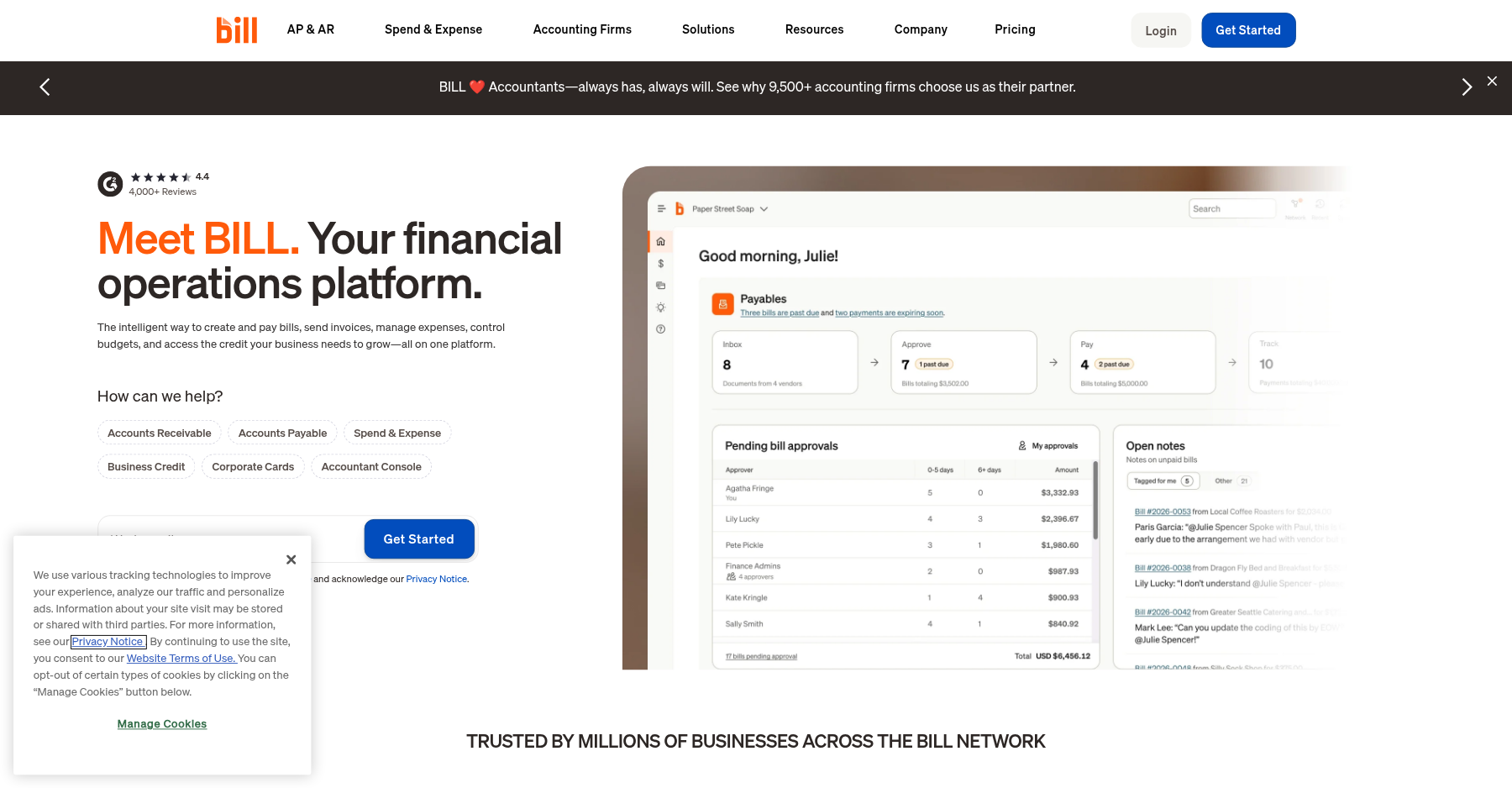
💳 AP inbox and AI bill capture
Vendor bills can be emailed, uploaded, or snapped on the mobile app. BILL’s AI reads the invoice, pulls out the amount, due date, and line items, and suggests a GL code. The coding is right often enough to save time, but expect to verify — it still misreads messy PDFs and handwritten amounts. The centralized inbox means no bill lives in someone’s personal email anymore.
💳 Approval workflows that actually enforce themselves
This is the feature I would buy BILL for. You set rules: bills under a threshold auto-approve, anything over it routes to a manager, large ones require two approvals. BILL will not release a payment until every required person signs off. The limitation reviewers flag is that you cannot stack more than one approver on a single step in complex chains, and bulk invite management is weak.
💳 Pay by ACH, check, virtual card, or wire
You fund BILL once and it disburses to vendors however they want: domestic ACH, a printed and mailed check, a virtual card number, or a wire. Virtual cards earn cash-back categories that vendors accept as a card payment. The catch is the fee stack on top of the subscription: roughly $0.59 per ACH, $1.99 per check, and 1% for instant push-to-debit. Those nickels add up fast if you run hundreds of payments a month.
💳 AR automation and W-9 collection
The receivables side lets you send invoices, track who owes you, and chase payments automatically. BILL says customers get paid about twice as fast, which tracks with my test — the reminders are firmer than most small businesses send on their own. The automated W-9 collection and verification (the “W-9 Agent”) is a genuine tax-season time-saver that I did not expect to like as much as I did.
💳 Accounting sync and reporting
Automatic two-way sync with QuickBooks Online and Xero starts on the Team plan; Essentials only supports manual CSV import/export, while NetSuite and Sage Intacct open up on Enterprise. Categorized bills and payments post back to your ledger so you do not double-enter. The weak spot is reporting inside BILL itself — dashboards are basic, customization is limited, and power users end up doing real reporting in their accounting system anyway.
Pricing: What You Actually Pay
| Plan | Price | What You Get |
|---|---|---|
| Essentials | $49/user/month | AP OR AR, approval workflows, ACH/check/virtual card payments, CSV + QBO/Xero sync, W-9 Agent |
| Team | $65/user/month | Custom roles, class/location tracking, deeper accounting sync |
| Corporate | $89/user/month | Combined AP + AR, advanced controls, multi-entity-ready |
| Enterprise | Custom | NetSuite/Dynamics sync, dedicated support, volume pricing |
Pros & Cons
Pros
- ✓ Genuine AP time savings with a centralized bill inbox and AI data extraction
- ✓ Strong approval workflows that enforce separation of duties
- ✓ Payees get paid by ACH, check, virtual card, or wire from one funding account
- ✓ Two-way sync to QuickBooks, Xero, NetSuite, and Sage Intacct
- ✓ Automated W-9 collection removes a recurring tax-season headache
Cons
- ✗ Expensive once per-transaction fees are added to the per-user subscription
- ✗ Customer support is slow and account holds are a recurring complaint
- ✗ Reporting inside BILL is basic; real reporting still lives in your ledger
- ✗ International and multi-currency payment support lags specialists like Tipalti
- ✗ Cannot stack multiple approvers per step; bulk user invites are limited
Bottom line: BILL is for small businesses paying 20+ vendor bills a month that need approval discipline and an audit trail; skip it if you’re a solopreneur paying three or four bills a month — your accounting software’s built-in bill pay is plenty.
Final Verdict
BILL is the category default for SMB accounts payable because the workflow automation genuinely works. Buy it if paper bills and missing approvals cost you real time; skip it if your volume is low or you cannot risk slow support when a payment stalls.
Frequently Asked Questions
Is BILL the same as Bill.com?
Yes. The company rebranded from Bill.com to BILL in 2023, but it’s the same product, dashboard, and reviews — just a new name. You’ll still see both used interchangeably online.
How much does BILL actually cost per month?
Subscriptions start at $49/user/month (Essentials), $65 (Team), and $89 (Corporate), plus custom Enterprise. On top of that you pay roughly $0.59 per ACH, $1.99 per check, and 1% for instant payments. Don’t forget those transaction fees — in high-volume shops they often exceed the subscription itself.
Does BILL replace QuickBooks?
No. BILL is an AP/AR automation layer that syncs to QuickBooks, Xero, NetSuite, or Sage Intacct. It doesn’t handle your full general ledger, payroll, or inventory. Think of it as a control tower on top of your accounting system — not a replacement.
What is the biggest complaint about BILL?
Customer support. Reviews keep citing slow email responses (often 18–24 hours), trouble reaching a human, and account verification or holds when a payment looks unusual. One G2/SmartCustomer reviewer wrote: “I have spent three days calling, holding, chatting to NO Avail… a vendor payment shows sent, but the vendor hasn’t received it.”
Can I use BILL just for accounts payable or just for receivables?
Yes. Essentials, Team, and Corporate all include both accounts payable and accounts receivable features, so you can run AP, AR, or both on any tier. The tiers differ in approval control, custom roles, and automatic sync — not in whether receivables are included.
What does a typical BILL approval workflow look like?
A vendor bill lands in BILL’s AP inbox by email or upload; the AI captures the amount, due date, and line items and suggests a GL code. Someone reviews and recodes it, then your rules take over — bills under a threshold auto-approve, anything above routes to a manager, and large ones require two sign-offs. Payment only releases once every required approver signs. You fund BILL once, and it disburses by ACH, printed check, virtual card, or wire. That enforce-it-yourself chain is why teams say it cuts AP time by about half.
Is BILL worth it for a small business?
BILL is worth it if you pay 20+ vendor bills a month and currently chase approvals over email — the separation of duties and the audit trail pay back the subscription fast. It is overkill at $49/user/month plus per-transaction fees if you are a solopreneur paying three or four bills a month; your accounting software’s built-in bill pay is enough. Reviews consistently flag slow support and occasional account holds as the tradeoff, so keep a backup payment method.
About the Author