The Short Version
Front isn’t built for you—at least not for you alone. It’s built for teams: customer-support teams, sales teams, operations teams that share one inbox and need to know who’s replying to what. Its core pitch is a shared inbox paired with a real ticketing system, routing rules, and SLA management. You can set it so VIP customer mail lands on the sales director, technical support goes straight to the support queue, and sales inquiries get distributed to the right rep—automatically, no daily manual triage.
In 2026 Front added AI: AI Compose helps draft replies, AI Topics auto-tags incoming mail by subject, and AI Translate handles multilingual threads. But that AI is a paid add-on at $20/seat/month on top of your base plan. It starts at $25/seat/month and scales up from there. A ten-person team on Starter runs $250 a month. That’s not cheap for a small crew, but for a 10–50 person support operation, Front’s tooling is the benchmark.
Who This Is For (And Who Should Skip)
✓ Support teams of 10–50 people. This is Front’s sweet spot: shared inbox plus ticketing, routing, and SLA tracking all in one place.
✓ Sales teams that need automatic distribution. Routing rules send each customer’s mail to the right rep without manual handoffs.
✓ Teams that live across multiple channels. Front pulls email, chat, WhatsApp, Instagram, and Messenger into one queue.
✗ Solo users. $25/seat/month for one person is hard to justify when Spark is free.
✗ Teams under five people. Missive runs roughly $14–24/seat/month and covers shared inbox, internal chat, and assignment at a fraction of the cost.
✗ Teams that want lightweight collaboration. Front is heavy machinery. If you just need a shared inbox and some comments, Missive is the lighter fit.
Score Breakdown
What Actually Matters: Features, Reviewed
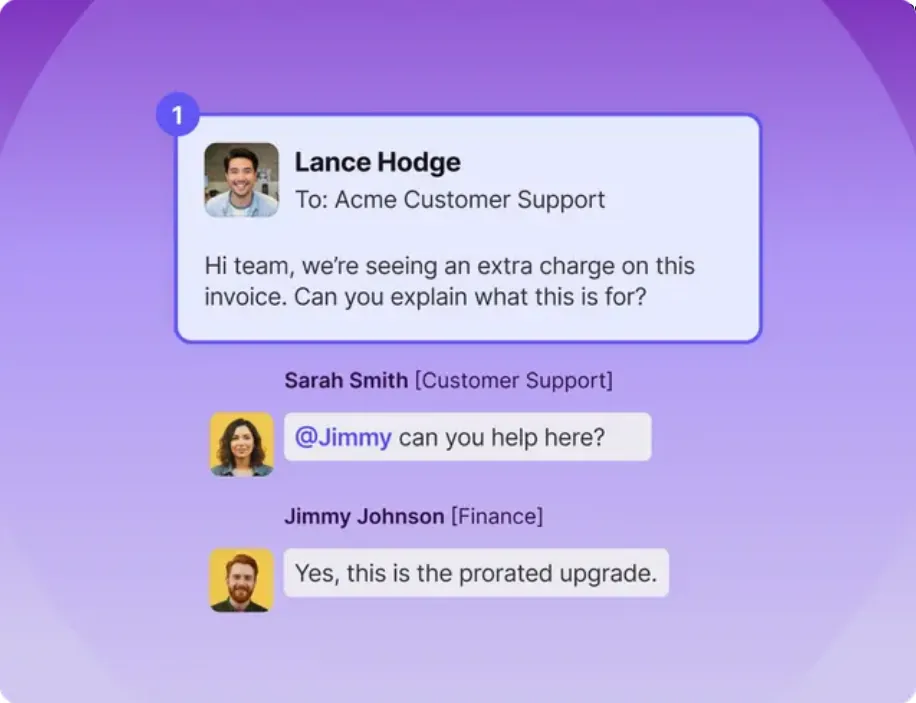
📮 Shared inbox — the foundation
Every team member sees the same inbox at the same time. Who’s handling which message, who’s already replied, who’s still drafting—it’s all visible, so two people never answer the same customer twice. G2 and Capterra reviewers repeatedly call this out: when multiple people work the same queue, the shared inbox kills duplicate replies and confusion.
🔀 Routing rules — where the time actually goes
Front routes mail automatically: VIP customers to the sales director, technical support to the support queue, sales inquiries to the sales team, spam straight to archive. Real users consistently name routing rules as one of the biggest time-savers in the product—no more spending the morning sorting mail by hand.
📈 SLA management — enterprise-grade, gated behind higher tiers
Set rules like “VIP customers get a reply within two hours” or “standard tickets within 24 hours,” and Front tracks and escalates automatically. The catch users flag: SLA management and advanced analytics only arrive on Professional ($65/seat/month) and above. Starter leaves you without them, which feeds the “it costs more than it looks” complaint.
🤖 AI — good when you pay for it, and it’s extra
Front’s Copilot add-on includes AI Compose (drafts replies), AI Topics (auto-classifies thread subjects), and AI Translate. Teams that use it say it genuinely speeds up response times—drafts and auto-tagging land well on customer-facing mail. The friction is commercial: AI is a $20/seat/month add-on on top of your base plan, so a team on Starter is already paying $45/seat/month by the time they turn Copilot on.
🔗 Integrations — deep, but tier-gated
Front connects to Salesforce, HubSpot, Zendesk, Slack, and Jira, so you can see a customer’s CRM record while replying inside Front. Two caveats show up in reviews: deep CRM integrations (Salesforce, HubSpot) require Professional or higher—Starter only gets basic connections—and some users reported that after a January 2026 update, “actions taken in Front don’t sync back to Outlook,” which made dual-side collaboration awkward for teams that rely on Outlook.
🔄 The update treadmill
Front moves fast, and not all of that movement lands well. One reviewer summed up a recurring frustration: “update after update that has made the platform harder to use.” For a tool your team lives in every day, churn in the UI is a real cost—worth testing your exact workflows in the trial before committing.
Pricing (and who should pick which tier)
Front offers a 14-day free trial. Pricing is per seat per month, billed annually; monthly billing costs more. Enterprise runs $105/seat/month:
| Plan | Price | What You Get |
|---|---|---|
| Starter | $25/seat/mo (annual) | Up to 10 seats, single channel, shared inbox & ticketing, AI Topics, 10 automation rules, basic analytics; AI Copilot is a paid add-on |
| Professional | $65/seat/mo (annual) | Up to 50 seats, omnichannel (email, SMS, social), macros, 20 automation rules, advanced analytics, SSO/SCIM; AI add-ons available |
| Enterprise | $105/seat/mo (annual) | Unlimited seats and rules, custom roles, multi-language knowledge base, AI Copilot, Smart QA and Smart CSAT included |
Honest math: a ten-person team on Starter pays $25 × 10 × 12 = $3,000/year. The same team on Professional (where SLA and CRM features actually live) runs $65 × 10 × 12 = $7,800/year. Add the $20/seat Copilot add-on and you’re at $96 × 10 × 12 = $11,520. For comparison, a ten-person Missive setup runs roughly $2,880/year. If you need SLA tracking, routing depth, and CRM panes, Front earns it; if you’re a five-person crew that just needs a shared inbox, Missive is the cheaper and simpler fit.
The Unfiltered Pros & Cons
Pros
- ✓ Shared inbox and routing rules kill duplicate replies—users on G2 and Capterra rate team collaboration highly.
- ✓ Clean interface for an enterprise tool; it's unusual to see this level of polish at this tier.
- ✓ Copilot's AI Compose and AI Topics genuinely speed up customer-facing replies.
- ✓ Ticketing, SLA management, and routing rules are the most complete set in the market.
- ✓ Integrates Salesforce, HubSpot, and Zendesk; 14-day free trial with no credit card.
Cons
- ✗ Expensive and rising: $25/seat/month to start, plus $20/seat for AI—the most common complaint on review sites.
- ✗ After the January 2026 update, users reported "actions taken in Front don't sync back to Outlook."
- ✗ A recurring critique: "update after update that has made the platform harder to use."
- ✗ SLA management and deep CRM integrations are gated behind Professional ($65/seat/month) and above.
- ✗ Powerful but heavy—small teams pay for features they won't touch, which hurts the value score.
Final Verdict
The benchmark shared-inbox platform for 10–50 person support teams—routing, ticketing, and SLA management are unmatched—but pricing climbs fast once AI and higher tiers enter.
Thirty-second decision: Are you running a 10–50 person support or sales operation that needs routing, SLA tracking, and CRM integration? Start the 14-day trial, build your routing rules, and pressure-test the Outlook sync before you buy—Professional at $65/seat/month is where the real features live. Under five people, use Missive. Solo? Use Spark or Superhuman.
Frequently Asked Questions
What’s the difference between Front and Missive?
Front is enterprise-grade: full ticketing, SLA management, and deep routing rules. Missive is lighter: shared inbox, internal chat, and task assignment without the overhead. Small teams pick Missive; larger customer-facing teams pick Front.
Is Front’s AI included in the base plan?
No. Copilot is a $20/seat/month add-on. Enterprise plans include it. Expect your per-seat cost to roughly double once you turn AI on.
Does Front have a free trial?
Yes—14 days, no credit card required. Use it to set up your routing rules and SLA targets before you commit.
Does Front support WhatsApp and Instagram?
Yes. Multichannel support (email, chat, WhatsApp, Instagram, Messenger) arrives on Professional and above; Starter covers email and basic chat only.
Did Front’s recent update break Outlook sync?
This is the most common recent complaint on G2 and Capterra. Multiple users report that after the January 2026 update, marks, archives, and replies made inside Front no longer flow back to Outlook—”actions taken in Front don’t sync back to Outlook.” If your team depends heavily on Outlook alongside Front, verify the two-way sync in your trial environment before rolling out.
User feedback sourced from G2 and Capterra reviews.
About the Author