You know the drill: you email a 40-page contract to a client, they reply with “Final v2 (actually final).pdf,” then “Final v3 REALLY FINAL.docx,” and two weeks later nobody can tell which version won. When you need to hand sensitive documents to clients without that email-ping-pong nightmare, Clinked is one of the oldest names in the client-portal category — and after testing it for two weeks, I can see why law firms, accounting practices, and record labels have stuck with it for a decade. It is not the flashiest tool on the market, and it is certainly not the cheapest. But it is one of the few portals that genuinely treats document security, granular permissions, and audit trails as the product rather than an afterthought.
My hands-on verdict: Clinked is the right choice for regulated professional-services firms that need a branded, compliance-minded white-label client portal and have the budget to pay for it. It is the wrong choice if you are a solo freelancer on a $20/month budget, or if you expect a consumer-grade, Notion-like editing experience. Below I break down pricing, real user complaints, and the five dimensions I score it on.
Who is Clinked for?
- ✅ Law firms, accounting practices, wealth managers, and consultancies handling confidential client documents.
- ✅ Agencies that need a white-label client portal with a custom domain and audit trails for compliance.
- ✅ Organizations that outgrow consumer tools like Dropbox Business and need granular per-folder permissions.
- ✅ Teams that want a vendor with a decade-plus track record and data centers in both US and EU regions.
- ❌ Solo freelancers or micro-agencies on a tight monthly budget — entry pricing starts near $95/month.
- ❌ Businesses that want deep billing, proposals, e-signature, and marketing automation built in.
- ❌ Clients who demand a polished, modern mobile-app experience — the iOS/Android apps are functional but not best-in-class.
What Clinked does well
1. Bank-grade security and compliance tooling
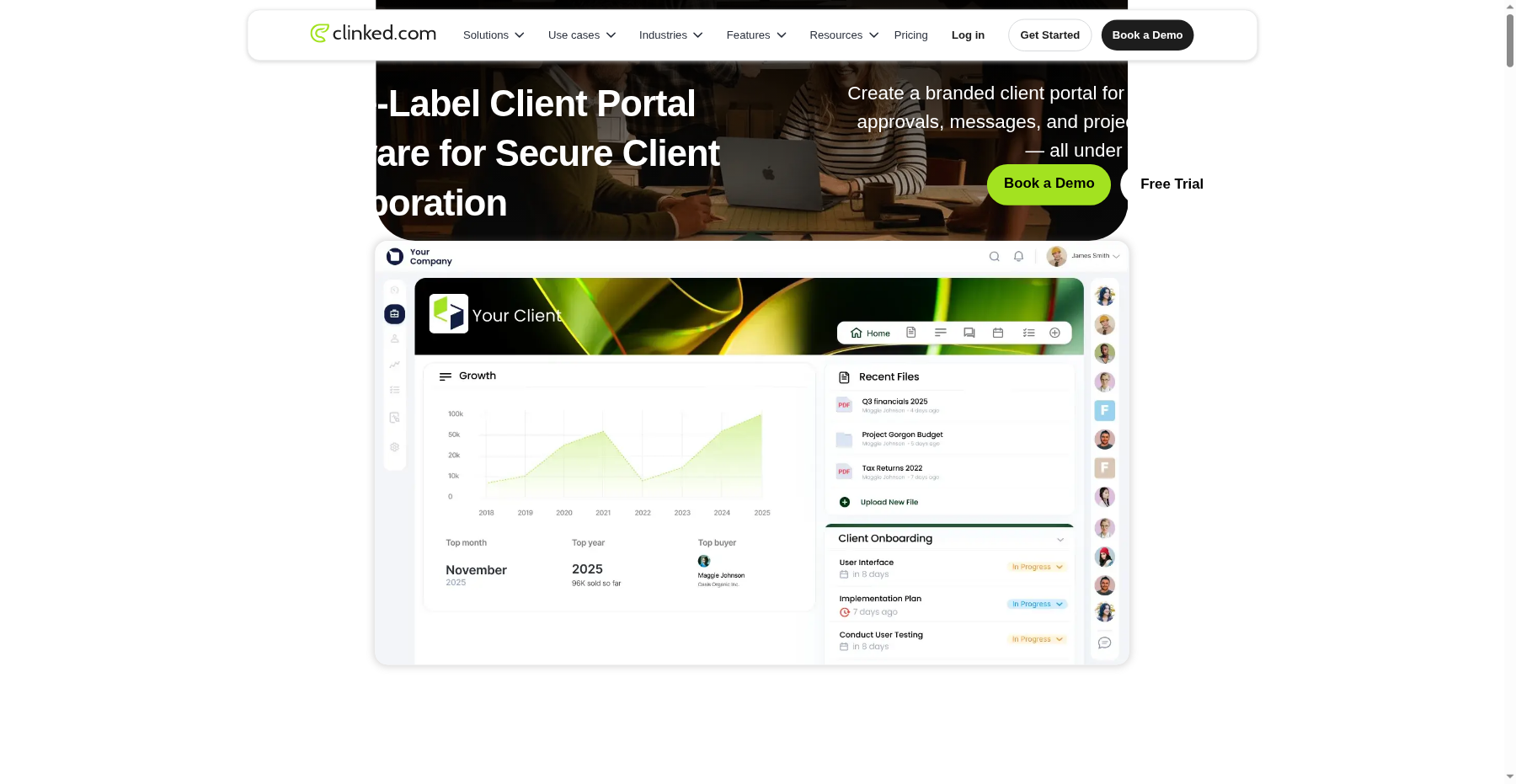
This is Clinked’s core promise and it delivers. Data is encrypted at rest (AES-256) and in transit (TLS), with optional EU data residency, two-factor authentication, granular per-folder permissions, document watermarking, and a full audit trail that logs who viewed, downloaded, or edited every file. For a law firm or accounting practice, that audit log alone justifies the price — it is the kind of evidence you can actually hand to a regulator.
2. True white-labeling on every plan
Unlike most portals that reserve white-label for top-tier enterprise contracts, Clinked includes white-label branding on the entry-level Lite plan. Your clients log into a portal that shows your logo, your colors, and your domain (custom domain unlocks on Standard). The mobile app can also be rebranded on Enterprise. The result is that clients genuinely believe the portal is yours, not a SaaS embed.
3. Document management that professionals actually use
Clinked’s file structure supports version control, granular read/write/admin permissions per folder, internal notes on files, and a desktop sync client (Windows; macOS support is more limited). You can set expiration dates on shared links, require passwords for downloads, and prevent forwarding. Reviewers on Capterra consistently mention that version control “means we never have to worry about outdated files being used.”
4. Built-in collaboration without leaving the portal
On the Standard plan and above, Clinked folds in shared tasks (with Kanban board view on Premium), a shared calendar, threaded discussions, and real-time 1:1 and group chat. It is not Asana, but it removes the need to spin up Slack or Trello alongside the portal. Clients can comment on files, complete tasks, and receive notifications without ever leaving the branded environment.
5. Workspaces that scale from 10 to 1,000+ members
Clinked is built around multiple workspaces — one per client, per department, or per project. You can add unlimited guests at no extra charge and only pay for named members. The Enterprise tier supports 1,000+ members, SSO/SAML, dedicated storage volumes, and a dedicated success manager. That scalability is why larger professional-services firms keep renewing.
Clinked pricing, decoded
Clinked prices by member tier, not per user, which is unusual. Every plan includes unlimited guests (clients) and white-label branding. Annual billing takes roughly 20% off; two-year commitments drop the bill by about 35%.
| Plan | Price | What You Get |
|---|---|---|
| Start Up | $8.80/user/mo | 1–25 users, 2 GB storage, branded client portal |
| Standard | $239/mo | 100 members, 1 TB, custom domain, audit trail |
| Premium | $479/mo | 250 members, 3 TB, Kanban boards, white-label emails |
| Enterprise | Custom | Unlimited users, SLA, onboarding |
The Start Up plan is priced at $8.80/user/month (billed yearly) for teams of 1–25 users and includes 2 GB of storage, white-label branding, and the core file-sharing portal. The Standard plan at $239/month unlocks 1 TB storage, custom domain URL, task management, shared calendar, discussions, real-time chat, and the audit trail — this is the tier most professional-services firms land on. The Premium plan at $479/month adds 250 members, 3 TB storage, Kanban boards, and white-labeled emails. Enterprise pricing is custom for teams above 1,000 members and 5 TB storage, and adds SSO, a branded mobile app, and dedicated support.
A 10-day free trial is available with no credit card required. Compare this to SuiteDash, which starts at $19/month with unlimited users, and the gap is obvious: Clinked is several times more expensive, but you are paying for compliance depth and document controls that SuiteDash does not match.
Pros and cons, from real users
Pros
- ✓ Bank-grade security: AES-256 encryption, EU data residency, 2FA, audit trails, document watermarking.
- ✓ True white-labeling on every plan, including custom domain on Standard and branded mobile app on Enterprise.
- ✓ Granular per-folder permissions and version control that professional-services firms rely on.
- ✓ Strong review scores: 4.8/5 on G2 (~140 reviews), 4.9/5 on Capterra (~110 reviews).
- ✓ Multi-workspace architecture scales from 10 to 1,000+ members with unlimited guests.
Cons
- ✗ Expensive: entry tier $8.80/user/month, Standard $239/month — far pricier than SuiteDash ($19) or Ahsuite (free).
- ✗ Slow document buffering: 'Sometimes the buffering speeds when opening documents are very slow' (G2).
- ✗ No spell check in notes: 'very frustrating and time consuming especially for clients' (Software Advice).
- ✗ Cost opacity on scaling: 'I find the scalability and licensing restrictions challenging… the cost opacity for scaling is a problem' (G2).
- ✗ Enterprise-y interface; occasional lags/freeze-ups; smaller number of native third-party integrations.
The praise on G2 (4.8/5 across ~140 reviews) and Capterra (4.9/5 across ~110 reviews) centers on security, white-label polish, and support. One G2 reviewer wrote: “Clinked provides a secure and professional client portal that makes it easy to collaborate with record labels, managers, and business partners in one centralized place.” Another Capterra user called it “my favorite all-in-one platform” for eliminating multiple disjointed tools.
The complaints are real and consistent. On G2, a verified user noted: “Sometimes the buffering speeds when opening documents are very slow. The in-app search function in Notes also needs refinement.” Another G2 reviewer wrote: “I find the scalability and licensing restrictions challenging with Clinked. The cost opacity for scaling is a problem.”
On Software Advice, a long-time user complained: “NO SPELL CHECK which is very frustrating and time consuming especially for clients — can be very off putting.” A smaller number of reviews mention slow response times, occasional freezes, and the site going down roughly once a month. The interface is also frequently described as “enterprise-y” and heavier than modern competitors.
Verdict: Is Clinked worth it in 2026?
Bottom line: Worth it for law firms, accountants, and wealth managers who handle confidential files and need an audit trail they can hand to a regulator; skip it if you’re a solo or creative on a budget — you’ll be paying a compliance tax you don’t need.
The best compliance-first, white-label client portal for law firms and accounting practices — if you can absorb the enterprise-grade pricing.
Clinked is worth every dollar if you run a law firm, accounting practice, wealth-management office, or any regulated professional-services business that handles confidential client files. The security tooling, audit trails, granular permissions, and white-label polish are genuinely best-in-class for this use case, and the review volume (250+ combined) suggests the product has staying power.
It is not worth it if you are a solo freelancer, a creative agency, or a startup that just needs a pretty place to drop deliverables. At $8.80/user–$479/month, you are paying a compliance tax that you do not need.
In those cases, Ahsuite (free tier, $8/month to start) or SuiteDash ($19/month) will serve you better. For a broader look at your options, see our roundup of the best client portal software. I score Clinked 4.6/5: held back by price, document load times, and a dated UI, lifted by security depth and a loyal professional-services customer base.
Frequently asked questions
How much does Clinked cost per month?
Clinked’s Start Up plan starts at $8.80/user/month on annual billing and covers teams of 1–25 users with 2 GB of storage. Standard runs $239/month, Premium $479/month, and Enterprise is a custom quote. Pay annually and you save ~20%; sign a two-year deal and it’s more like ~35% off.
Is there a free trial of Clinked?
Yep — you get a 10-day free trial and they don’t ask for a credit card. Just don’t look for a forever-free plan; that’s where Ahsuite has it beat.
Is Clinked secure enough for law firms and accountants?
Yes. Clinked encrypts at rest with AES-256 and in transit with TLS, throws in optional EU data residency, two-factor auth, granular per-folder permissions, document watermarking, and a full audit trail. Regulated professional-services firms in 40+ countries already run on it.
Does Clinked have a mobile app?
Yes, there are iOS and Android apps — but reviewers call them functional rather than best-in-class. On the Enterprise tier you can white-label the app under your own brand, which is a nice touch.
How does Clinked compare to SuiteDash or Ahsuite?
Clinked wins on security, compliance, and document controls. SuiteDash takes feature breadth — billing, CRM, LMS, automation — at a fraction of the price, while Ahsuite wins on ease of use and a generous free tier. Pick Clinked when document security is the priority, not feature volume.
About the Author