The Short Version
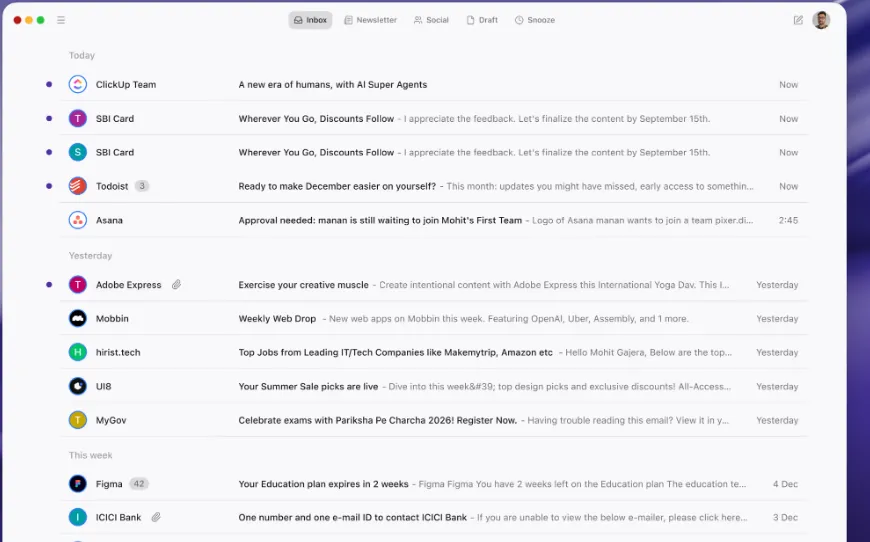
Newton Mail isn’t trying to be Superhuman, Spark, or Front. It’s none of those—it’s a clean, fast, cross-platform email client with a very deliberate narrow feature set. No AI, no shared inbox, no CRM sidebar. What it does offer is a handful of tools that people actually ask for: Read Receipts (see when your sent mail was opened), Send Later, Snooze, and Recap (which surfaces threads you sent but haven’t heard back on).
At $49.99/year, one price unlocks every platform—Mac, Windows, iOS, Android—and there’s no monthly option. The pitch is the calm inbox: nothing flashy, nothing noisy. People who want a quiet, no-surprises email experience tend to love it. People who want AI assistants, team workflows, or Salesforce panes will outgrow it in a week.
Who This Is For (And Who Should Skip)
✓ People who want a clean, distraction-free inbox. No AI prompts, no marketing noise, no bells and whistles—just fast, quiet email.
✓ People who work across Mac, Windows, iPhone, and Android. One $49.99/year subscription unlocks every platform with no per-device fees.
✓ Sales and business users who need read receipts. Knowing exactly when (and how often) someone opened your email is genuinely useful for follow-ups.
✗ Anyone who wants AI features. Newton has no AI at all—point them at Spark Plus or Superhuman.
✗ Teams that need a shared inbox. No team features here; Missive or Front is the right call.
✗ People on a zero-budget. $49.99/year is cheap compared to Superhuman, but Spark’s free tier is actually free.
Score Breakdown
What Actually Matters: Features, Reviewed
👁 Read Receipts — the headline feature
Newton silently tracks the emails you send: when the recipient opened it, and how many times. The recipient gets no notification—tracking runs invisibly. G2 and Capterra reviews keep circling back to the same feeling of calm: one user described doing email as “more relaxing doing email,” which is exactly the result of stripping away everything that doesn’t matter. It’s handy for business follow-ups, but use it with judgment.
📅 Send Later — schedule across time zones
Draft a message now and have it go out at the exact time you choose—great for cross-border work or avoiding weekend inbox dumps. In our two-week test it fired reliably every time. Reviews don’t praise or complain about it; it just works, which is what you want from a scheduling tool.
💤 Snooze — tuck mail away until it matters
Snooze a message and it vanishes from your inbox until the time you pick, then pops back. It’s a standard feature these days, and Newton’s implementation is clean and predictable. Users don’t write paragraphs about it, which is the best compliment a snooze button can get.
🔄 Recap — never drop the follow-up
Recap tracks the threads you’ve sent that haven’t gotten a reply and surfaces them so you can follow up. It’s a quiet but useful nudge for anyone who juggles open conversations. Reviews are sparse—most people use it and forget it, which means it’s doing its job.
🔗 Connected Apps — light integrations only
Newton connects to Pocket, Asana, Todoist, Evernote, and OneNote. That covers the “save to read later” and task-management side of life. What’s missing matters more than what’s there: no Salesforce, no HubSpot, no Slack. Sales teams will feel the gap immediately; solo users usually won’t.
⚠️ Stability and longevity — the real risks
Newton is a small shop that has had its ups and downs—it was famously shut down once before being revived—and updates move slowly. Users on G2 and Capterra openly worry about whether it’ll be around in two years. More concretely, a July 2026 update introduced a bug where, as one user put it, “open an email, a completely random different email pops up.” Newton doesn’t let you roll back to an older version, so you wait for the fix. That fragility is the biggest reason to weigh a year-long commitment.
Pricing (and who should pick which tier)
Newton has a single plan—there’s no free tier, no monthly option, and no ladder of tiers. A 14-day free trial (no credit card) gives you the full product before you pay:
| Plan | Price | What You Get |
|---|---|---|
| Annual | $49.99/yr (~$4.17/mo) | All features: Read Receipts, Send Later, Snooze, Recap, Tidy Inbox, Connected Apps. Unlocked on Mac, Windows, iOS, and Android |
Honest math: Newton works out to roughly $4.17/month on the annual $49.99 plan. Spark’s free tier is $0. Superhuman Starter is $300/year. Newton sits in between—cheaper than the premium crew, but you’re paying for something you could get for free if you don’t specifically need read receipts and cross-platform polish. The no-monthly-option rule means committing for a full year sight-unseen, which is exactly why the 14-day trial matters.
The Unfiltered Pros & Cons
Pros
- ✓ Clean, fast, cross-platform—users say it's "more relaxing doing email."
- ✓ Read receipts actually work and run invisibly for follow-up tracking.
- ✓ Send Later and Snooze are reliable and simple.
- ✓ $49.99/year is far cheaper than Superhuman's $300/year.
- ✓ 14-day free trial with no credit card required.
Cons
- ✗ No AI features at all.
- ✗ No team or shared-inbox features.
- ✗ Thin integrations—no Salesforce, HubSpot, or Slack.
- ✗ No free version; only a 14-day trial, and no monthly billing option.
- ✗ Longevity is a real worry: the company is small, updates are slow, and it once shut down entirely; after a July 2026 update one user "open an email, a completely random different email pops up" with no rollback option.
Final Verdict
A clean, fast, cross-platform email client with great read receipts at $49.99/year—but no AI, no team features, and small-stability worries temper the calm.
Thirty-second decision: Do you want a quiet, fast, cross-platform inbox with working read receipts, and you’re willing to live without AI and team features? Take the 14-day trial, run your normal mail across Mac and iPhone, and if the calm feeling sticks, $49.99/year is fair. If you need AI (Spark Plus), a shared inbox (Missive or Front), or Salesforce integration (Superhuman Business), Newton won’t satisfy you.
Frequently Asked Questions
What’s the difference between Newton Mail and Spark?
Newton is clean and fast at $49.99/year, with read receipts as its standout. Spark’s free tier already covers most people, and Plus at $99/year adds AI. Pick Newton if you want quiet polish; pick Spark if you want AI.
Does Newton Mail have a free version?
No permanent free tier. There’s a 14-day free trial with no credit card required. After that, it’s $49.99/year—no monthly option.
Does Newton support Windows?
Yes. One subscription covers Mac, Windows, iOS, and Android, with sync across all of them.
Does the recipient know I read their email with read receipts?
No. Newton’s tracking runs silently—the recipient never gets a “read receipt sent” notification. Use it for follow-ups, but be mindful of how you use the information.
What went wrong with Newton’s recent update?
This is the most common complaint on G2 and Capterra. After a July 2026 update, one user reported that they “open an email, a completely random different email pops up,” and Newton doesn’t support rolling back to an older version—you wait for an official fix. Combined with the company’s small size, slow update cadence, and the fact that it shut down once before, the recurring worry among long-time users is simple: what if it stops existing again?
User feedback sourced from G2 and Capterra reviews.
About the Author