The Short Version
Mailbird is one of the best email clients on Windows, and it does something most of its peers refuse to do: sell itself outright instead of locking you into a monthly subscription. Pay once, around $99.75 for the Premium tier, and it is yours. No renewal anxiety, no annual bill creeping up on you in January.
The core of it is a clean, fast Unified Inbox that pulls Gmail, Outlook, and IMAP accounts into one window, plus a Birdhouse sidebar that runs Slack, WhatsApp, Google Calendar, Trello, and Asana without switching apps. Premium adds built-in ChatGPT and Microsoft Exchange support. It ships natively on Windows and macOS (Mailbird first shipped on Mac in October 2024 and reached the Mac App Store in September 2025), but the Windows client is still the mature, stable build.
Who This Is For (And Who Should Skip)
✓ Windows users who want a clean, fast desktop client. This is Mailbird’s home turf and the reason most people buy it.
✓ Anyone who hates monthly subscriptions. The $99.75 Premium license is a one-time purchase; spread over five years that works out to roughly $28 a year including update fees.
✓ Business users on Microsoft Exchange. Premium connects to Exchange so you are not stuck inside Outlook just to read work mail.
✗ Mac power users. The Mac build is new and still rough around the edges. Use Spark or Superhuman instead.
✗ Mobile users. Mailbird has no iOS or Android app; you are tied to the Windows or Mac desktop.
✗ People who only want a cheap monthly plan. The cheapest paid option is a one-time license; there is no low-cost monthly tier.
✗ Teams needing a shared inbox, assignment, or internal chat. Mailbird has no collaboration layer. Use Missive or Front.
Score Breakdown
What Actually Matters: Features, Reviewed
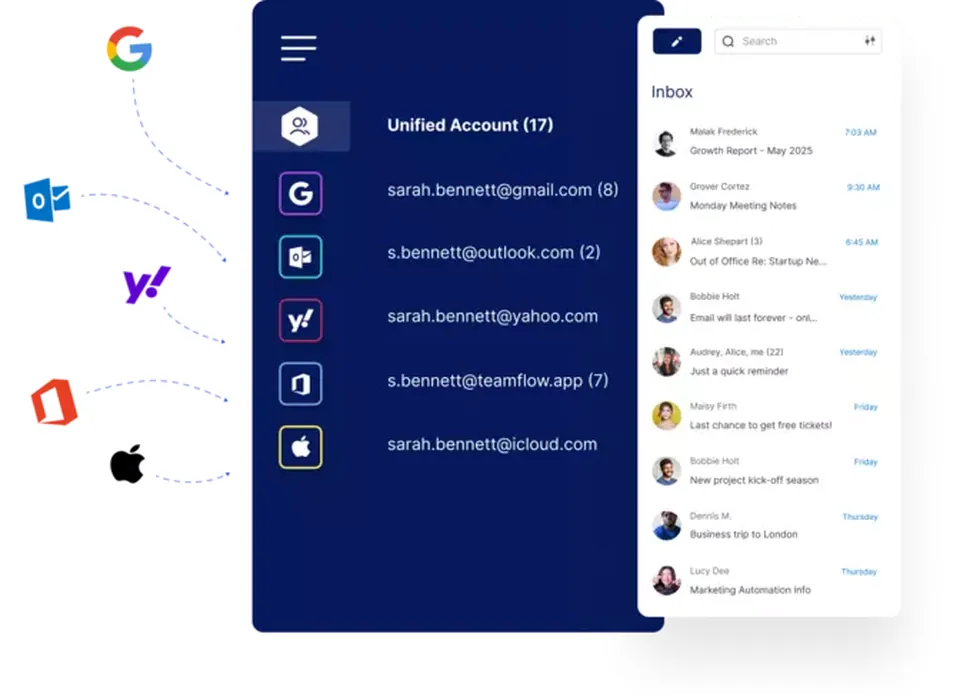
📥 Unified Inbox — the headline
Mailbird merges every account you add—Gmail, Outlook, IMAP—into a single inbox. The most common praise on G2 and Capterra is almost always the same three things in the same order: clean interface, fast, and the unified inbox just works. You stop bouncing between apps and read everything in one window.
🤖 ChatGPT integration — handy, but shallow
Premium puts ChatGPT inside the compose window so you can polish a draft without opening a browser tab. That step-skipping is genuinely convenient. But the depth is limited—as one G2 reviewer put it, “AI depth is relatively light.” You also have to bring your own OpenAI API key; Mailbird does not bundle a ChatGPT subscription.
🏢 Microsoft Exchange — Premium only
Business users on Premium can connect Microsoft Exchange accounts, which means you can run work mail through Mailbird’s unified inbox instead of staying in Outlook. It works well on Windows. The catch shows up on the new Mac build, where users report issues with “calendar sync, Exchange meeting handling, and general stability.”
🨯 Birdhouse sidebar — 30+ integrations
The Birdhouse store offers 30-plus integrations that live in a sidebar: Slack, WhatsApp, Google Calendar, Trello, Asana, Dropbox. You check a Slack thread or drag a file from Dropbox without leaving your inbox. It is one of the reasons people stick with Mailbird after they buy.
🖌 Custom themes — pretty but fussy
Mailbird ships with a long list of themes and layouts. The options are genuinely broad, but they lean on the flashy side. If you want a stripped-back, minimal look, expect to spend a few minutes tweaking rather than being happy with the defaults.
Pricing (and who should pick which tier)
Mailbird sells licenses outright rather than by the month. Free covers one account; Standard and Premium are one-time purchases with optional yearly update fees.
| Plan | Price | What You Get |
|---|---|---|
| Free | $0 | 1 mailbox, basic features, custom themes |
| Standard | $49.50 one-time (+$10/yr updates) | Unlimited mailboxes, basic integrations |
| Premium | $99.75 one-time (+$20/yr updates) | ChatGPT integration, Microsoft Exchange support, VIP support, all integrations |
Honest math: Premium is $99.75 once, plus $20 a year for updates. Over five years that is about $140 total, or roughly $28 a year. Compare that to Spark Plus at $99 a year ($495 over five years) or Superhuman Starter at $300 a year ($1,500 over five years). If you are on Windows and plan to keep the client for a few years, the buy-to-own model wins on cost.
The Unfiltered Pros & Cons
Pros
- ✓ One-time purchase—no monthly subscription; Premium is $99.75 up front.
- ✓ Clean, fast, ready out of the box—these are the most repeated praises on G2 and Capterra.
- ✓ Unified Inbox merges Gmail, Outlook, and IMAP accounts into one window.
- ✓ 30+ Birdhouse integrations (Slack, WhatsApp, Google Calendar, Trello, Asana) in a sidebar.
- ✓ Premium includes Microsoft Exchange support and built-in ChatGPT.
Cons
- ✗ The new Mac build is immature; users report problems with "calendar sync, Exchange meeting handling, and general stability."
- ✗ AI is shallow—one G2 reviewer said "AI depth is relatively light," and you supply your own OpenAI API key.
- ✗ No team features at all—no shared inbox, assignment, or internal chat.
- ✗ Free version connects only one mailbox; multiple accounts require a paid license.
- ✗ The cheapest paid option is a one-time license—there is no low-cost monthly plan.
Final Verdict
A fast, clean Windows email client with a one-time $99.75 license, Unified Inbox, and 30+ sidebar integrations—but the Mac build is new and unpolished, and there is no team layer.
Thirty-second decision: Are you on Windows, do you want one clean inbox, and are you sick of monthly subscription fees? Grab the Premium license for $99.75—it is worth it. If you are a Mac user, skip it until the Mac build matures; head to Spark or Superhuman. And if you run a team that needs a shared inbox with assignment and internal chat, use Missive or Front instead.
Frequently Asked Questions
Does Mailbird support Mac?
It supports Windows and macOS (Mailbird first shipped on Mac in October 2024 and reached the Mac App Store in September 2025), but the Mac build is still newer and not as mature as Windows. Stick with Spark or Superhuman on Mac for now.
Does Mailbird have a mobile app for iOS or Android?
No. Mailbird is a desktop-only client with no native iOS or Android app. If you need a smartphone inbox, rely on your phone’s built-in mail app or use Spark or another cross-platform client.
Is Mailbird free?
The free version connects a single mailbox. Unlimited accounts and integrations require the Standard or Premium one-time license.
Do I need to pay extra for the ChatGPT integration?
The integration is included in Premium, but you supply your own OpenAI API key. Mailbird does not bundle a ChatGPT subscription, so API usage costs go to OpenAI.
Does Mailbird support Microsoft Exchange?
Yes—Exchange support is a Premium feature. It is stable on Windows; the new Mac build still has meeting and calendar-sync issues.
How stable is the new Mac version? This is the complaint we see most.
It is the single most common gripe on G2 and Capterra. The Mac client is new, and users report problems with “calendar sync, Exchange meeting handling, and general stability.” If you are on Mac, we would wait a few update cycles before switching.
User feedback sourced from G2 and Capterra reviews.
About the Author