The Short Version
Polymail is not trying to be a gentler, prettier inbox for everyone. It is a sales and business tool. Its reason to exist is knowing exactly when a prospect opened your email, how many times, and which link they clicked—and then nudging the ones who went quiet on their own.
The core features are Email Tracking with read receipts, Follow-up Reminders, and (on Premium) automated Sequences that chase non-responders on a schedule. Calendar Scheduling lets you drop a booking link straight into an email. It starts at $10 per user per month on an annual plan, with a 7-day trial. If you are just reading your own inbox, Spark’s free tier does the job; if you are selling or doing business development, Polymail earns its keep.
Who This Is For (And Who Should Skip)
✓ Sales reps and account executives. Knowing when a contact opened your email is the whole point.
✓ Business development and freelancers who chase leads. Sequences and Follow-up Reminders take the mental math out of “who have not I heard from.”
✓ Consultants and freelancers who book calls. Calendar Scheduling lets people pick a slot without the back-and-forth.
✗ Personal users who just read and reply. You do not need tracking; Spark’s free tier covers you.
✗ Support teams needing a shared inbox. There is no real shared-inbox workflow. Use Missive or Front.
✗ Anyone who wants built-in AI writing tools. Polymail has no AI features. Use Spark or Superhuman.
Score Breakdown
What Actually Matters: Features, Reviewed
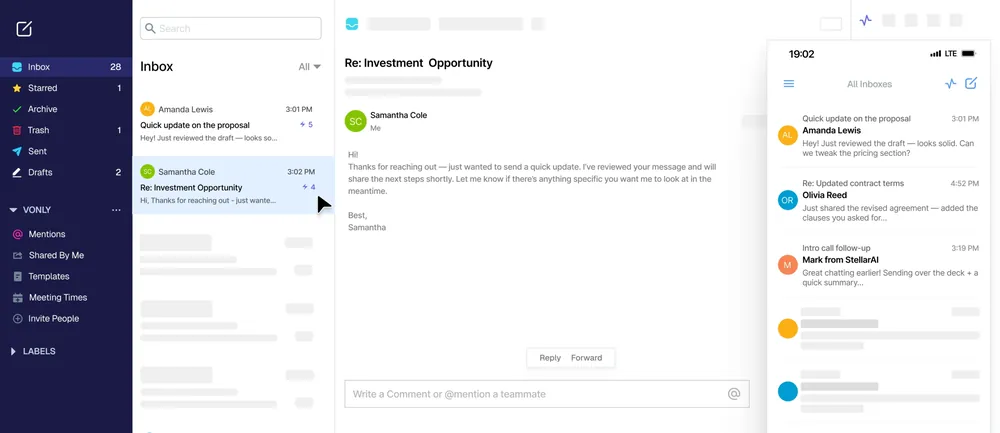
👁 Email Tracking — the reason people buy
Every email you send gets tracked: timestamp on open, number of opens, link clicks. G2 and Capterra reviewers keep coming back to the read receipts—being able to tell “they read it and did not reply” from “they never opened it” changes how you pace a follow-up. The frustration is sync: one user reported “Not all emails are synced,” and dropped messages are a recurring complaint.
🔄 Sequences — automated follow-up, Premium only
Set a sequence: send on day one, nudge on day three if there is no reply, follow up again on day five. It is the single most useful sales feature here, and it is gated behind Premium at $24 per user per month. Basic ($10) users do not get it, which catches people who sign up for the cheaper tier expecting it.
⏰ Follow-up Reminders — simple and useful
Send an important email, set a number of days, and Polymail pings you if there is no reply. G2 users consistently call this one of the quiet wins—it removes the “did I forget to chase that?” anxiety without any setup complexity.
📅 Calendar Scheduling — drop a booking link in
You publish a calendar page and paste its link into an email; the recipient picks a time and it lands on your calendar. Freelancers and business users say it kills the endless “what works for you?” chain. The weak spot is global search: one user complained you “have to type in the WHOLE name” to find a contact—typing a partial name often returns nothing.
💬 Comments & Mentions — collaboration, but thin
Teammates can comment on a thread and @mention each other. It covers light internal discussion, but there is no full shared inbox, assignment, or internal chat—heavy collaboration still belongs in Missive or Front. Customer support is also a recurring gripe; as one user put it, plainly: “Poor Customer Support.”
Pricing (and who should pick which tier)
Polymail offers a 7-day free trial with no credit card. After that, three tiers—Basic and Premium are billed per user, Enterprise is custom.
| Plan | Price | What You Get |
|---|---|---|
| Basic | $10/user/mo annual ($13 monthly) | Up to 2 mailboxes, Email Tracking, Follow-up Reminders, Send Later, templates, 1 Calendar Page |
| Premium | $24/user/mo annual ($29 monthly) | Up to 20 mailboxes, Automated Sequences, Calendar Scheduling |
| Enterprise | Custom pricing | Salesforce integration, SSO, advanced analytics, phone support |
Honest math: Basic runs $10 per user per month billed annually ($120 a year), or $13 month-to-month. Premium jumps to $24 per user per month annual ($288 a year), and that is where Sequences live. If you only want read receipts, Basic is fine; if you need automated follow-up, you are paying Premium. Compare to Newton at $49.99 a year flat—Newton is cheaper but has no sales tooling at all.
The Unfiltered Pros & Cons
Pros
- ✓ Polished, easy-to-use design—clean interface and quick onboarding are the default praise on G2.
- ✓ Email Tracking and read receipts genuinely work, letting sales tell "opened but no reply" from "never opened."
- ✓ Automated Sequences chase non-responders on a schedule (Premium tier).
- ✓ Follow-up Reminders are simple and reliably useful for not letting leads slip.
- ✓ Calendar Scheduling drops a booking link into emails and cuts down on scheduling back-and-forth.
Cons
- ✗ Sync bugs—one user reported "Not all emails are synced," and dropped messages are a recurring complaint.
- ✗ Customer support is weak—one reviewer described it plainly as "Poor Customer Support."
- ✗ Search is poor—one user said you have to "type in the WHOLE name" to find a contact.
- ✗ No AI features at all, while competitors add AI writing tools by default.
- ✗ Sequences are locked behind Premium ($24/user/month), and there is no full shared inbox for teams.
Final Verdict
A clean, sales-oriented client with Email Tracking, Follow-up Reminders, and Premium Sequences—but sync issues and weak support are the recurring complaints.
Thirty-second decision: Are you selling, doing business development, or booking a lot of calls? Start the 7-day trial, and if you need automated follow-up, go Premium at $24 per user per month—it is the tier that delivers the actual sales workflow. If you are a personal user, save the money and use Spark’s free tier. If you need a real shared inbox, go to Missive or Front. If you want AI writing, look at Spark or Superhuman.
Frequently Asked Questions
What is the difference between Polymail and Newton?
Polymail is sales-oriented—Email Tracking, read receipts, Sequences. Newton is a clean, no-nonsense client with none of the sales tooling. Pick Polymail if you track prospects; pick Newton if you just want a fast, uncluttered inbox.
Is there a free version?
No permanent free tier. There is a 7-day free trial with no credit card required.
Does Polymail work on Windows?
A Windows version exists but is newer and less mature than the Mac and iOS builds. Expect rough edges if you are on Windows.
Does the recipient know I am tracking them?
No. Tracking runs silently in the background; the recipient has no visible indicator that their open or click was logged.
How reliable is the sync? This is the complaint we see most.
It is the most common frustration on G2 and Capterra. Users report missing messages—one said “Not all emails are synced”—and slow or unhelpful support, with another describing it simply as “Poor Customer Support.” We would run the 7-day trial against your actual mailbox before committing, to confirm sync behaves on your accounts.
User feedback sourced from G2 and Capterra reviews.
About the Author