The Short Version
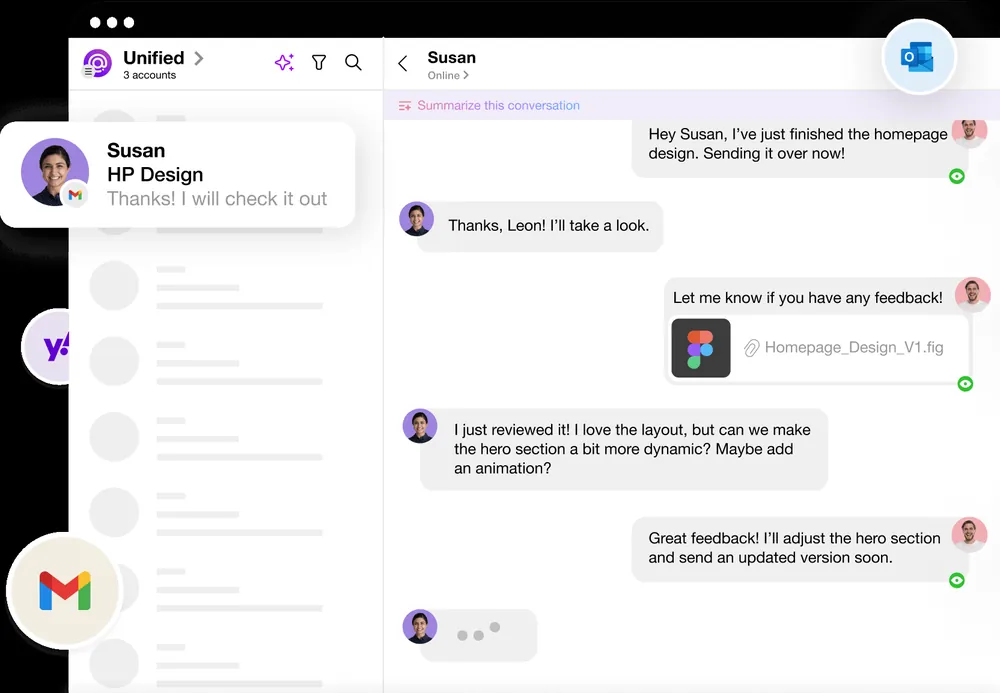
Spike is the most opinionated client on this list after HEY: it strips away subject lines, headers, and quoted history and renders your email as chat bubbles, the way WhatsApp or iMessage would. The bet is that most modern email between people you actually know is messaging, so why dress it up like a memo? On top of the conversational inbox it bundles team chat, one-click video calls, notes, tasks, and an AI it calls Magic AI.
It works surprisingly well for the mail it’s designed for, quick questions, short replies, back-and-forth with a handful of regular contacts. It works noticeably worse for the mail it isn’t: long, formal, multi-recipient threads with screenshots and quoted history. The free tier is genuinely usable, and Pro starts at $6/user/month, which makes Spike one of the cheapest paid options here. Whether the chat reformat saves or costs you time depends almost entirely on what your inbox actually looks like.
Who This Is For (And Who Should Skip)
✓ People whose email is mostly short exchanges. If your inbox is quick questions with the same handful of contacts, the chat view is faster than traditional threading.
✓ Budget-conscious users who still want AI. A usable free tier and $6/month Pro beat most paid rivals on price.
✓ Small teams that want to collapse apps. Built-in team chat and video calls can stand in for a lightweight Slack-plus-email setup.
✗ Anyone who sends formal, multi-recipient mail. Contracts, client proposals, and long quoted threads read worse in bubble form.
✗ People who need best-in-class AI triage. Magic AI is basic; Superhuman or Spark do auto-archive and auto-draft properly.
✗ Support teams needing a real shared inbox. Spike’s collaboration is light; Missive or Front handles queues and assignment properly.
Score Breakdown
What Actually Matters: Features, Reviewed
💬 Conversational Email — the whole product
Spike removes the formal email chrome and shows messages as a continuous chat thread with your replies as bubbles. For short, human mail it genuinely removes friction; G2 reviewers say things like “Spike removes the parts of email that make it slow and cumbersome to use.” The catch is well documented too: as one hands-on review put it, “Long formal threads are actively harder to read” once they’re reformatted into bubbles. You can flip a thread back to classic view, but doing that constantly defeats the point.
🤖 Magic AI — useful but shallow
Magic AI summarizes long threads, drafts quick replies, translates, and offers smart replies. It handles the common cases fine and is unlimited on Pro, but it doesn’t do the deeper triage Superhuman and Spark now offer, there’s no auto-archive, no auto-labeling, and no pre-written draft waiting in the inbox. If AI is your main reason for paying, Spike isn’t the strongest pick.
👥 Team chat and video calls — fewer apps to juggle
Group chat, @mentions, and one-click audio/video calls live inside the same feed as your mail, so a small team can run lightweight internal communication without opening Slack or Zoom. G2 teams describe it as “Slack but inside your email.” It’s a real benefit at the Team tier, though it doesn’t approach Slack’s depth or a help desk’s routing.
📝 Notes, tasks, and calendar — bundled but basic
Notes and to-dos sit alongside mail, and a calendar is built in. For personal organization it’s convenient to have everything in one pane. The weakness reviewers flag is the calendar: meeting invites and event handling have gaps, so people who live by complex calendar invites will find it rough compared to Google Calendar or Outlook.
📦 Plan limits and the formal-mail ceiling
Know the caps before you pay. Pro limits you to three connected email accounts, 5GB of storage, and 100MB file uploads; a fourth account forces Ultimate at $12/user/month. And the core caveat never goes away: if 30% or more of your daily mail is enterprise-style, multi-recipient, or contractual, the chat reformat costs more time than it saves, and switching individual threads back to classic view breaks the rhythm.
Pricing (and who should pick which tier)
Spike offers a real free tier plus cheap paid plans for individuals and a separate team line. Annual billing gives the lowest per-month rates:
| Plan | Price | What You Get |
|---|---|---|
| Free | $0 | One account, 1 GB storage, limited Magic AI, Priority Inbox |
| Pro | ~$6/user/mo annual | Up to 3 accounts, 5 GB storage, unlimited Magic AI, priority support |
| Ultimate | ~$12/user/mo annual | Unlimited accounts, 20 GB storage, advanced customization |
| Team | ~$4/member/mo annual | Team chat, shared inbox, video calls, 100 GB per member |
Honest math: most individuals can live on the free tier, and Pro at $6/user/month is dramatically cheaper than Spark Plus (~$8.25/month annual) or Superhuman Starter ($25/month). A 10-person team on the Team plan pays roughly $40/month, which looks attractive only if Spike genuinely replaces your Slack and help desk; if it doesn’t, you’re paying for bundled tools you’ll still duplicate elsewhere.
The Unfiltered Pros & Cons
Pros
- ✓ Chat-style view makes short back-and-forth email faster and less cluttered.
- ✓ A genuinely usable free tier and cheap Pro plan (~$6/user/mo).
- ✓ Built-in team chat and one-click video calls can replace Slack and Zoom for small teams.
- ✓ Cross-platform: Mac, Windows, iOS, Android, and web.
- ✓ Magic AI covers summarizing, drafting, and translating for everyday use.
Cons
- ✗ Long formal multi-recipient threads are 'actively harder to read' as chat bubbles.
- ✗ Users report gaps in calendar and meeting-invite handling.
- ✗ Pro caps the unified inbox at three accounts and 5 GB of storage.
- ✗ AI is shallow versus Spark or Superhuman (no auto-archive, auto-labels, or auto-drafts).
- ✗ Not a real shared inbox or help desk; support teams should use Missive or Front.
Final Verdict
Spike turns email into chat bubbles and folds in team chat and video calls. It is fast and cheap for short, casual exchanges, but long formal threads become harder to read.
Thirty-second decision: open your sent folder and look at what you actually write. If it’s mostly one- or two-line replies to the same people, start on the free tier, and if the chat view clicks, Pro at $6/month is an easy yes. If your mail is full of long formal threads, contracts, and multi-recipient discussions, or you need serious AI triage or a support-grade shared inbox, stick with Spark/Superhuman for personal mail and Missive/Front for teams.
Frequently Asked Questions
What’s the difference between Spike and Spark?
Spike reformats email into chat bubbles and bundles team chat and video; Spark keeps a traditional email layout with a strong Smart Inbox and deeper AI. Pick Spike if you want messaging-style mail; pick Spark if you want conventional threads and AI summaries.
Is Spike actually free?
Yes. The free tier supports one email account, 1GB of storage, Priority Inbox, and a small monthly Magic AI allowance. Paid Pro lifts the limits and adds unlimited AI.
Does Spike work on Windows and Android?
Yes. Spike runs on Mac, Windows, iOS, and Android, and works with Gmail, Outlook, iCloud, and generic IMAP accounts.
How does Spike’s AI compare to Superhuman?
Magic AI covers summaries, drafts, and translation, but it lacks the automated triage Superhuman offers, such as auto-archive, auto-labels, and waiting auto-drafts. For AI-first email, Superhuman or Spark is stronger.
Who regrets switching to Spike?
People whose mail is formal. The most common complaint is that “long formal threads are actively harder to read” after the chat reformat, and reviewers also flag gaps in calendar/invite handling plus tight Pro caps (three accounts, 5GB). If you can’t switch a long thread to classic view without losing your flow, Spike will frustrate you.
User feedback sourced from G2 and Capterra reviews.
About the Author