
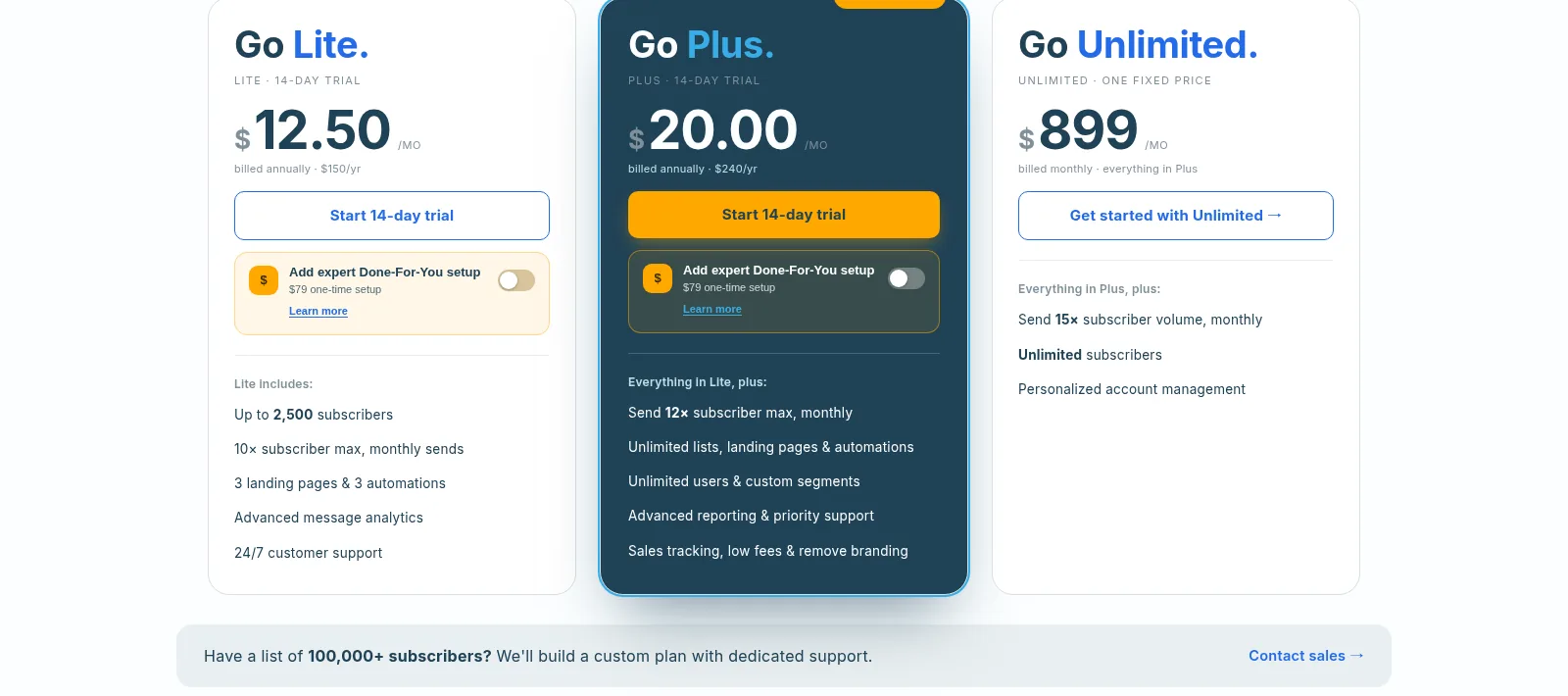
If you want the headline first, here it is. AWeber is the safe, easy, human-supported ESP for small businesses who will pay a modest premium for 24/7 phone support; buy Plus not Lite, and comparison-shop once your list passes a few thousand contacts. On pricing, the short version: Free plan: up to 500 subscribers, 3,000 sends/mo, 1 landing page, 1 automation, 1 user. 14-day trial on paid tiers, 30-day money-back. At 500 subscribers: Lite $15/mo monthly or $12.50/mo annual ($150/yr); Plus $30/mo monthly or $20/mo annual ($240/yr); Unlimited flat $899/mo (sends up to 15x list size). Prices scale with list size (1,000 subs Lite $25 / Plus $45; 5,000: $60 / $90; 10,000: $100 / $135). Done For You setup: $79 one-time fee on top of Plus ($30/mo monthly, $20/mo billed annually; normally $599). E-commerce fees 1.0% Lite, 0.6% Plus. The current overall score is 4.4/5. Every number here comes from the live site or aggregator-reported ratings, not a vendor deck, so you can decide in one read whether it is worth the trial.
If you’ve been online long enough, you remember when AWeber was the autoresponder everyone used — the one half the internet’s email list seemed to run on. It’s easy to assume the old guard has been lapped by newer, shinier tools, but it’s still here and still shipping. I took a proper look at its current features, pricing, and limits to see whether it’s a dated relic or a dependable workhorse that still deserves a spot on a small business’s shortlist.
The Short Version
AWeber is one of the oldest email marketing services still standing, founded in 1998, and it still builds itself for the small-business owner who wants a phone number that picks up and an inbox that actually lands. After an in-depth look at its live pricing, the plan comparison table, the feature pages, and what reviewers on G2, Capterra, and Trustpilot have written, I would call it the calmest option in a category that has gotten increasingly loud. It is not the cheapest, and a chunk of its long-time customers are genuinely unhappy about recent price increases. But for a solopreneur or a small shop that values reaching a human at 9pm on a Sunday, it is hard to beat.
Here’s what I actually looked at. I pulled up the live pricing page with a headless browser and went through the plan cards, the subscriber slider, the annual and monthly prices, and the comparison table row by row. I also worked through the features page, the free-plan FAQ, and the integrations list, and cross-checked the ratings against independent review trackers. I did not complete a signup in this environment, so I did not build a live campaign inside the editor; in-app experience is drawn from the documented feature set, the screenshots on their own pages, and what reviewers report.
The short version: start on the free plan to see whether the editor and the support feel like you, and if you outgrow it, buy Plus rather than Lite. Lite looks cheaper but caps you at three automations and three landing pages, which bites creators within weeks. The people who should keep looking are shoppers comparing line by line with Brevo, MailerLite, or ConvertKit, because AWeber’s per-contact price climbs fast and the old complaints about paying more for less are real.
Who This Is For (and Who Should Skip)
Match yourself to the product before you enter a credit card.
- ✅ Small-business owners who want a human on support If the thought of troubleshooting a broken email at 8pm with nothing but a chatbot makes you break out in hives, AWeber’s 24/7 phone, chat, and email support is the actual product here, and reviewers say it backs that claim up.
- ✅ Beginners who have never sent a campaign before The drag-and-drop builder, the AI subject-line and writing assistants, and the Smart Designer template generator are aimed squarely at non-technical users, and the free plan lets you poke at all of it before paying.
- ✅ Creators who sell through email, not a big cart The built-in e-commerce (digital products, subscriptions, payment plans) with low 0.6% transaction fees on Plus, plus landing pages and behavioral automation, covers a coach, course creator, or newsletter writer without a separate store tool.
- ❌ Shoppers optimizing purely on price per contact AWeber’s per-contact pricing climbs as your list grows, and several long-time reviewers complain about 2024 price hikes that came without new features. If every dollar of marginal cost matters, Brevo or MailerLite will be cheaper at scale.
- ❌ Power automators and enterprise senders Behavioral automation exists, but the visual workflow builder is not Klaviyo-grade, the self-serve tiers stop at 150,000 subscribers, and anything above that pushes you into a sales conversation and eventually the $899/month Unlimited plan.
Score Breakdown
What Actually Matters: Features, Reviewed
AWeber does the basics a small business needs, and it does them in a way that does not require a manual. Here is where that shows up, with the line between what I verified on the live site and what I only read about kept visible.
✏️ The email builder and the AI assistant
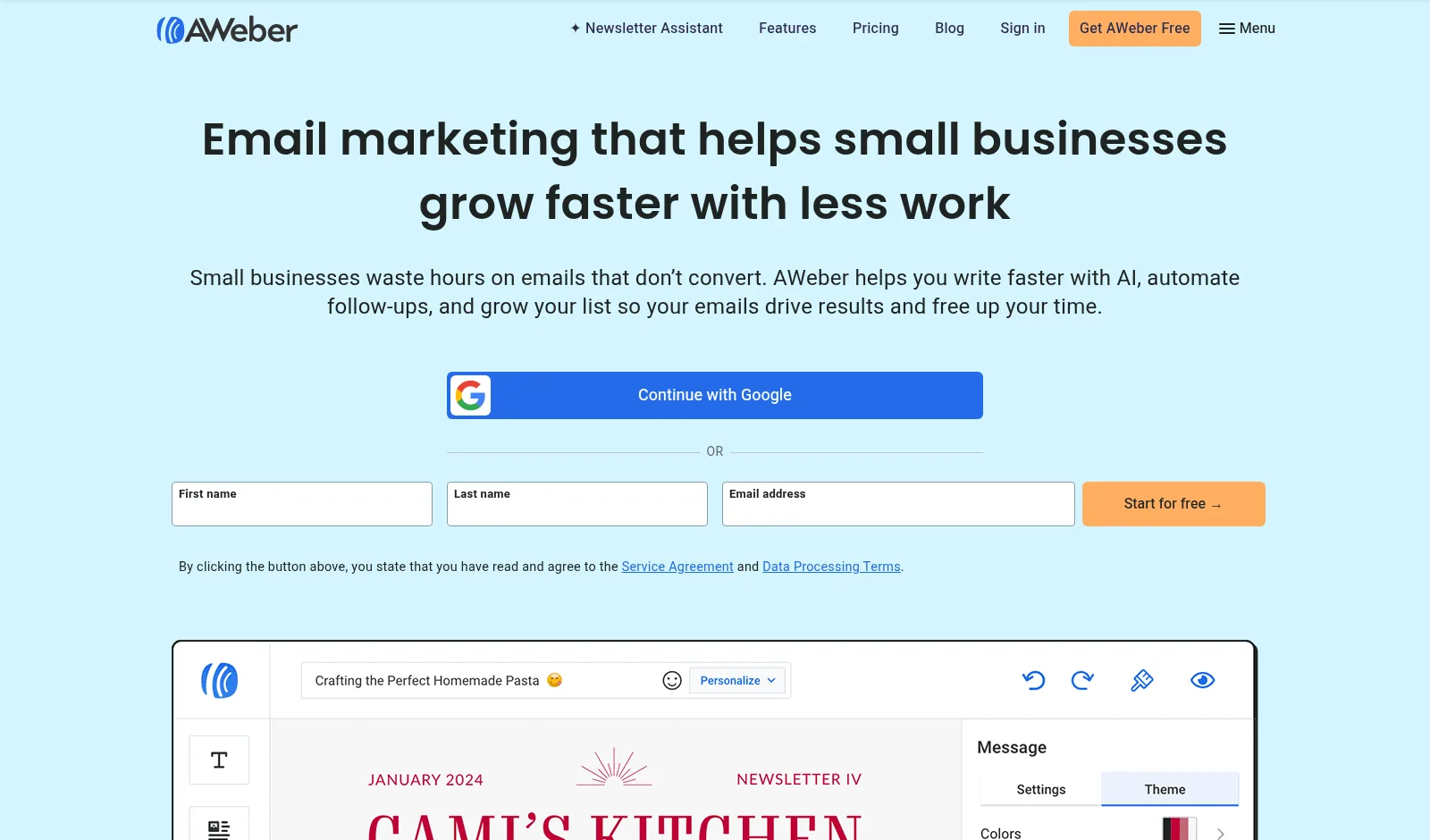
The editor is a drag-and-drop builder with mobile editing, saved templates, dynamic content, split testing, and AMP emails. The newer stack is the AI layer: a subject-line generator, an AI writing assistant that drafts action-driven copy, a Newsletter Assistant that pulls together a weekly newsletter in your voice, and a Smart Designer that auto-generates a branded template. Canva is built straight into the editor, which matters if your whole brand lives in Canva already. Per reviewers, the AI tools are a fine first draft but worth editing before send. The templates themselves are functional rather than fashionable, which is the same complaint every long-time AWeber user makes.
📧 Automation, landing pages, and the Lite cap
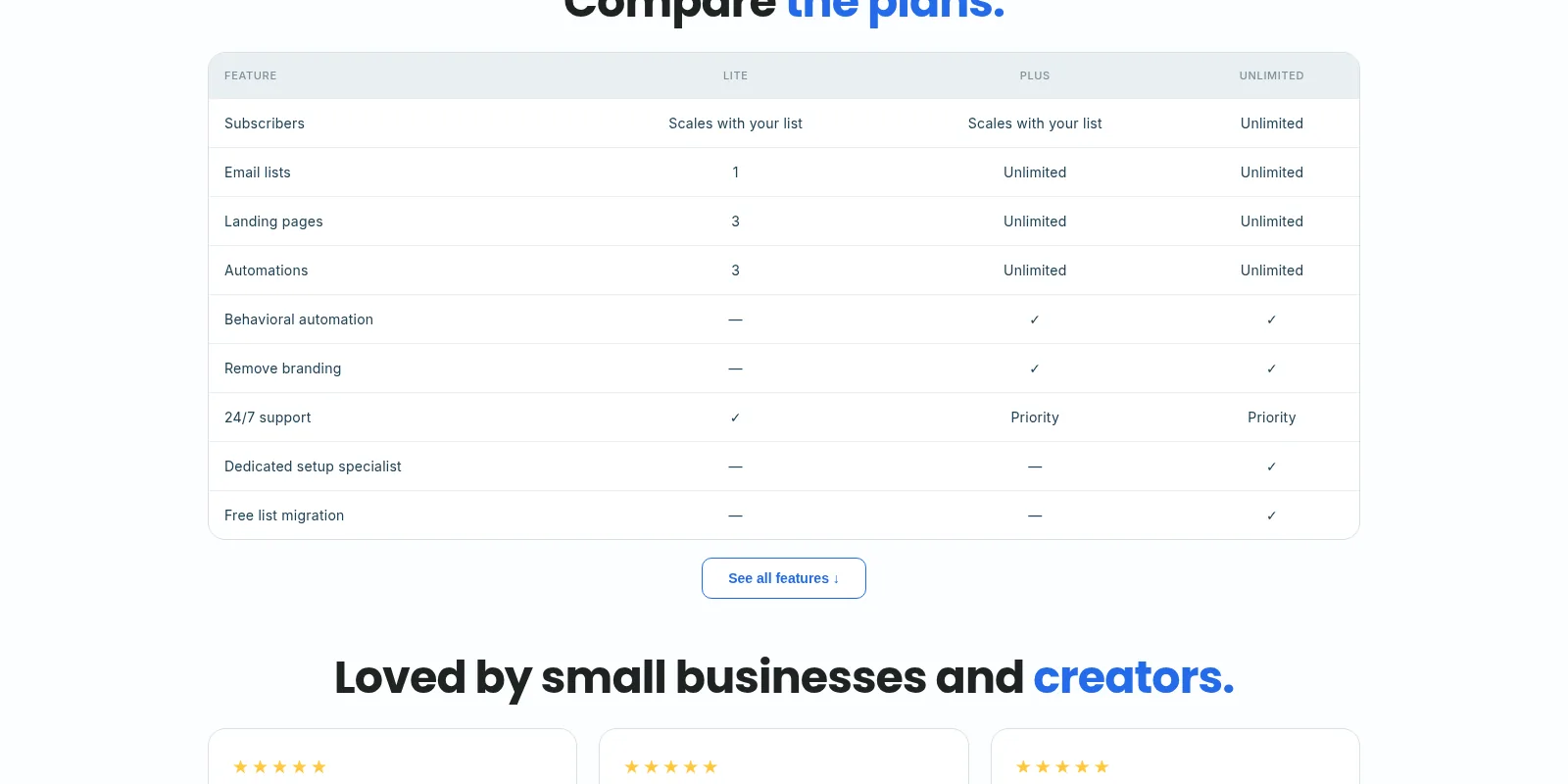
This is where the plan split gets sharp. Lite gives you exactly one email list, three landing pages, three automations, three users, and one custom segment, with sends capped at 10x your subscriber count each month. Plus flips all of those to unlimited, raises the monthly send allowance to 12x your list size, adds behavioral automation (trigger emails based on what people click or buy), removes AWeber branding, and unlocks advanced reporting. If you are a side-hustler who just needs a welcome sequence and one landing page, Lite is fine. If you plan more than one funnel, or you want a second user, you will hit the wall within a month or two and wish you had bought Plus. The comparison table on the pricing page makes this explicit, which is more honest than a lot of ESPs manage.
🛒 Built-in e-commerce and web push
You can sell digital products and services, take subscriptions and payment plans, and track purchases without a separate cart tool. The transaction fee is 1.0% on Lite and 0.6% on Plus, which beats paying Shopify or Gumroad on top of an ESP. There is also web push notification collection and sending, Facebook pixel and Google Analytics on landing pages. AWeber states internal deliverability above 99%, but independent trackers I found put it more mid-pack, and one third-party roundup cited EmailToolTester tests at about 83% inbox placement in January 2024, placing AWeber 11th of 15, well below MailerLite’s high-80s to mid-90s depending on the test. Treat the 99% number as a vendor claim, not a benchmark.
📞 Integrations and the WordPress crowd
AWeber claims 750-plus integrations, and the ones that matter for a small business are native and well-used: WordPress, Shopify, WooCommerce, PayPal, Facebook, and Zapier for everything else. If your site runs on WordPress and you want a signup form to just appear, this is one of the smoothest setups in the category, which is why the user base skews toward bloggers and small online stores. The directory is not as deep as Klaviyo’s for advanced e-commerce triggers, but it covers the stack AWeber’s customers actually run.
What Real Users Actually Say
AWeber has a genuinely large review footprint, which is rare for an ESP this old. The interesting thing is how split the picture is between business buyers and the billing-focused minority.
The Aggregate Scores
Across the trackers I could cross-check, G2 puts AWeber at 4.2 out of 5 across a solid mid-sized review base, and Capterra at 4.4 out of 5 across a smaller but established base, with customer service scored separately at 4.5. The outlier is Trustpilot, where a much smaller pool averages 2.5 out of 5, with about a third of those being one-star. AWeber’s own landing pages show a 4.9 across roughly 2,000 invited reviews, which I would read as happy-customers-only.
— G2 and Capterra product pages blocked automated access; figures cross-checked via independent review trackers and roundups on 24 October 2026, and are vendor- and aggregator-reported rather than pulled live
The Recurring Criticism
The praise line is consistent: the interface is easy for non-technical people, and the support actually answers the phone and stays on the line. The complaints cluster in three places. First, price: multiple long-time users point to a late-2024 price increase that arrived without matching new features, and one G2 reviewer quoted in a third-party comparison described “new sending limits combined with significant price increases” as a disconnect from the loyal base. Second, value as the list grows: per-contact pricing ramps quickly, and monthly sends are capped at a multiple of your list size. Third, polish: templates feel dated compared to MailerLite or Brevo, and independent deliverability tests place AWeber below the inbox-placement leaders.
— Third-party comparison pages quoting G2 reviews, Sender and independent review roundups, October 2026; no verbatim quotes from the review platforms themselves, which blocked access
Read the split correctly. The 4.2 and 4.4 scores come from people who use the product every day and talk to support; the 2.5 on Trustpilot comes disproportionately from people fighting a charge or a cancellation. Both are true. If you are the kind of customer who calls rather than disputes, you will land in the 4.4 camp. If you expect to churn and forget, read the Trustpilot camp carefully before you sign.
User feedback sourced from G2 and Capterra reviews.
Pricing: Every Plan, Laid Bare
AWeber has a genuinely free plan, a 14-day free trial on the paid tiers, and a 30-day money-back guarantee. Paid plans are priced by how many subscribers you have, and the page defaults to the annual view with a “Save 33%” toggle; paying month to month costs the monthly column below. I have quoted prices at the 500-subscriber tier because that is where almost everyone decides.
| Plan | Price | What You Get |
|---|---|---|
| Free | $0 | Up to 500 subscribers, 3,000 email sends/month, 1 landing page, 1 email automation, 1 user. A taster, not a home for a growing list. |
| Lite | $15/mo monthly, or $12.50/mo billed annually ($150/yr) at 500 subs | 1 email list, 3 landing pages, 3 automations, 3 users, 1 custom segment, sends up to 10x your list size, 24/7 support, advanced message analytics, 1.0% e-commerce transaction fee. |
| Plus (most popular) | $30/mo monthly, or $20/mo billed annually ($240/yr) at 500 subs | Unlimited lists, landing pages, automations, custom segments, and users; sends up to 12x list size; behavioral automation; remove branding; advanced reporting; priority 24/7 support; 0.6% transaction fee. |
| Unlimited | $899/mo flat, billed monthly | Everything in Plus, no subscriber cap, sends up to 15x list size, plus personalized account management and sales-led onboarding. |
The Unfiltered Pros & Cons
Pros
- ✓ 24/7 phone, chat, and email support on every paid plan, and reviewers say humans actually pick up, which is the whole reason people still choose it
- ✓ A real free plan (500 subscribers, 3,000 sends/month) plus a 14-day trial and a 30-day money-back window
- ✓ Plus unlocks genuinely unlimited lists, landing pages, automations, segments, and users at a simple per-contact price
- ✓ Built-in e-commerce with low 0.6% fees, web push, Canva integration, and 750+ connections including WordPress, Shopify, and WooCommerce
- ✓ Genuinely beginner-friendly builder, with AI subject-line, writing, and newsletter assistants included
Cons
- ✗ Lite is deliberately capped: 3 automations, 3 landing pages, 1 list, and sends limited to 10x your subscriber count
- ✗ Per-contact pricing ramps fast, and a late-2024 price increase is the most repeated complaint on G2 and Trustpilot
- ✗ Trustpilot averages 2.5 stars from a small, billing-heavy review base, driven mostly by billing and cancellation friction
- ✗ Templates look dated versus newer ESPs, and independent deliverability tests put AWeber mid-pack rather than at the top
- ✗ I did not send a live campaign or build an automation in this environment, so day-to-day editor feel is assessed from documentation and reviewer reports
Final Verdict
AWeber is the email marketing service for the person who wants to talk to a human before they talk to their subscribers. It is safe, easy, and supported, and Plus removes every artificial cap that gets in a small business’s way. It is not the cheapest at scale, its templates show their age, and the people furious about recent pricing are not imagining things. Buy it if support and simplicity matter more than squeezing every dollar of send volume; buy elsewhere if you are optimizing purely on cost per contact.
My practical recommendation: start on the free plan, send one welcome email and build one landing page, and when you are ready to pay, skip Lite and go straight to Plus. The $7-per-month gap between them buys you unlimited automations, unlimited landing pages, behavioral automation, and the removal of AWeber branding, and the people who start on Lite almost always upgrade within a month anyway. If you are at 10,000-plus subscribers and the per-contact bill already stings, run a quote against Brevo or MailerLite before renewing; AWeber’s value math stops being favorable well before you need the $899 Unlimited tier.
You should still pick AWeber if the thought of phoning support and getting a real person is worth a modest premium to you, because on that one variable it outperforms nearly every competitor in this category. And if you want to know how I test and why you can trust these numbers, that is written up on our methodology page.
Frequently Asked Questions
Is AWeber free?
Yes. AWeber offers a free plan for up to 500 subscribers, which includes 3,000 email sends per month, 1 landing page, 1 email automation, and 1 user. Paid plans also come with a 14-day free trial, and paid subscriptions carry a 30-day money-back guarantee.
How much does AWeber cost?
At 500 subscribers, Lite is $15 per month month-to-month or $12.50 per month billed annually ($150 per year), and Plus is $30 month-to-month or $20 per month billed annually ($240 per year). Pricing scales with subscribers: at 5,000 contacts Lite is $60/month and Plus $90/month. For lists with no cap at all, Unlimited is a flat $899 per month. The Done For You setup service is a $79 one-time setup fee on top of the Plus subscription ($30/month month-to-month, or $20/month billed annually), normally $599.
Is AWeber worth it in 2026?
For a small business or creator who values 24/7 human support and an editor that does not require training, yes. It is rated 4.2 on G2 and 4.4 on Capterra, and the support reputation is real. It is less worth it if you are purely price-sensitive as your list grows, because per-contact pricing ramps up and recent increases are the top complaint on review sites.
Does AWeber integrate with WordPress, Shopify, and WooCommerce?
Yes. AWeber ships native WordPress, Shopify, WooCommerce, PayPal, Facebook, and Canva connections, plus Zapier and 750-plus integrations in total. It also includes built-in e-commerce to sell digital products and subscriptions with transaction fees of 0.6% on Plus and 1.0% on Lite.
About the Author
