
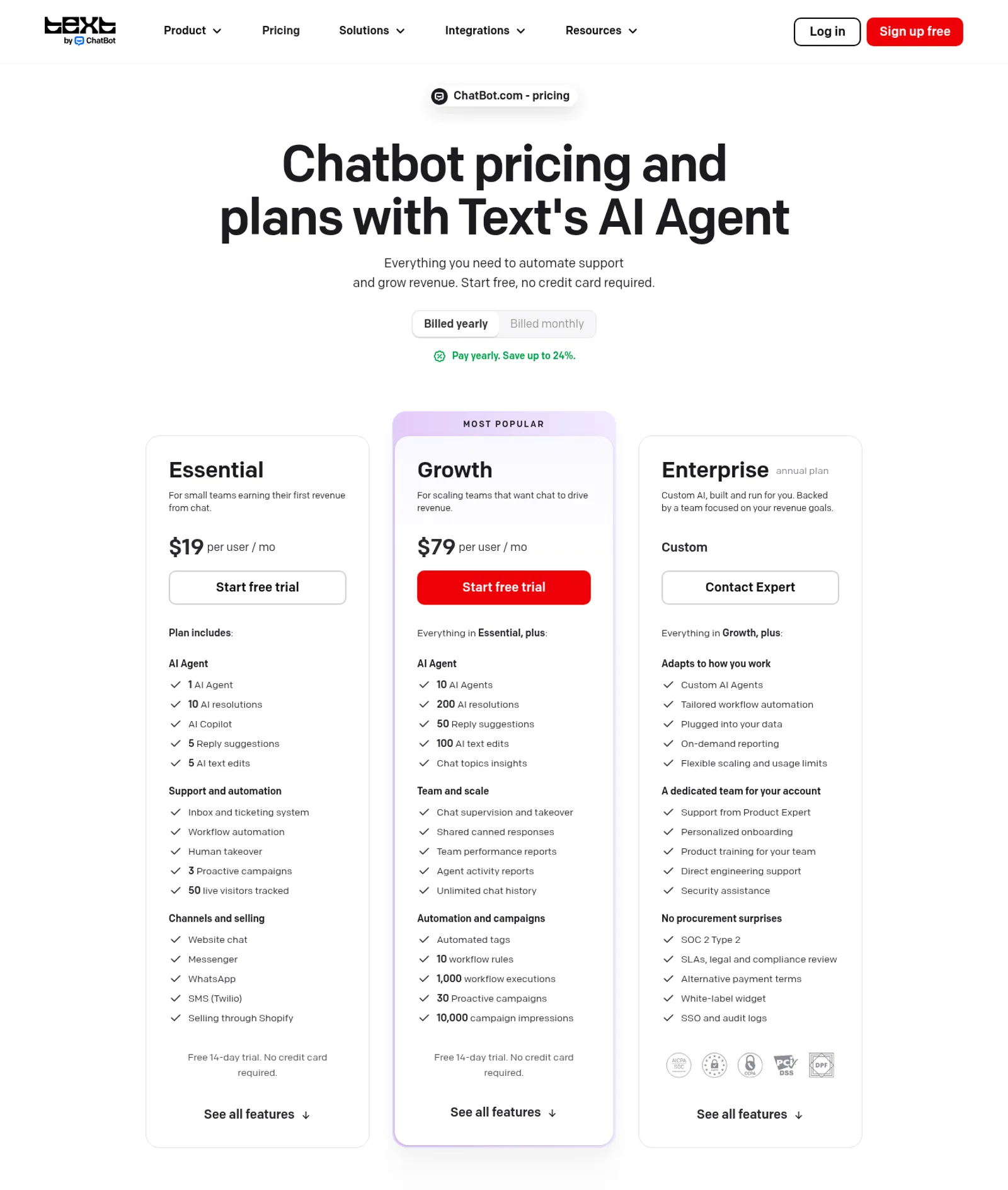
Before you scroll, a quick orientation. ChatBot blends an AI agent, shared inbox and ticketing into one seat-based product with multi-channel and Shopify selling, but the entry plan’s ten monthly AI resolutions are a tight ceiling and there is no free forever tier. On pricing, the short version: Essential $19/user/mo yearly ($25 monthly): 1 AI Agent, 10 AI resolutions/mo, 5 reply suggestions, inbox/ticketing, human takeover, 50 live visitors. Growth $79/user/mo yearly ($99 monthly): 10 agents, 200 resolutions, 50 suggestions, 10 workflow rules, 1,000 executions, 30 proactive campaigns, real-time Shopify. Enterprise custom: SSO, audit logs, SOC 2 Type 2, white-label. Add-on: 50 AI resolutions $49.50; 100k API calls $29.50. 14-day free trial, no permanent free tier. The current overall score is 4/5. Every number here comes from the live site or aggregator-reported ratings, not a vendor deck, so you can decide in one read whether it is worth the trial.
The Short Version
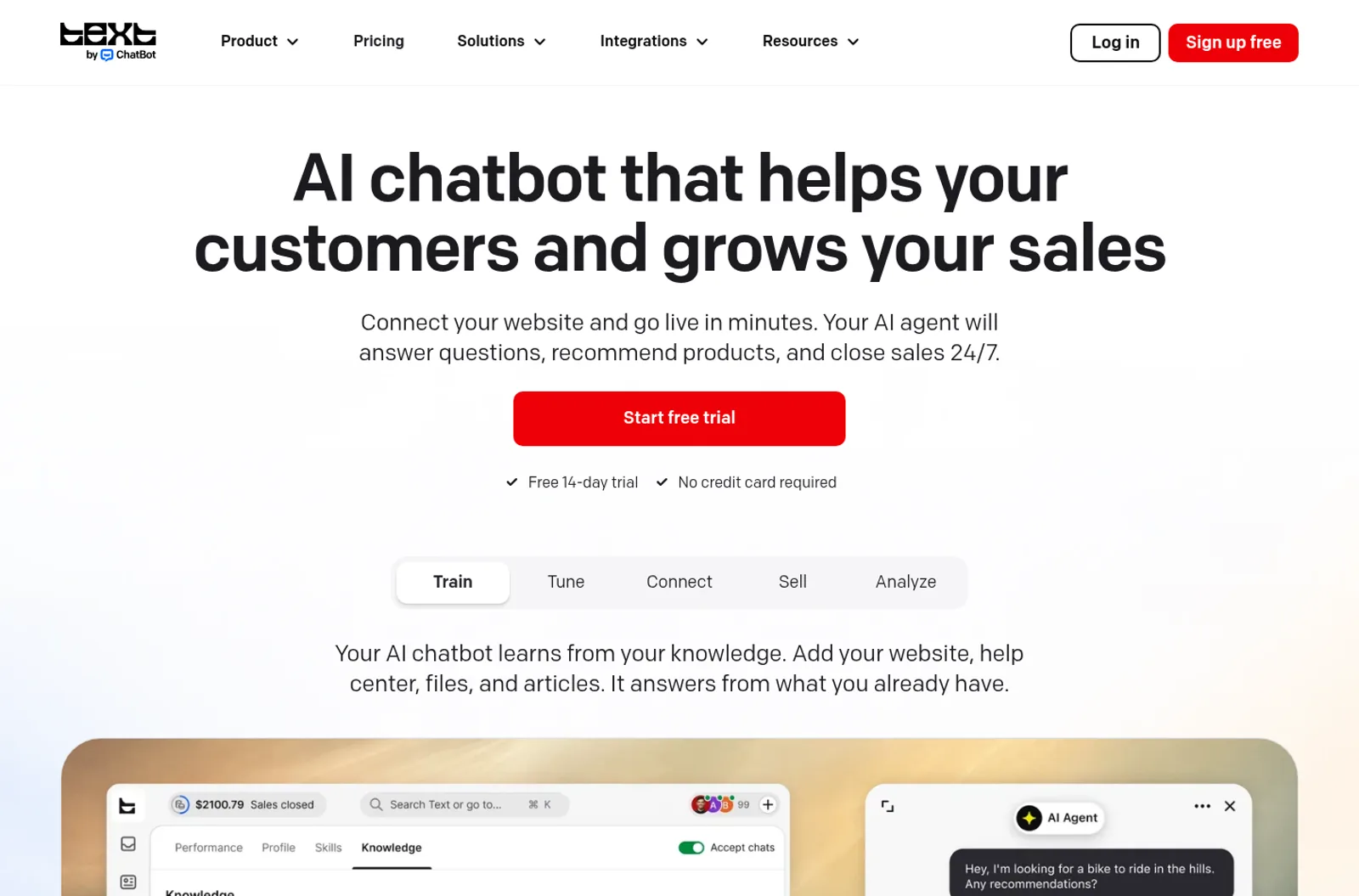
ChatBot comes from the same company that built LiveChat, and it has quietly stopped being a simple rule-based bot builder. The current product is built around an AI Agent that runs conversations on its own, with a human inbox and ticketing system sitting underneath rather than sold separately. After working through the live pricing page, the full plan-by-plan comparison, the channel list, and what reviewers on the platforms I could actually access say, ChatBot is a strong pick for a small support or sales team that wants one seat-based tool instead of stitching together a chat widget, a help desk, and a bot. The catch is the pricing model: the cheap Essential plan includes only ten AI resolutions a month, and once a real customer base starts asking questions, the resolution meter and the per-seat cost climb together. It is a workflow tool for a team, not a free toy for a solo site.
Here is what I actually checked. I worked through the live pricing page with both the yearly and monthly toggles, all three tiers, the AI-resolution definitions, the add-on packages, and the full comparison table, plus the homepage and enterprise feature walkthrough. I cross-checked ratings against the review platforms I could access automatically. The builder itself sits behind a signup, so my read of the in-app editor and bot-building flow comes from documented features and reviewer reports rather than my own published bot.
The short version: if your team already runs a shared support inbox and wants an AI agent to handle routine questions before a human steps in, the per-seat model is predictable and you get live chat, ticketing, and automation in one place. If you only want a cheap widget for a low-traffic site, Essential’s ten monthly resolutions will run out almost immediately, and a simpler flat-rate tool will feel less like metered billing.
Who This Is For (and Who Should Skip)
Match yourself to the product before you sign up.
- ✅ Small support teams that want AI plus a human inbox in one seat This is ChatBot’s center of gravity: an AI Agent that resolves routine questions, a shared inbox with ticketing, human takeover, and workflow automation, all billed per user rather than across three separate tools.
- ✅ E-commerce stores selling on Shopify The Growth tier lets the AI read your real-time Shopify catalog, spot buying intent, recommend products, and qualify customers, so the bot runs a sales motion instead of only answering FAQs.
- ✅ Teams that meet customers across several channels Website chat, Messenger, WhatsApp, and SMS through Twilio are covered, so a customer who starts on WhatsApp lands in the same inbox as one who used the web widget.
- ❌ Solo sites that only need a cheap FAQ widget The entry plan includes just ten AI resolutions a month, and there is no permanent free tier, only a 14-day trial. A low-traffic site will pay for capacity it barely uses.
- ❌ Buyers who dislike metered usage Extra AI resolutions are sold in 50-packs, and per-seat prices rise as you add teammates, so a team that scales quickly has to watch both the seat count and the resolution meter.
Score Breakdown
What Actually Matters: Features, Reviewed
Rather than recite the marketing page, I focused on the four things that decide whether you buy, skip, or upgrade.
🤖 The AI Agent and how a resolution is counted
The core concept is the AI Agent, which runs a conversation on its own using the knowledge, tone, and skills you give it. A resolution is counted when the AI directly solves a customer question, and multiple questions inside the same chat still count as one resolution. Essential includes one agent and ten resolutions a month, while Growth includes ten agents and 200 resolutions. This is the part worth understanding before you buy: the entry plan is built to let a small team test the concept, not to run a full support queue, and once real traffic arrives you will either move up a tier or buy add-on resolution packs.
📥 AI Copilot, inbox, and human takeover
ChatBot is not only for fully automated chats. Every plan includes a shared inbox and ticketing system, and an AI Copilot drafts replies, summarizes chats, and suggests tags for the human on the seat. Reply suggestions and AI text edits are capped per user on the lower tier and open up on Growth. When a conversation needs a person, the agent hands off cleanly rather than forcing the customer to repeat themselves. For a small team this is the practical difference between a bot experiment and a real support desk, and it is the main reason to pick ChatBot over a standalone widget.
🛒 The Shopify sales motion and multi-channel inbox
On Growth, the AI sees your entire Shopify catalog in real time, including products, prices, variants, and stock, so it can recommend items that actually exist and qualify buyers instead of handing every pricing question to a human. The same conversations can start on website chat, Messenger, WhatsApp, or SMS through Twilio and still land in one inbox. Proactive campaigns greet visitors who show buying intent rather than waiting for them to message first. The honest limit is that most of the selling features, including workflow rules and higher campaign impressions, are gated to the middle tier, so a store that wants the full sales motion should budget for Growth, not Essential.
🚀 API, MCP server, and the automation layer
Every plan includes an MCP server and API access, with higher call packages available, so a technical team can connect ChatBot to internal systems rather than relying only on the no-code builder. Workflow automation lets you define rules that trigger skills such as offering a discount or escalating to a human, with execution limits split by tier. If you run a standard support queue this layer is more than enough; if you are feeding ChatBot into a large custom pipeline, the API caps and the Enterprise usage limits are the reason to negotiate a custom plan rather than assume the self-serve tiers scale indefinitely.
What Real Users Actually Say
The two biggest review platforms block automated access, so I am separating what I could verify directly from what is only reported by secondary aggregators.
The Scores I Could Check
On TrustRadius, which I could access directly, ChatBot is rated 9 out of 10 across a relatively small set of reviews, with reviewers crediting the ease of building bots and the clean handoff to human agents. Secondary aggregators report G2 and Capterra scores broadly in the 4.5 to 4.7 range, but their reported review counts conflict sharply across sources, so I am not quoting a precise number I cannot ground. Read the high ratings as directionally positive rather than as a statistically settled verdict.
— TrustRatio product page accessed directly (9/10); G2 and Capterra pages disallow automated access via robots.txt, and secondary aggregator figures conflict, last checked November 2026
The Recurring Criticism
The praise is consistent: quick setup, no-code bot building, and a smooth blend of automated and human chat. The complaints cluster around cost and limits. First, the resolution quota on the entry tier is easy to outgrow, and buyers who expected a set-and-forget widget find themselves watching the meter. Second, per-seat pricing means adding teammates raises the bill even when usage stays flat. Third, some reviewers note that documentation lags newer AI features and that advanced logic still needs the API or support. There is no evidence of a reliability or trust crisis; the main debate is whether the metered model fits how a team grows.
— Accessible review platforms and aggregator-tagged feedback, November 2026; individual G2 and Capterra threads were not opened directly
Read the split correctly. The strong scores come mainly from teams that replaced a patchwork of tools with one seat-based inbox, and they are not a claim that the entry plan is cheap at scale. The recurring warning is about planning: estimate your real monthly resolutions and your seat count before you commit, rather than judging the product on the trial.
User feedback sourced from G2 and Capterra reviews.
Pricing: Every Plan, Laid Bare
ChatBot uses a per-seat model with AI resolutions included, and there is no permanent free tier, only a 14-day trial with no credit card. The figures below are exactly what the live pricing page shows, with yearly and monthly prices noted.
| Plan | Price | What You Get |
|---|---|---|
| Essential | $19/user/mo billed yearly; $25/user/mo monthly | 1 AI Agent, 10 AI resolutions/mo, 5 reply suggestions, 5 AI text edits, inbox and ticketing, workflow automation, human takeover, 3 proactive campaigns, 50 live visitors tracked, website/Messenger/WhatsApp/SMS/Shopify channels. |
| Growth (most popular) | $79/user/mo billed yearly; $99/user/mo monthly | 10 AI Agents, 200 resolutions/mo, 50 reply suggestions, 100 AI text edits, chat topic insights, 10 workflow rules, 1,000 workflow executions, 30 proactive campaigns, 10,000 campaign impressions, real-time Shopify catalog, unlimited chat history, team reports. |
| Enterprise | Custom | Custom AI Agents and workflows, flexible usage limits, SOC 2 Type 2, SSO and audit logs, white-label widget, SLAs and compliance review, dedicated Product Expert, personalized onboarding, direct engineering support. |
| Add-on packages | 50 AI resolutions for $49.50; 100,000 API calls for $29.50 | Extra resolution and API capacity available from billing; resolution packs refill as needed on the self-serve tiers. |
A few honest caveats before you pick. First, the yearly prices are meaningfully cheaper than monthly, but the per-seat cost is multiplied by every teammate, so model the seat count before you annualize. Second, the ten resolutions on Essential are a testing allowance, not a full-volume budget; a busy team will likely land on Growth. Third, there is no free forever plan, so the 14-day trial is the only no-cost window and should be used on real conversations. For category context, see our client portal category and our LiveChat review for the platform it sits alongside.
The Unfiltered Pros & Cons
Pros
- ✓ AI Agent, Copilot, shared inbox, ticketing, and automation in one seat-based product
- ✓ Multi-channel coverage across web chat, Messenger, WhatsApp, and Twilio SMS
- ✓ Real-time Shopify catalog enables a genuine sales motion on Growth
- ✓ No-code setup with same-day launch, plus MCP server and API for technical teams
- ✓ Clean human takeover keeps automated and live chat in one thread
Cons
- ✗ Only ten AI resolutions a month on Essential, which real traffic outgrows quickly
- ✗ No permanent free tier; only a 14-day trial
- ✗ Per-seat billing rises as teammates are added, even at flat usage
- ✗ Most selling and workflow features are gated to Growth
- ✗ G2 and Capterra exact figures cannot be independently verified, and support is chat/email only on self-serve
Final Verdict
ChatBot is a team-grade blend of AI automation and human support, and it is most compelling when it replaces several separate tools rather than acting as a cheap widget. The per-seat model is predictable compared with per-message billing, and the Shopify and multi-channel features give it a real sales job. What keeps it from a higher score is the tight resolution quota on the entry tier, the absence of a free forever plan, and the way both seat and meter costs climb as a team grows. Buy it if you run a real support or sales inbox and want an AI agent in front of it; skip it if you only need a low-cost FAQ box for a quiet site.
If you are testing for the first time, use the 14-day trial on real customer conversations rather than demo questions, and count how many chats the AI resolves without a human. That number tells you whether Essential is enough or whether you will land on Growth. If your store runs on Shopify and you want the catalog-aware sales motion, start with Growth directly, because those features are not on the entry tier.
You can read more about how we test and why you can trust our calls on our methodology page.
Frequently Asked Questions
Is ChatBot free?
There is no permanent free tier. Every plan includes a 14-day free trial with no credit card required, giving full access to the AI agent, inbox, workflows, and reporting. After the trial, the cheapest plan is Essential at $19 per user per month billed yearly, or $25 monthly.
What is an AI resolution?
A resolution is counted when the AI directly solves a customer question. Multiple questions within the same chat count as one resolution. Essential includes ten resolutions a month and Growth includes 200, and extra capacity is sold in 50-packs for $49.50.
Which channels does ChatBot support?
Website chat, Messenger, WhatsApp, and SMS through Twilio are included, along with selling through Shopify. Conversations from these channels flow into the same shared inbox and ticketing system.
Is ChatBot worth it for a small team?
Worth it if you want one seat-based tool for AI automation, live chat, and help desk instead of paying separately for each. Less worth it for a very small site, because the entry resolution quota is tight and there is no free forever plan.
About the Author
