
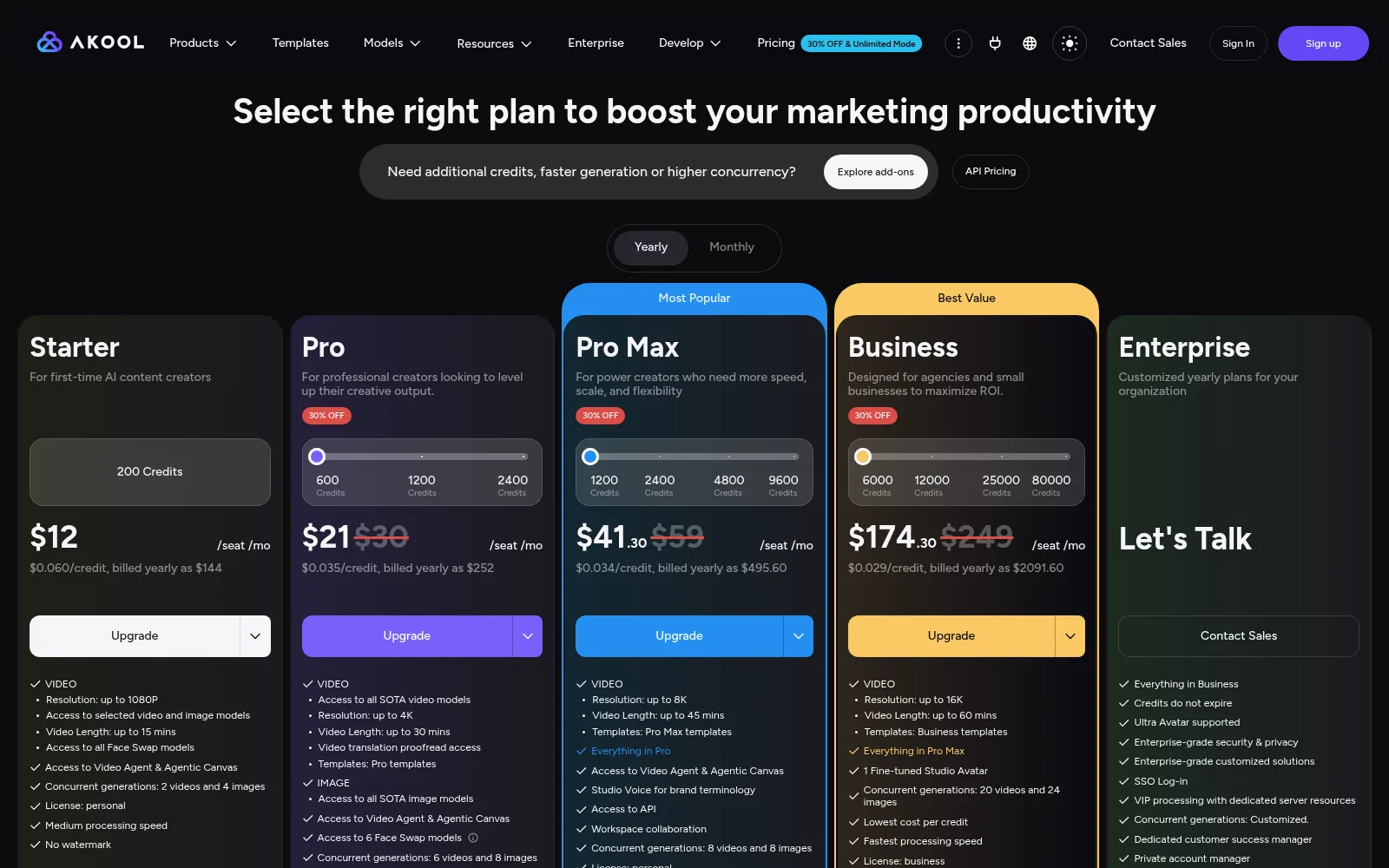
Before you scroll, a quick orientation. Akool is one of the strongest all-in-one AI video suites for face swap and 155-language lip-sync, but the credit meter, per-seat billing, and no-refunds policy make the commercial model the real thing to watch. On pricing, the short version: Free $0 (720P, 10-min, watermark). Billed yearly per seat: Starter $12 (200 credits, $0.060/credit, $144/yr); Pro $21 (600 credits, $0.035, $252/yr; monthly $30); Pro Max $41.30 (1,200 credits, $0.034, $495.60/yr; monthly $59); Business $174.30 (6,000 credits, $0.029, $2,091.60/yr; monthly $249); Enterprise custom. Personal license on Starter/Pro/Pro Max; business license only on Business. Every invited admin/editor billed the owner’s full seat rate. Credits expire monthly except Enterprise. The current overall score is 4.2/5. Every number here comes from the live site or aggregator-reported ratings, not a vendor deck, so you can decide in one read whether it is worth the trial.
Type a script, pick a face, hit generate — and a few minutes later you’ve got a talking-head video without a camera, a studio, or a human on screen. That’s the promise of AI avatars, and Akool is one of the names that keeps coming up in the space. I wanted to know whether its results are genuinely usable for a business or whether they fall into that familiar uncanny valley that screams ‘AI’ the moment someone watches. I dug into its tools, pricing, and output quality to find out.
The Short Version
Most AI video tools pick one lane: avatars, or face swap, or dubbing. Akool tries to run all of them out of one login, and it is unusually good at the two trickiest ones, face swap and lip-synced video translation. After working through its pricing page, the full tier comparison table, and what reviewers across G2, Capterra, and Trustpilot actually say, the product lives up to the brochure on features. The catch is the bill. Akool sells a cheap-looking subscription that is actually a credit meter, credits burn at wildly different rates depending on what you make, they do not roll over, and every teammate you invite pays your full plan price. People on G2 love the output; the negative Trustpilot reviews mostly argue with the billing rather than the videos.
Here is what I actually checked. I went through the live pricing page, all five tiers, and the full comparison table, the product tiles on the homepage, and the published credit rates, cross-referenced against G2 Learn Hub, Capterra sub-scores, and independent write-ups. The editor itself sits behind a signup, and I did not register an account or render a video here, so my read of the generation experience comes from the documented tool flow and reviewer reports rather than my own renders.
The short version: if your work genuinely needs face swap, multilingual lip-sync, and avatar video together, Akool is one of the most capable all-in-one suites you can buy, and the entry price is low. If you only need one of those jobs, a specialist will bill you more predictably, and if you are the type who hates watching a meter, the credit model will wear on you.
Who This Is For (and Who Should Skip)
Match yourself to the product before you hand over a card.
- ✅ Marketers and e-commerce teams who need face swap or personalized video This is the lane Akool is actually rated for on G2, and the face-swap engine (multi-face, re-age, live camera) is the reason it shows up in shipped brand campaigns rather than demo reels.
- ✅ Teams localizing existing video into many languages The translation tool covers 155+ languages with automatic lip-sync, and the proofread editor, SRT import/export, and voice dictionary turn on from Pro. Repurposing one webinar into six markets is the use case that justifies the subscription.
- ✅ Agencies that want one login instead of four separate AI subscriptions Face swap, avatar video, talking photo, voice clone, and image/video generation all draw from one credit pool, which beats paying four specialists if you would otherwise juggle them.
- ❌ Solo creators who want a flat, predictable monthly cost The headline price is only the entry point. Credits decide how much you actually make, unused credits expire, and reviewers report costs climbing fast once you start regenerating. Budget shoppers will be frustrated.
- ❌ Anyone running client work on a personal-license plan The license on Starter, Pro, and Pro Max is personal. Commercial use for clients only unlocks on the Business tier, which jumps to $174.30 a month. Buying Pro and reselling the output is against the terms.
Score Breakdown
What Actually Matters: Features, Reviewed
Akool lists roughly a dozen tools. Rather than recite them all, I focused on the four that actually drive a purchase decision.
🎬 Face swap and the live-camera mode
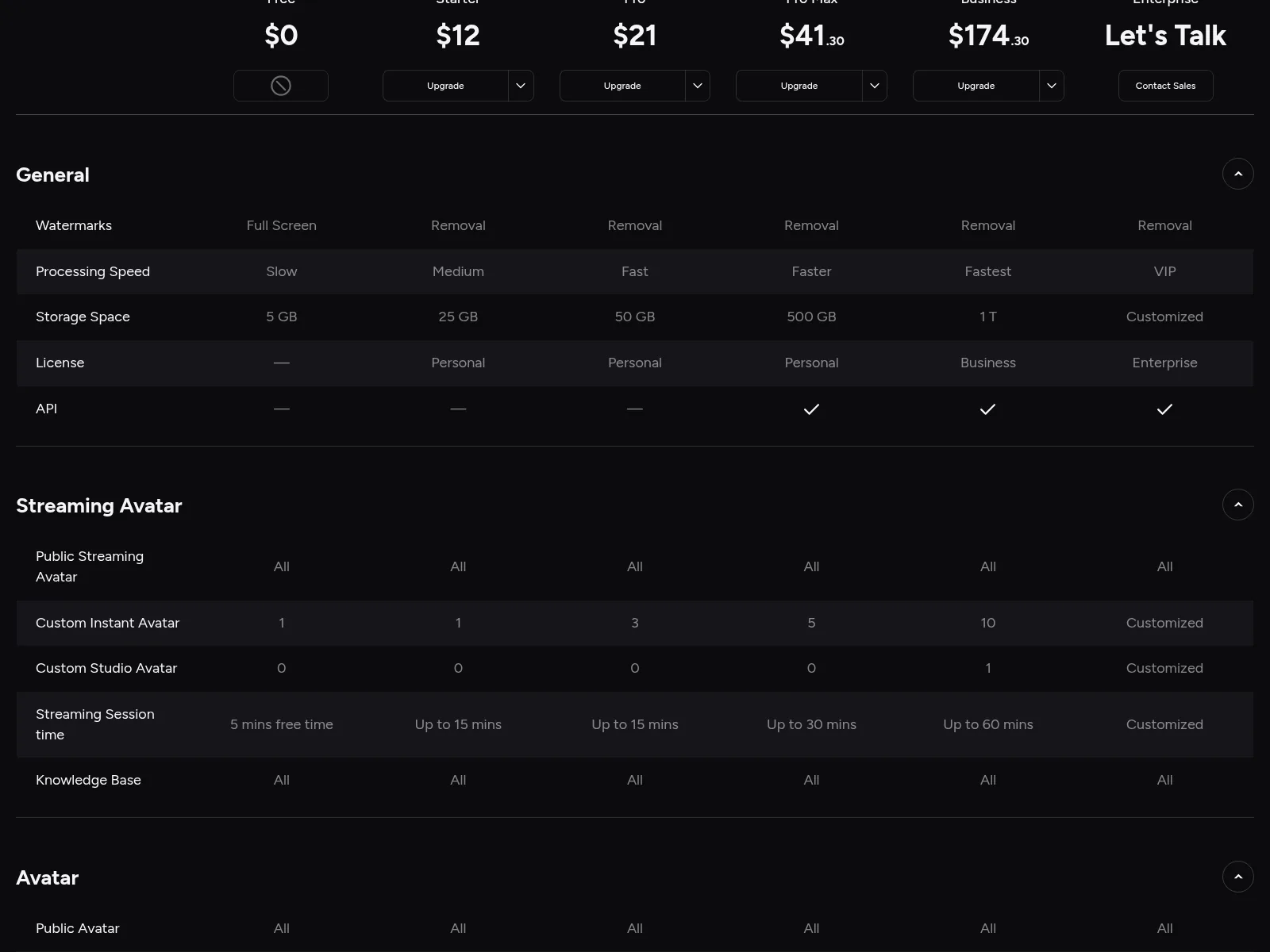
This is the feature Akool is known for, and the one G2 reviewers return to again and again. You can swap faces in photos and video, detect multiple faces in one frame and swap each separately, re-age a face, and run a live face swap on a webcam for calls and streams. The upload ceiling climbs with the tier: 720P free, 1080P on Starter, up to 16K from Pro, with live-swap sessions from 5 free minutes to 120 minutes on Business. The honest caveat is that quality depends on input: matching lighting, a front-facing angle, and stable footage give clean results, while fast motion or low-res faces need a re-roll, and that re-roll costs credits.
🎥 Avatar video, streaming avatars, and talking photo
You get a public avatar library, instant avatars from your own footage, and (only on Business) a fine-tuned studio avatar, plus a real-time streaming avatar that answers from a connected knowledge base. Avatar video runs from 720P free to 4K on Pro and above, with clips from 10 minutes up to 60 minutes on Business. One number is easy to misread: the plan cards advertise “up to 8K” on Pro Max and “up to 16K” on Business, but those are the upload / marketing-resolution ceilings for face swap and video translation, not the resolution of the presenter video you render. Akool’s own comparison table caps avatar-video output at 4K on every paid tier. Reviewers also note the avatars look sharp but can feel stiff, with limited expression, and the built-in voices sometimes need a manual pacing pass.
🌐 Video translation in 155+ languages with lip-sync
This is the second feature that justifies the subscription. Upload a video and it dubs it into 155+ languages with lip-sync, removes background music, and burns in subtitles; higher tiers add a proofread editor, SRT/ASS import and export, and a voice dictionary for brand terms. Upload length scales from 5 minutes free to 120 minutes on Business. Independent reviewers rate this as Akool’s most commercially useful tool, while still flagging that localized output needs a human pass before it goes to a paying audience. If your job is turning one course launch into six-language versions, test this first.
⚡ The model shelf and the credit meter underneath it
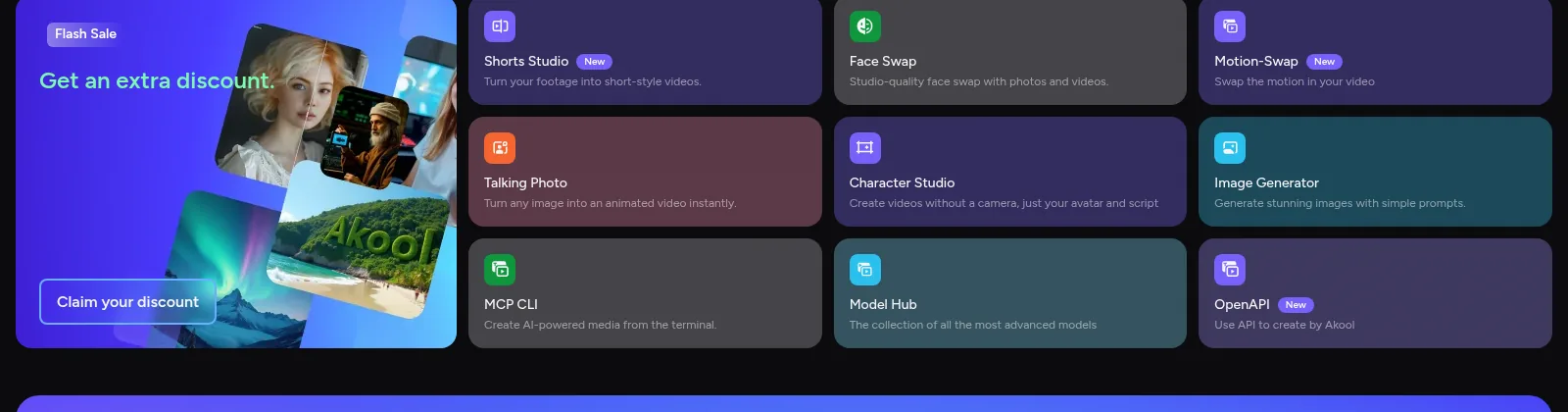
Akool has become a model hub rather than a single engine: it routes jobs to Kling, Seedance, Sora, Veo, MiniMax Hailuo, and Wan, plus image models like Nano Banana, so you pick the engine per task, and output quality then depends on which one you chose. The part to budget for is the meter. The credit rates as listed on Akool’s API pricing page (summarized in the independent SmartPostly write-up) work out to about 5 credits per 10 seconds of talking avatar at 1080p (double for 4K), video translation at about 1 credit per 5 seconds, a talking photo at about 10 credits per 5 seconds, and a video face swap at about 10 credits per 10 seconds; Akool publishes per-credit prices rather than fixed per-task rates, so actual burn rates vary by model and resolution. A 600-credit Pro plan sounds generous until a few 30-second 4K clips plus re-rolls eat it. Unused credits expire each cycle; only Enterprise gets credits that never expire.
What Real Users Actually Say
This is the part of the review where I have to split the platforms rather than quote a single badge.
The Aggregate Scores
G2 is the strongest signal: Akool holds 4.8 out of 5 across a solid mid-sized review base, with ease of use as the most-tagged theme. Capterra shows a perfect 5.0, but from only a very small review base, so treat it as a tiny sample; its sub-scores are more useful, with ease of use at 4.8, value for money at 4.2, and customer service at 4.3. Trustpilot’s global score is strong too, at 4.8 out of 5 across a broader international review base, but that average hides a regional split: some country pages, including Canada and Sweden, run closer to 3.3 to 3.5, and those complaint-heavy pages are dominated by billing, refund, and trial auto-charge issues rather than the videos themselves. The occasional claim that Trustpilot removed fake reviews from the company’s page is one I could not independently verify.
— G2 Learn Hub and Capterra sub-scores cross-checked October 2026, plus two independent write-ups; G2 and Capterra product pages themselves block automated access, so review counts are as reported on third-party roundups and the G2 Learn Hub
The Recurring Criticism
The pattern is consistent across sources. First, the credits: reviewers say burn rates are hard to forecast, different tasks consume several times more credits than others, unused credits expire with no rollover, and overdraft credits can be charged to a card without notice. Second, billing friction: the no-refunds policy, trial-to-paid auto-charges, and reports of cancellation buttons not working recur on Trustpilot, including users charged a few hundred dollars after forgetting to cancel a short trial. Third, the product itself: slow rendering under load, avatars that can feel stiff, voices that need manual pacing, and output that degrades with messy source footage. Fourth, collaboration: every admin or editor you invite is billed your full seat rate.
— G2 tagged-feedback summaries on G2 Learn Hub, Capterra sub-scores, and Trustpilot complaints as summarized by independent reviewers, October 2026; I did not open individual review threads directly
Read the split correctly. The high G2 and global Trustpilot scores come from verified business buyers who like the output; the negative Trustpilot reviews, concentrated in certain countries, are mostly about the commercial model, not the videos. That separation is the whole review: the software is good, the billing mechanics are what people fight about. If you can budget and cancel on purpose, the G2 experience is the one you are likely to have; if you forget the renewal date, the Trustpilot one is.
User feedback sourced from G2 and Capterra reviews, as summarized on G2 Learn Hub and independent review write-ups.
Pricing: Every Plan, Laid Bare
Akool has a real free tier rather than a credit-card trial: the free plan gives you 720P video up to 10 minutes, but with a full-screen watermark, 5 GB of storage, and only a handful of text-to-speech uses. Every paid tier removes the watermark. Prices below are the monthly equivalent billed yearly, exactly as shown on the pricing page; the struck-through monthly-billing numbers are displayed next to them, so paying month to month costs roughly 40–50% more.
| Plan | Price (per seat, billed yearly) | What You Get |
|---|---|---|
| Free | $0 | 720P video up to 10 min, full-screen watermark, 5 GB storage, 5 minutes of free streaming avatar, 5 text-to-speech uses total, 155-language translation capped at 5-minute uploads. |
| Starter | $12/mo (200 credits, $0.060/credit; $144/yr) | 1080P, 15-min videos, no watermark, personal license, medium speed, 2 concurrent videos, 2 instant avatars + 1 custom streaming avatar, 15-min streaming sessions, face swap to 1080P, 5 voice clones, 25 GB. |
| Pro (most popular) | $21/mo (600 credits, $0.035/credit; $252/yr; $30 monthly) | 4K, 30-min videos, all SOTA video and image models, translation proofread editor, 6 face-swap models, 6 concurrent videos, fast speed, personal license, 30 voice clones, 50 GB. |
| Pro Max (best value) | $41.30/mo (1,200 credits, $0.034/credit; $495.60/yr; $59 monthly) | 45-min videos, Studio Voice for brand terms, API access, workspace collaboration, 8 concurrent, faster speed, personal license, 180 voice clones, 500 GB. Higher credit bands up to 9,600 credits available. |
| Business | $174.30/mo (6,000 credits, $0.029/credit; $2,091.60/yr; $249 monthly) | 60-min videos, business license, 1 fine-tuned studio avatar, 20 concurrent videos, fastest speed, 500 voice clones, 1 TB storage, credits at the lowest per-unit rate. Bands up to 80,000 credits. |
| Enterprise | Custom | Everything on Business, credits that do not expire, Ultra Avatar, SSO, a dedicated customer success manager, and custom concurrency. |
The Unfiltered Pros & Cons
Pros
- ✓ One login covers face swap, live face swap, avatar video, streaming avatars, talking photo, 155-language lip-sync, voice clone, and a big third-party model shelf
- ✓ Face swap and lip-synced translation are genuinely strong, the two features G2 reviewers praise most
- ✓ Cheap entry at $12/month on the annual plan, no watermark on every paid tier, and a usable free tier for testing
- ✓ Ease of use is the top-tagged theme on G2; non-editors report usable output in minutes
- ✓ API from Pro Max, Zapier, and Canva/Adobe links give it a real place in a marketing workflow
Cons
- ✗ The credit meter is hard to forecast: burn rates vary several-fold, unused credits expire monthly, and overdrafts can be charged without warning
- ✗ Billing friction is a real recurring complaint: no-refunds policy, trial auto-charges, and reports of cancellation problems on Trustpilot
- ✗ Every invited teammate pays your full seat rate; collaboration is expensive, and there is no cheap shared-credit pool
- ✗ Commercial use only starts on Business at $174.30/month; Pro and Pro Max carry a personal license, and 8K/16K marketing numbers are upload ceilings, not avatar-video resolution
- ✗ Slow rendering under load, stiff avatars, generic-sounding voices, and crowded navigation are consistent smaller gripes
Final Verdict
Akool is the rare AI video suite that is actually good at more than one hard thing: face swap and 155-language lip-sync translation both hold up, and one credit pool replaces what would otherwise be four subscriptions. The product earns its 4.8 G2 score. What keeps this from an unreserved recommendation is the commercial layer on top, an opaque credit meter, per-seat billing, a no-refunds stance, and a Trustpilot record of auto-charge complaints. Buy it if you need the combination and will watch your burn; skip it if you want a flat fee or only one of the tools.
If you are testing for the first time, do not put a card on the free plan and hope. Render three things before you pay: one avatar video, one face swap on footage that resembles your real work, and one translated clip, then check the credit counter after each. If those outputs look right and the meter feels tolerable, Pro at $21/month is the sensible entry for a solo marketer; it unlocks 4K, the proofread editor, and 6 face-swap models. If you are an agency shipping client work, plan on Business for the commercial license rather than stretching Pro.
If your brief is polished talking-head video and you do not care about face swap, HeyGen gives a smoother, more predictable script-to-video workflow for similar money, and if you need corporate training onboarding, Synthesia’s compliance story is more mature. Akool wins when the brief is face swap, personalization, or multilingual repurposing in volume. You can read more about how we test and why you can trust our calls on our methodology page.
Frequently Asked Questions
Is Akool free?
There is a genuinely free plan, not just a trial: you get 720P video up to 10 minutes, 5 GB of storage, and 5 minutes of free streaming avatar, but with a full-screen watermark and only five total text-to-speech uses. Paid plans start at $12 per seat per month billed annually on Starter, and every paid tier removes the watermark.
How much does Akool actually cost?
Billed yearly per seat, Starter is $12 for 200 credits, Pro is $21 for 600 credits, Pro Max is $41.30 for 1,200 credits, and Business is $174.30 for 6,000 credits. Monthly billing shows roughly $30, $59, and $249 on the paid tiers. The real cost depends on credits, which run from about 5 credits per 10 seconds of avatar video, and unused credits expire monthly unless you are on Enterprise.
Is Akool worth it for a marketer or small agency?
Worth it if your work genuinely combines face swap, avatar video, and multilingual translation, because replacing those with separate tools usually costs more and creates more admin. Less worth it if you only need one of them, if you hate unpredictable usage-based billing, or if you are tempted by Pro but need to ship client work, since the commercial license only arrives on the Business tier.
How does Akool compare to HeyGen, and what does it integrate with?
HeyGen is smoother for polished, predictable talking-head video; Akool is broader and stronger on face swap, live transformation, and translation, but with a more credit-driven and billing-contested model. Akool offers a REST API from Pro Max, Zapier for video campaigns, and links with Canva and the Adobe apps, plus knowledge-base connections for its streaming avatars. There is no large native app directory, so deeper automation goes through Zapier or the API.
About the Author
