
Here is the short version up front. EngageBay delivers the affordable all-in-one CRM bundle for small teams priced out of HubSpot, but the UI is less polished, automation gates at Growth, and metered email/automation limits squeeze growing senders. On pricing, the short version: Real free plan (250 contacts). All-in-One per user/month: Free $0; Basic $12.74 biennial / $14.99 monthly; Growth $42.49 biennial / $49.99 monthly (marketing automation, 5,000 contacts, 25,000 emails); Pro $84.99 biennial / $99.99 monthly (unlimited contacts, 50,000 emails, SSO, role management, custom reporting, phone support, dedicated manager). Yearly 8% off; separate Marketing/CRM&Sales/Service Bay start ~$11.04/user/mo. Free migration from other platforms. The current overall score is 4/5. Every number here comes from the live site or aggregator-reported ratings, not a vendor deck, so you can decide in one read whether it is worth the trial.
The Short Version
EngageBay sells itself as the affordable HubSpot alternative: one subscription that bundles marketing automation, a sales CRM, live chat, and a help desk, aimed squarely at small businesses that can’t stomach HubSpot’s per-seat prices. After working through the pricing page, the full plan comparison table, and what reviewers on Capterra and G2 actually say, the pitch is mostly real. It genuinely folds four tools into one bill at a fraction of the price, and the review scores back that up. The trade-offs are the usual ones for a cheap all-in-one: the interface is busier than a mature incumbent, the deeper modules (serious automation, web analytics, SSO) sit behind the top tier, and a handful of users hit nagging bugs and restrictive email caps. For a small team on a budget, it’s one of the better value plays in the category.
Here’s what I actually tested. I worked through the live pricing page, the four-tier comparison table (Free, Basic, Growth, Pro), the separate Marketing / CRM & Sales / Service Bay packaging, and the vendor’s own review claims, and I cross-checked the ratings against independent 2026 rating snapshots. I did not complete a signup or log into the app in this environment, so this review is based on the live marketing site, the documented plan limits, and third-party user feedback rather than a hands-on build-out of a campaign or a deal pipeline. Where something depends on clicks inside the product, I’ve said so.
The short version: if you are a startup or a small team that needs marketing, sales, and support tooling in one cheap login, EngageBay delivers the consolidation promise and the free plan is a real way to kick the tires. If you expect HubSpot-level polish, enterprise reporting, or an app with zero rough edges, you will be frustrated. And if you only need one piece (say, just live chat), the bundled price still may not beat buying a focused tool.
Who This Is For (and Who Should Skip)
Match yourself to the product before you pay.
- ✅ Startups and small teams priced out of HubSpot If you currently duct-tape a free CRM, a cheap email tool, a separate live chat, and a support inbox together, the All-in-One plan replaces all of it for less than one HubSpot seat.
- ✅ Teams that want to try before they buy The free plan includes CRM, email marketing, live chat, and a help desk at 250 contacts, which is genuinely usable for a tiny list, and the company offers free data migration from other platforms.
- ✅ Growing companies that will outgrow free quickly but need automation soon Growth is where marketing automation, A/B testing, and custom landing domains turn on, so a team that is serious about lead nurture usually lands there rather than on Basic.
- ❌ Anyone who only needs a live chat widget If chat is literally the only thing you need, you will pay for CRM and marketing modules you won’t open. A focused tool like LiveChat or a lighter chat widget does the single job cheaper and cleaner.
- ❌ Teams that need enterprise-grade reporting, SSO, or flawless polish SSO, role management, web analytics, custom reporting, phone support, and a dedicated account manager are all Pro-tier, and reviewers consistently note the UI is not as polished as the incumbents.
Score Breakdown
What Actually Matters: Features, Reviewed
Here’s what the product actually does, with the line between what I verified on the live site and what I only read about kept visible.
📧 The all-in-one promise: marketing, CRM, chat, and help desk
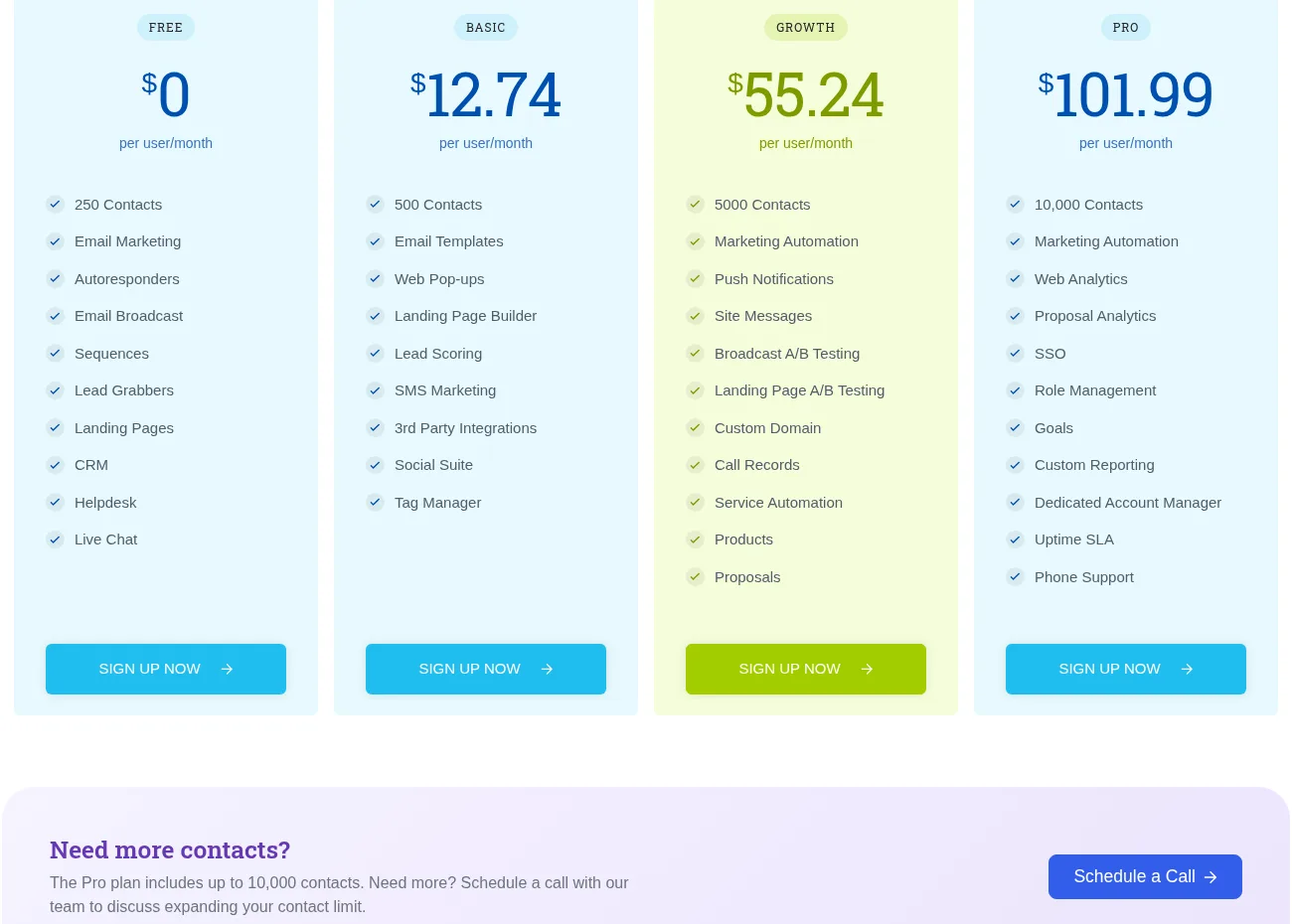
EngageBay splits into three “Bays”: Marketing Bay, CRM & Sales Bay, and Service Bay, and you can buy any one of them separately or take the All-in-One bundle. On the live comparison table, the free plan already includes 250 contacts, email marketing, autoresponders, email broadcast, sequences, landing pages, the CRM, a help desk, and live chat. That is an unusually complete free tier, not a watered-down trial. The paid Basic plan raises you to 500 contacts, 3,000 branded emails, landing page builder, lead scoring, SMS marketing, and 1 GB of storage. The honest read: the free plan is a legitimate starting point for a tiny list, but the 250-contact ceiling arrives fast, and most real businesses move off it within a few months.
⚡ Marketing automation and the Growth tier gate
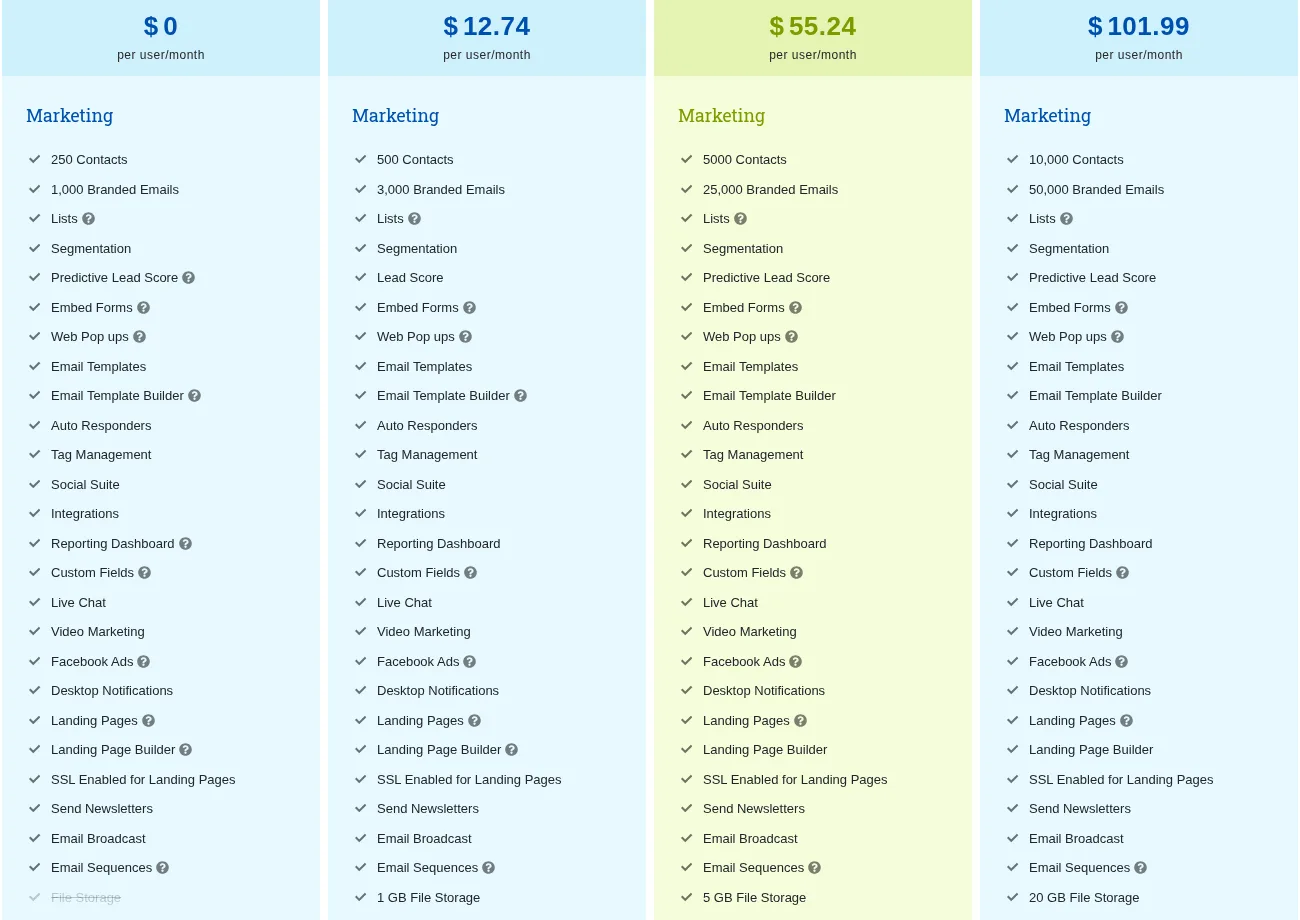
This is the tier decision that matters. On the comparison table, marketing automation, site messages, push notifications, broadcast A/B testing, landing page A/B testing, and a custom landing domain are not in Basic. They turn on at Growth, which also jumps you from 500 to 5,000 contacts and from 3,000 to 25,000 branded emails, adds call records, service automation, products, and proposals, and gives you 5 GB of storage. Automation is also metered, with a fixed allowance of workflow automations per account on Growth. So if your reason to buy is lead nurture and drip campaigns, budget for Growth, not Basic. If you just need to send a newsletter and track deals, Basic covers it.
💼 Sales CRM, calling, and the Pro-tier extras
The CRM side covers the expected small-business loop: contacts and companies with a 360-degree view, deals in tracks with custom milestones, tasks, appointment scheduling, email tracking and scheduling, Gmail/Outlook/Office 365 sync, and calling minutes (a small allocation on the lower tiers). Pro is where the enterprise-ish extras unlock: unlimited contacts, 50,000 branded emails, web analytics, proposal analytics, SSO, role management, goals, custom reporting, a dedicated account manager, an uptime SLA, and phone support. In other words, if your team needs sign-on controls or a named contact at the vendor, you are on Pro, which is a real price jump from Growth.
💬 Service Bay, live chat, and the “client portal” question
Worth being precise about positioning: EngageBay is a small-business CRM and support suite, not a dedicated client-portal product. Its Service Bay gives you ticketing, ticket views, macros, groups, canned responses, and a customer 360 view, and the live chat widget handles website conversations. That is real help-desk and chat functionality, and it is part of the value bundle, but if your core need is a secure customer portal where clients log in to view files, invoices, or project status, this is not that tool. The live chat itself is solid for an add-on, but if chat is your primary channel, compare it against a purpose-built chat platform like LiveChat before buying the whole bundle.
What Real Users Actually Say
EngageBay has built a surprisingly large review footprint for a low-cost entrant. Here is what I found.
The Aggregate Scores
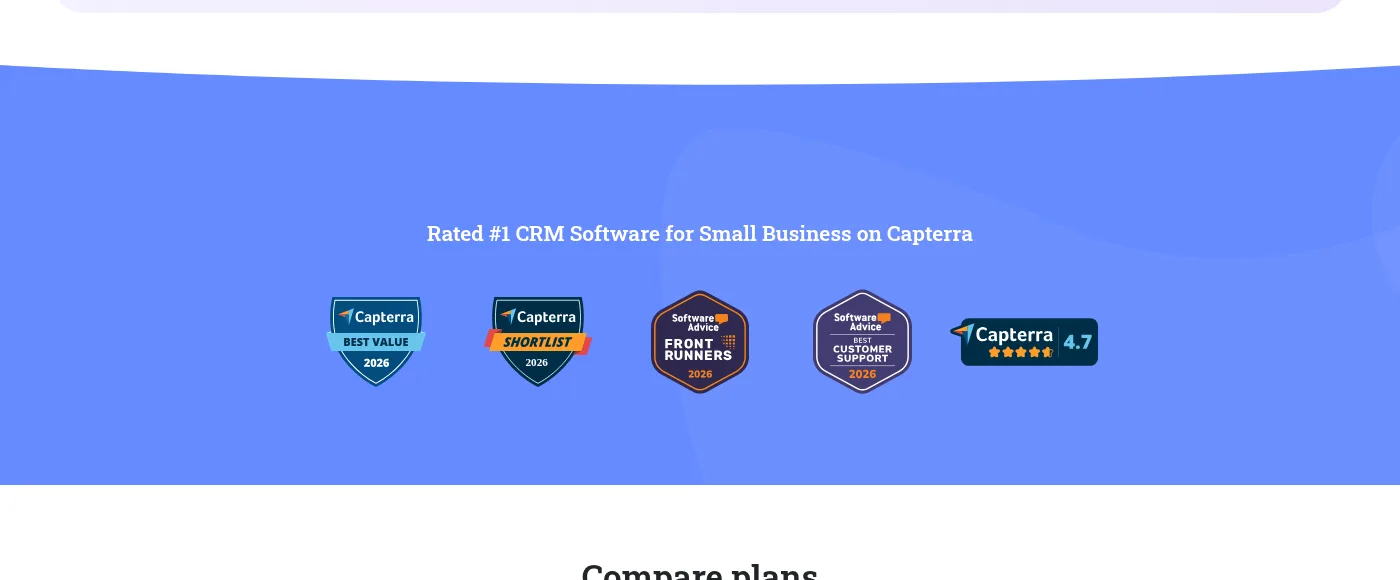
Across independent 2026 snapshots, EngageBay sits at about 4.7 out of 5 on Capterra from a large review base, and about 4.7 on G2 from a solid mid-sized base, with Trustpilot-reported scores around 4.8 on smaller bases. The vendor claims 46,000-plus small businesses use the product, which is a vendor figure rather than something I could independently verify. The consistent praise across both platforms is the same: the price, the all-in-one consolidation, and the responsiveness of support.
— Independent 2026 rating snapshots of Capterra and G2, plus vendor-reported Trustpilot figures, cross-checked October 2026; the G2 and Capterra pages themselves block automated access, so counts are aggregator-reported rather than pulled live
The Recurring Criticism
The negative pattern is coherent rather than random. First, polish: reviewers and independent comparisons note occasional bugs, performance lag during peak usage, and an interface that feels busier and less refined than HubSpot. Second, limits: the daily email caps and the metered automation/workflow allowances frustrate teams that outgrow a tier before they expect to. Third, support tiers: free-plan users report limited live help compared with paid customers, and phone support only exists on Pro. Fourth, the usual billing and migration friction teams mention when consolidating tools from a competitor.
— G2 and Capterra review patterns as summarized in independent 2026 comparisons, October 2026
Read the scores correctly. A 4.7 across roughly 1,500 combined reviews is a strong value-for-money signal, but it is coming from budget buyers who chose the product precisely because it is cheap and broad. It does not mean the tool is as polished or as deep as the premium incumbents; the recurring complaints about rough edges and tiered limits are the ones that should shape which plan you buy on.
User feedback sourced from G2 and Capterra reviews.
Pricing: Every Plan, Laid Bare
EngageBay has a real free plan, no credit-card-upfront free trial-style onboarding, and three paid tiers. Prices below are per user per month exactly as displayed on the live pricing page in the biennial billing view; the page also offers Monthly and Yearly (8% off) billing, and a separate Marketing / CRM & Sales / Service Bay packaging that starts around $11.04 per user per month if you want just one piece.
| Plan | Price (per user / month) | What You Get |
|---|---|---|
| Free | $0 | 250 contacts, 1,000 branded emails, email marketing, autoresponders, sequences, landing pages, CRM, help desk, live chat. The real starter tier, not a trial. |
| Basic | $12.74 biennial / $14.99 monthly | 500 contacts, 3,000 branded emails, 10 lists, 10 forms, 10 pop-ups, 10 landing pages, email templates, landing page builder, lead scoring, SMS marketing, 1 GB storage, a small allocation of calling minutes. |
| Growth (most common for automation) | $42.49 biennial / $49.99 monthly | 5,000 contacts, 25,000 branded emails, marketing automation with a metered workflow allowance, site messages, push notifications, broadcast and landing page A/B testing, custom domain, call records, service automation, products, proposals, 5 GB storage. |
| Pro | $84.99 biennial / $99.99 monthly | Unlimited contacts, 50,000 branded emails, web analytics, proposal analytics, SSO, role management, goals, custom reporting, dedicated account manager, uptime SLA, phone support, 20 GB storage. |
A few honest caveats. The headline $12.74 requires the biennial commitment; on monthly billing Basic starts at $14.99 per user, Growth runs about $49.99, and Pro about $99.99. Marketing automation does not exist on Basic, so anyone buying for lead nurture should jump to Growth rather than under-buying. Contact and email allowances are metered, and automation workflows are capped, so teams with large lists or heavy drip programs should check those limits against their actual volume. For more context on where this fits the customer-communication landscape, see our client portals and customer communication category.
The Unfiltered Pros & Cons
Pros
- ✓ One login bundles marketing automation, sales CRM, live chat, and a help desk for a fraction of HubSpot’s seat price
- ✓ The free plan is genuinely usable: 250 contacts, email marketing, sequences, CRM, help desk, and live chat at no cost
- ✓ About 4.7 on both Capterra and G2 across roughly 1,500 combined reviews, with value and responsive support praised repeatedly
- ✓ Free data migration from other platforms softens the switching cost, and you can buy a single Bay instead of the whole suite
- ✓ Growth is the tier where automation actually turns on, so the upgrade path is clear rather than hidden
Cons
- ✗ The interface is busier and less polished than HubSpot-class tools, with occasional bugs and peak-time lag noted by reviewers
- ✗ Marketing automation is gated to Growth; Basic is a newsletter-and-deals tier, not an automation tier
- ✗ Contact, email, and automation limits are metered, and daily send caps frustrate larger senders
- ✗ SSO, role management, custom reporting, dedicated support, and phone support all sit on the top Pro tier
- ✗ I did not run a live campaign or pipeline inside the product in this environment, so in-app UX is assessed from documentation, the comparison table, and user reports
Final Verdict
EngageBay earns its affordable all-in-one pitch. For a startup or small team priced out of the premium CRM platforms, it bundles marketing, sales, chat, and support into one cheap bill with a credible free plan and strong value reviews. It is not as polished, as deep, or as fast as HubSpot, the heavy features sit on the upper tiers, and the metered limits will eventually squeeze growing senders. Buy it if consolidation and value matter more than refinement; pay up for an incumbent if your stack demands it.
Start on the free plan if you are evaluating it, but be honest with yourself about the 250-contact ceiling. If your real need is lead nurture, plan on Growth rather than Basic, because that is the tier where marketing automation, A/B testing, and custom domains actually switch on. If you are a team that needs SSO, role-based access, or a named account manager, you are looking at Pro, and the price jump from Growth to Pro is where this tool stops feeling like a budget buy.
If you only need a single capability like live chat, you are probably overpaying for modules you will not open, and a focused tool is the better match. You can read more about how we evaluate tools and why you can trust our reviews on our methodology page.
Frequently Asked Questions
Is EngageBay free?
Yes. EngageBay has a genuinely free plan that includes 250 contacts, email marketing, sequences, landing pages, the CRM, a help desk, and live chat, with no credit card required to start. Paid tiers begin at $12.74 per user per month on the biennial plan (about $14.99 monthly) on Basic.
How much does EngageBay cost?
Per user per month, the All-in-One plans are Free, Basic at about $12.74 biennial ($14.99 monthly), Growth at about $42.49 biennial ($49.99 monthly), and Pro at about $84.99 biennial ($99.99 monthly). Yearly billing takes 8% off, and you can also buy just Marketing, CRM & Sales, or Service Bay separately starting around $11.04 per user per month.
Is EngageBay worth it for a small business?
Usually yes, if your pain is juggling several cheap tools and you are priced out of HubSpot. The consolidation math and the free plan are the draw, and reviewers rate it around 4.7 on Capterra and G2. It is less worth it if you only need one module (like live chat), if you need enterprise-grade polish or SSO, or if your send volume will hit the metered email and automation limits.
Is EngageBay a client portal software?
Not really. It is a small-business CRM and support suite that includes a help desk (Service Bay) and live chat, with ticketing and a customer 360 view. It is not a dedicated customer portal where clients log in to access files, invoices, or project status. If a true client portal is your core need, look at a purpose-built tool rather than this bundle.
About the Author
