
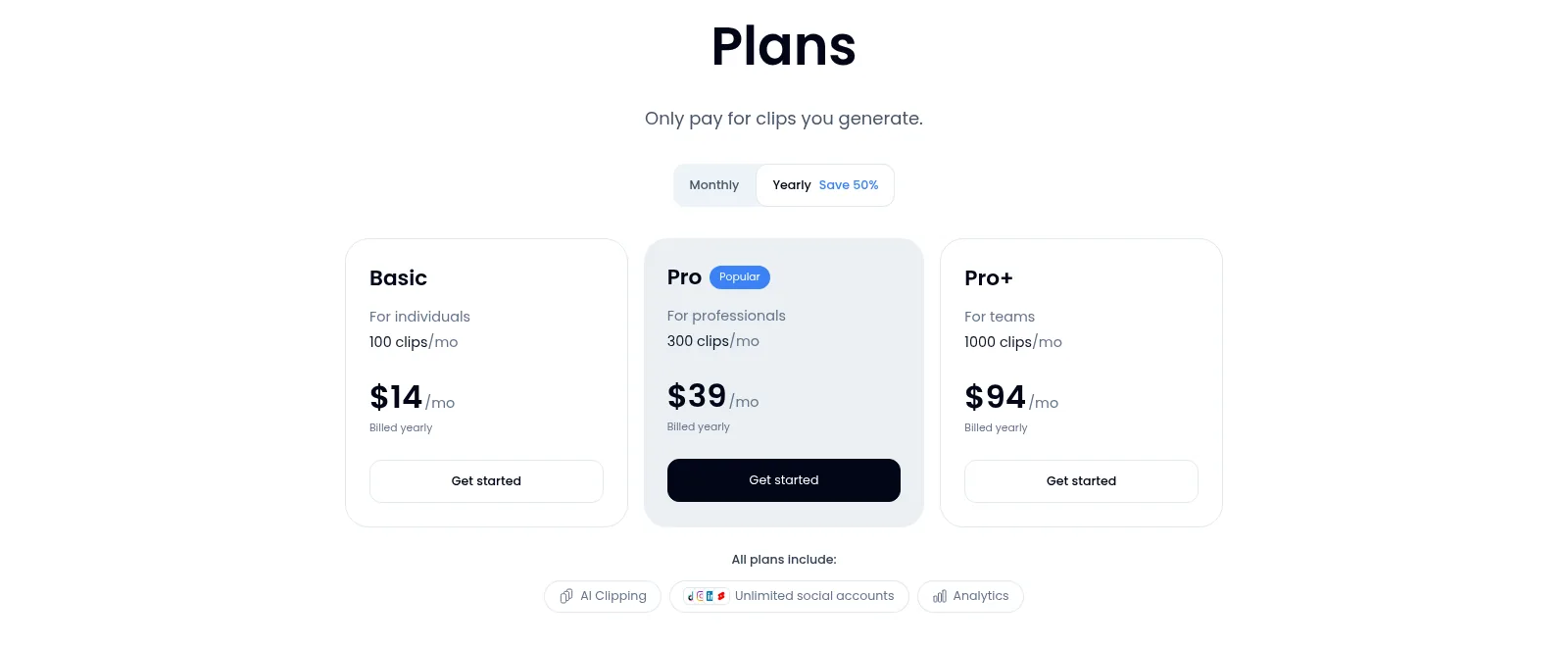
A short orientation before the details. Klap is the fastest, cheapest one-click path from speech-led long video to captioned vertical shorts on a yearly plan, but it is thin on design and editing depth and its yearly billing is the recurring complaint. On pricing, the short version: One free video (no card, no watermark advertised; no recurring free tier). Billed yearly per month: Basic $14 (100 clips/mo, $168/yr), Pro $39 (300 clips/mo, $468/yr), Pro+ $94 (1,000 clips/mo, $1,128/yr). Month to month roughly $29/$79/$189 (yearly saves ~50%). All plans: AI clipping, unlimited social accounts, analytics. API: ~$0.44/input + $0.32/generated short + $0.48/export. Uploads up to 4 hours/file; 52 captions languages. The current overall score is 4/5. Every number here comes from the live site or aggregator-reported ratings, not a vendor deck, so you can decide in one read whether it is worth the trial.
The Short Version
There are two kinds of long-video-to-shorts tools. The kind that want to be a full editor, and the kind that want to get out of your way. Klap is the second kind. You paste a YouTube link or drop a file, walk away, and come back to a batch of vertical clips already cut, reframed, and captioned, each scored for how likely it is to perform. It does not try to be CapCut and it does not try to be an AI avatar studio. After working through the pricing page, the feature list, and what reviewers actually say across the app stores and review sites, it is the fastest paste-a-link-and-you-are-done tool I have tested for speech-led content. The catches are real: the paid tiers are yearly commitments, the clip allowance is a quota rather than a flat unlimited, and the editing depth and caption design are thinner than the more design-heavy rivals.
Here is what I actually checked. I worked through the live pricing page in both its yearly and monthly billing states, the homepage feature list, Klap’s own comparison pages, and the published upload and language limits, and I cross-referenced the ratings against independent review trackers. The editor itself is behind a signup, and I did not register an account or run a clip through it in this environment, so my read of the day-to-day output is based on the documented flow, the public feature claims, and user reports rather than my own renders. Where that matters, I have said so.
The short version: if you publish a podcast, a webinar, or a talking-head video a few times a week and your job is to squeeze five to fifteen short clips out of each one, Klap is one of the fastest and cheapest ways to do it, especially on a yearly plan. If you need rich caption animations, a timeline editor, AI avatars, or you want to pay month to month without locking in for a year, look at Submagic, Opus Clip, or Vizard first.
Who This Is For (and Who Should Skip)
Match yourself to the product before you pay.
- ✅ Podcasters and speakers who already film talking-head content Klap’s algorithm is built around speech detection, so a one-hour interview or keynote becomes a batch of vertical clips in minutes. That is the exact use case it is tuned for.
- ✅ Marketers and course creators repurposing webinars If you have a 60-to-90-minute recorded webinar and need ten Reels a week, the paste-a-link workflow and built-in scheduling to TikTok, YouTube, Instagram, and LinkedIn save real editing time.
- ✅ Teams that want one login and a cheap yearly rate At $14/month billed yearly on Basic, Klap is among the cheapest in the category if you commit for a year, and every tier includes unlimited connected social accounts and analytics.
- ❌ Creators who want a design-forward caption toolkit Submagic and Opus Clip ship more animated caption styles, sound effects, template packs, and hook tools. Klap’s captions are clean and editable but less flashy.
- ❌ Anyone who refuses a yearly commitment or needs a free tier they can keep Klap gives you one free video, not a recurring free plan, and the advertised prices are yearly-billed. Month to month is roughly double, and the recurring Trustpilot complaints are about being locked into the yearly charge.
Score Breakdown
What Actually Matters: Features, Reviewed
Klap does fewer things than an all-in-one AI video suite, but the things it does are the ones that eat a content marketer’s week. I focused on the four that drive the buying decision.
⚡ The one-click clipping engine
This is the whole pitch, and it holds up. You paste a YouTube link or upload a file, Klap transcribes the speech, scores segments for virality, and returns a batch of vertical clips with captions burned in. The rule of thumb on the site is that a one-minute source produces about five clips, and longer sources scale from there. The honest caveat the company itself states is that the algorithm relies heavily on speech detection, so a silent gameplay video, a music track, or a screen recording with no talking gives it very little to work with. If your content is talking-head, it is near magic; if it is not, lower your expectations.
🎬 AI Reframe 2 and the captions
The newer selling point is AI Reframe 2, which resizes clips per platform and picks a layout: split-screen for two-person podcasts, centered talking head for interviews, dedicated framing for screencasts and gaming, rather than just locking onto the nearest face. Captions are word-level, editable, and come in 52 languages, and you can tweak fonts, colors, and logos to match a brand. Where Klap is deliberately simple rather than best-in-class is the design layer: the caption styles and animation presets are clean but not as broad as Submagic’s library, and there is no real timeline for frame-level edits. You trim, you restyle, you export.

📦 Publish, schedule, and the API
Every plan, including the entry tier, lets you connect an unlimited number of social accounts and post or schedule straight to TikTok, YouTube, Instagram, and LinkedIn, with basic analytics on what you published. For a one-person operation that is the feature that turns Klap from a clip generator into a publishing workflow. Developers get a separate API priced by operation, roughly 44 cents per processed input, 32 cents per generated short, and 48 cents per export, plus Zapier, Make, n8n, and an MCP server for wiring it into other tools. There is no deep CRM or email integration, but for a clip tool that is not the job.
🔄 How it stacks up against Vizard, Opus Clip, and Submagic
Klap competes in a crowded field, and the differences are narrower than the marketing. Against Vizard, Klap’s own comparison page claims more languages (52 versus Vizard’s 30), content-aware reframing beyond face tracking, free re-runs instead of credit burns, and cheaper per input minute; treat those as Klap’s own numbers, not an independent bake-off. Where the broader consensus points is that Opus Clip generally wins on virality scoring, hook tools, and polish, Submagic wins on caption design and template variety, and Klap wins on raw speed, simplicity, and the yearly price. If your priority is beautiful captions, look at Submagic; if it is the most aggressive AI cut, look at Opus Clip; Klap is the low-friction, cheap, fast middle.
What Real Users Actually Say
This category splits by platform: the app works, but the billing model has its own fan club of unhappy customers. Here is what I found.
The Aggregate Scores
Klap is reported at around 4.7 out of 5 on G2, though I could not open the G2 product page directly to confirm the review count, so treat that as an aggregated third-party figure rather than a freshly counted one. The more useful signal is Trustpilot, where Klap sits much lower at about 3.4 out of 5 across a small review base (similar totals per the Cliphi tracker), with around 38% of those at one star. The split is the whole story: people like the clips, and a meaningful group of people are angry about the bill. The company markets itself as used by 3.5M creators, a vendor-reported figure I could not independently audit.
— G2 rating as summarized by third-party trackers, Trustpilot figures as summarized by an independent comparison-site review in September 2026; the G2 and Trustpilot pages themselves block clean automated reading, so counts are approximate
The Recurring Criticism
The negative pattern is almost entirely billing rather than the software. The most common Trustpilot complaints, as summarized by independent trackers, are an unexpected yearly charge on the card, difficulty finding or using cancellation, and slow support responses once someone disputes a renewal. The product-side gripes are milder and familiar for the category: the AI occasionally picks a weak segment that needs manual trimming, the caption styling is less varied than rivals, and if your video has little speech the tool has little to work with. There is no recurring theme that the clips look bad; the theme is that people did not realize they were committing to a year.
— Trustpilot complaint patterns as summarized by independent comparison-site reviews, September and October 2026; I did not open individual review threads directly
Read the two numbers together. The high G2 score is from people who got the clips they wanted and used the tool; the low Trustpilot score is concentrated around the annual billing and cancellation flow. If you set a calendar reminder before your renewal and intentionally want a yearly plan, you are far more likely to have the G2 experience than the Trustpilot one. If you tend to forget subscriptions, assume the Trustpilot experience.
User feedback sourced from G2 and Trustpilot reviews, as summarized by independent trackers.
Pricing: Every Plan, Laid Bare
Klap does not have a recurring free tier. You get one free video to try it, no credit card required, and the free export is advertised without a Klap watermark; after that you pay. The prices below are the monthly equivalent on a yearly subscription, exactly as shown on the pricing page, and the page’s own toggle confirms year-round billing saves about 50%, so paying month to month costs roughly double. Every paid tier includes AI clipping, unlimited connected social accounts, and analytics; the tiers differ only by how many clips you get per month.
| Plan | Price (per month, billed yearly) | What You Get |
|---|---|---|
| Free trial | $0 | One video clipped for free, no credit card, no ongoing free tier. Upload limits are reported around 4 hours per file in trackers; 52-language captions. |
| Basic | $14/mo ($168/yr) | 100 clips per month. AI clipping, unlimited social accounts, analytics, unlimited storage, free re-generations. Month-to-month roughly $29. |
| Pro (Popular) | $39/mo ($468/yr) | 300 clips per month, same features. Roughly 3,600 upload minutes a month on Klap’s own math. Month-to-month roughly $79. |
| Pro+ | $94/mo ($1,128/yr) | 1,000 clips per month, marketed for teams. Month-to-month roughly $189. Seat count is not published on the pricing page. |
| API | Pay as you go | Separate from the consumer plans: per a third-party reading of Klap’s API docs, about $0.44 per processed input, $0.32 per generated short, and $0.48 per export, billed by operation. |
A few honest caveats before you check out. First, the headline prices are yearly: Basic is $168 up front, not $14, and the Trustpilot complaints are largely people who did not realize that. Second, Klap meters clips rather than minutes on the public page I screenshotted, though independent trackers see the hydrated checkout reading as roughly 300 / 900 / 2,700 uploaded source minutes a month, so confirm the exact allowance in your checkout rather than trusting a cached screenshot. Third, there is no published rollover for unused clips, so a light month still costs the full quota. Fourth, export resolution is not spelled out tier by tier on the pricing page; Klap’s comparison marketing mentions 4K, but one independent tracker could not confirm which tier unlocks it, so ask before paying if 4K matters to you. For the category context, see the broader AI video category; for how Klap compares to a heavier AI studio approach, see our review of Akool.
The Unfiltered Pros & Cons
Pros
- ✓ The fastest paste-a-link-to-clips workflow in the category; genuinely one-click for talking-head content
- ✓ Cheap on a yearly plan, at $14/month entry, with free re-generations so iterating does not cost extra
- ✓ Unlimited social accounts, direct publishing and scheduling to TikTok, YouTube, Instagram, and LinkedIn on every tier
- ✓ AI Reframe 2 handles split-screen, screencast, and gaming layouts, not just face tracking
- ✓ Word-level captions in 52 languages and a one-video free trial with no credit card
Cons
- ✗ Paid tiers are yearly commitments; month to month is roughly double, and Trustpilot is full of unexpected-renewal complaints
- ✗ Clip quota rather than flat usage, no published rollover, and the public unit (clips vs minutes) has shifted without a clear published matrix
- ✗ Caption styling and template variety are thinner than Submagic and Opus Clip; no timeline editor
- ✗ Only works well on speech-led video; silent, music, or gameplay footage gives the algorithm little to cut from
- ✗ I did not generate a clip inside the editor, so output quality is assessed from documentation and user reports, not my own renders
Final Verdict
Klap is the low-friction entry point to AI clipping: paste a link, get a batch of captioned vertical clips back in minutes, post them. It earns its good G2 score for speed and simplicity, and it is cheap if you commit to a year. It is not the tool if you want design-forward captions, a timeline editor, AI avatars, or a month-to-month bill. Buy it for recurring speech-led repurposing; buy something else if creative control or billing flexibility is what matters most.
If you are a podcaster or course creator who already knows you will repurpose content every week, start with the free video, then commit to the yearly Basic or Pro only if the first batch of clips matches what you would have posted anyway. Pro at $39/month is the sweet spot for someone turning a weekly hour-long show into a steady stream of shorts; Basic works for lighter output. Set a renewal reminder the day you sign up, because the cancellation and renewal complaints are real and avoidable.
If your clips need animated caption flair, hook templates, and more editorial control, Submagic or Opus Clip will serve you better despite the higher price. If you also want AI avatars, face swap, or multilingual dubbing in the same tool, that is a different category and a heavier platform like Akool is the comparison to run. For most one-person creators and small marketing teams, Klap does the one job it promises, quickly and cheaply, as long as you go in knowing it is a yearly bill.
Frequently Asked Questions
Is Klap free?
You can clip one video for free with no credit card and no watermark advertised, but there is no recurring free plan. After that, paid tiers start at $14 per month billed yearly on Basic. The free trial is a one-time test, not a free tier you keep using.
How much does Klap cost?
Billed yearly, Basic is $14 per month for 100 clips, Pro is $39 for 300 clips, and Pro+ is $94 for 1,000 clips. Yearly billing saves about 50% versus paying month to month, which works out to roughly $29, $79, and $189 respectively. Every plan includes AI clipping, unlimited social accounts, and analytics. There is also a pay-as-you-go API billed per input, per generated short, and per export.
Is Klap worth it for a podcaster or small business?
If you regularly turn talking-head podcasts, webinars, or keynotes into short-form clips, yes: it is among the fastest and cheapest ways to do that on a yearly plan. It is less worth it if your videos have little speech, if you want rich caption templates and a timeline editor, or if you refuse to commit to a yearly subscription.
How does Klap compare to Vizard, Opus Clip, and Submagic?
Klap is the simplest and cheapest on a yearly plan, with fast one-click clipping and 52-language captions. Opus Clip generally scores higher on virality tools and polish, Submagic wins on caption design and template variety, and Vizard sits in between with a credit-based model. Klap publishes its own favorable comparison against Vizard, so weigh that as marketing rather than an independent benchmark.
About the Author
