
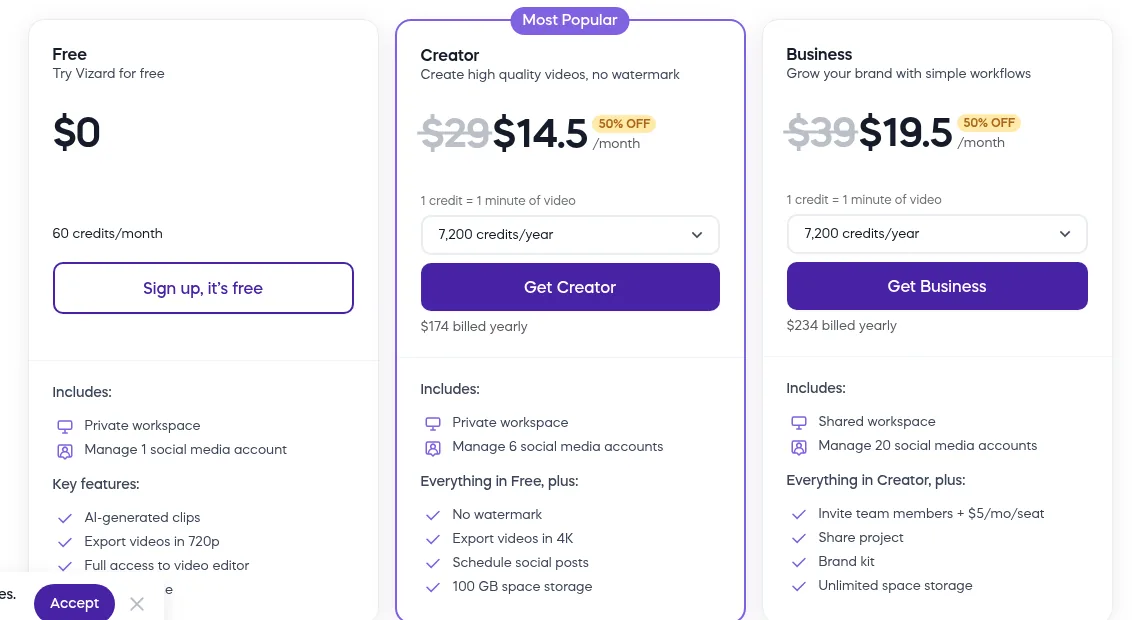
If you want the headline first, here it is. Vizard is the workflow-conscious long-to-short clipping tool for teams that repurpose webinars: clips, captions, brands, schedules and publishes from one account, but the promo pricing hides the real $29/$39 cost and the free tier is a one-hour taster. On pricing, the short version: Free: 60 credits/mo (1 credit = 1 source minute), 720p export with watermark, 1 social account, 3-day storage. Creator $14.50/mo yearly ($174/yr; $29 monthly): 7,200 credits/yr, 4K export, no watermark, 6 social accounts, scheduling, 100GB, SRT + subtitle translation, basic API. Business $19.50/mo yearly ($234/yr; $39 monthly): same credits, shared workspace, 20 accounts, +$5/mo seats, brand kit, unlimited storage, faster processing. Extra team seats $5/user/mo. The current overall score is 3.8/5. Every number here comes from the live site or aggregator-reported ratings, not a vendor deck, so you can decide in one read whether it is worth the trial.
The Short Version
Vizard belongs to a crowded category that did not exist five years ago: upload a long podcast, webinar, or interview, and let AI cut it into thirty vertical clips with burned-in captions. After working through its live pricing page, the full plan comparison table, the feature walkthrough, and what reviewers on G2 and Capterra actually say, Vizard does the core job well, and it is one of the more workflow-minded tools in the category rather than a pure one-click toy. The catch is that the price page sells you a 50%-off future, the free tier is a taster that lasts one long video, and the team features most buyers actually want do not arrive until the second tier. It is a solid pick for a marketing team or a coach who publishes on a calendar, and a slightly over-complex one for a solo creator who only wants the fastest possible clip button.
Here is what I actually checked. I worked through the live pricing page with the yearly toggle on, all three tiers, the credit ladder, and the full plan-by-plan comparison table, plus the homepage feature walkthrough, and I cross-checked the ratings against third-party review aggregators. The editor itself sits behind a signup, and I did not register an account or process a video here, so my read of the clipping quality and the in-app timeline comes from the documented workflow and reviewer reports rather than my own upload.
The short version: if your team ships one webinar a week and needs it turned into scheduled vertical posts without a freelance editor, Creator or Business is a cheap way to do it, and the brand kit and scheduling are the reasons to pick Vizard over a simpler one-click clipper. If you are a solo podcaster who only wants the fastest clip button and does not care about team seats, scheduling, or SRT exports, there are leaner tools, and the credit allowance on the free plan will tell you almost nothing about the paid experience.
Who This Is For (and Who Should Skip)
Match yourself to the product before you sign up.
- ✅ Marketing teams that repurpose one webinar into a month of posts This is Vizard’s center of gravity: one long upload, AI clips, captions in 50+ languages, direct publishing to up to 6 or 20 connected accounts, and scheduling, all without a freelance editor.
- ✅ Coaches, consultants, and course creators who post every week Uploads run up to 600 minutes on paid tiers, the editor trims by editing the transcript, and brand templates keep every clip visually consistent, which is the difference between a hobby account and a brand.
- ✅ Agencies that need shared projects and client preview links Business adds a shared workspace, brand kit, extra editors, and link-based sharing, so a two-person content shop can move clips from draft to client sign-off in the same tool.
- ❌ Solo creators who only want the cheapest, fastest clip button You can pay more attention to the credit meter and the plan ladder than to the actual clips, and the free tier’s 60 monthly credits burn on a single hour of footage. Leaner one-click clippers may feel simpler.
- ❌ Anyone expecting a full desktop video editor Vizard trims by text and on a timeline, and it does captions, reframe, and B-roll well, but it is not a Premiere or CapCut replacement for cuts, transitions, and sound design. It is a clipping and publishing tool, not a compositor.
Score Breakdown
What Actually Matters: Features, Reviewed
Rather than recite the whole marketing page, I focused on the four things that decide whether you buy, skip, or upgrade.
✈️ Upload, transcribe, and the AI clipping pass
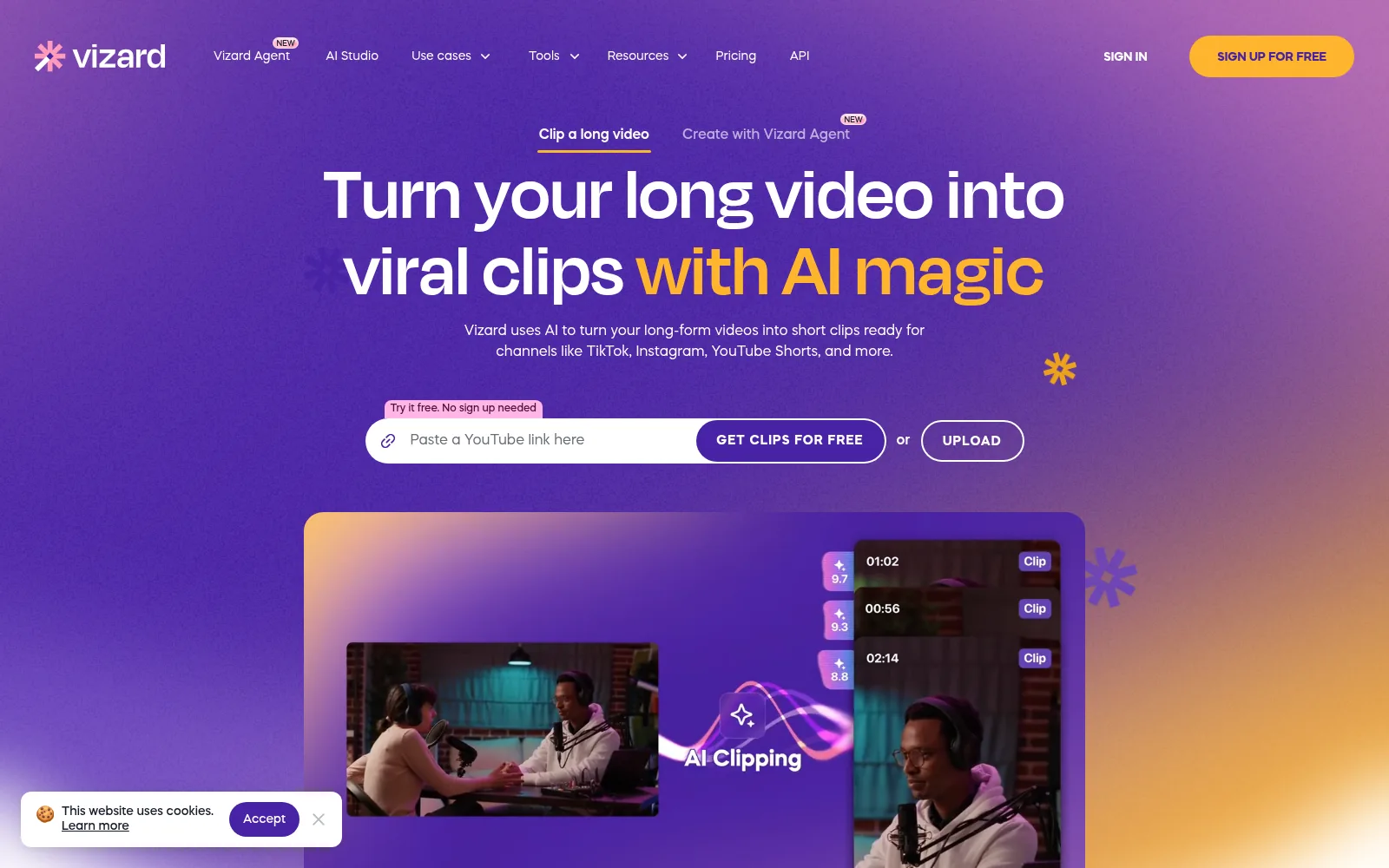
The loop is the reason the tool exists: you upload a long video, Vizard transcribes it, identifies speakers, and generates a batch of vertical clips centered on the speaker, with captions, reframe, AI emojis, and keyword highlights already applied. On paper the upload ceiling is generous: up to 60 minutes and 1GB on the free tier, rising to 600 minutes and 30GB on the paid plans, which means a full two-hour webinar fits comfortably. The honest limitation is the credit meter underneath: one credit is one minute of source video, so a 60-minute podcast costs 60 credits whether it comes out as one clip or twenty. Reviewers are mixed on how much cleanup each batch needs, which is normal for this category and worth budgeting into your workflow rather than pretending the clips ship untouched.
💬 Captions, translation, and the editor underneath
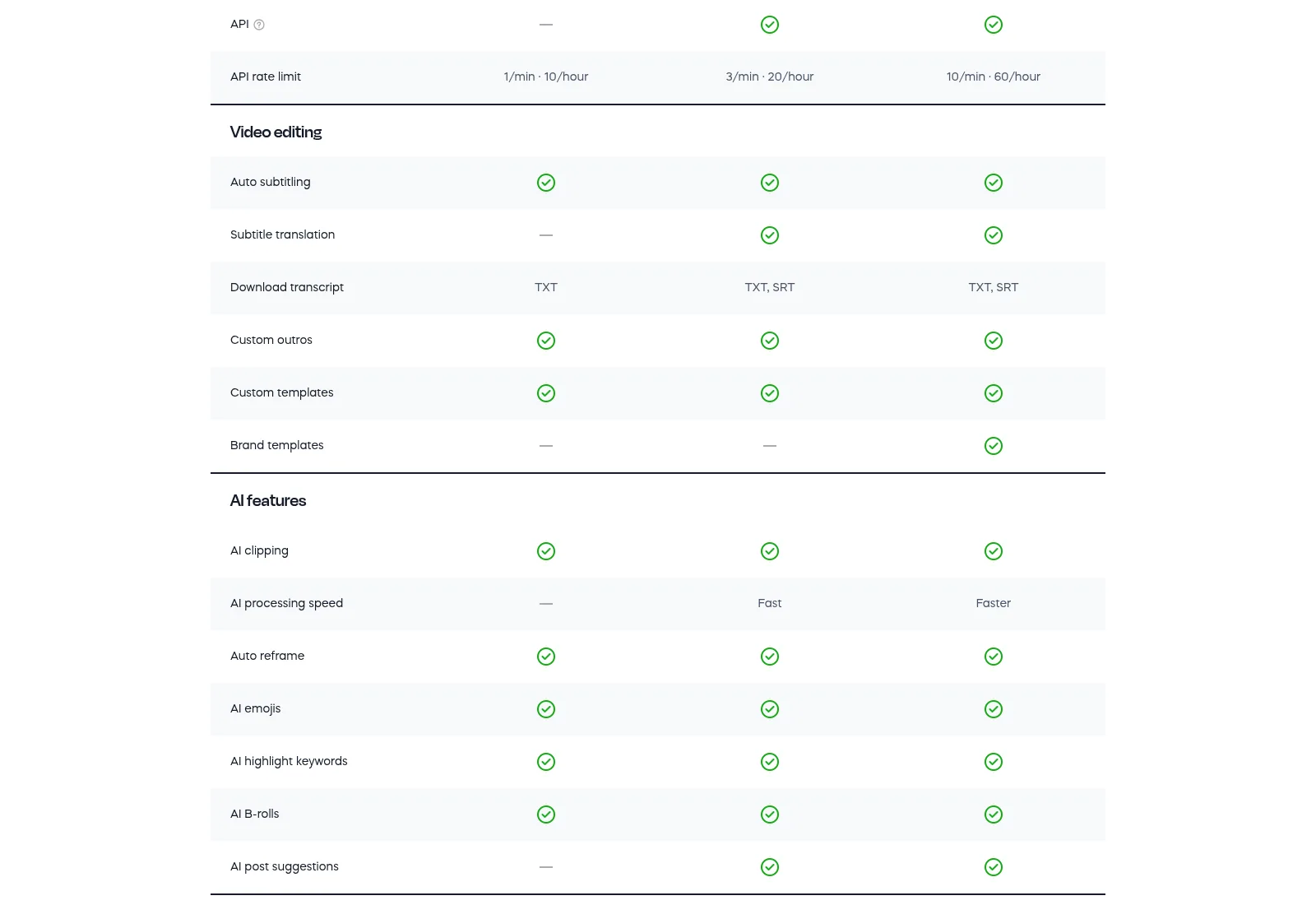
This is where Vizard separates itself from the simplest one-click clippers. Captions support 50-plus languages with AI-generated emojis and keyword highlighting, caption translation reaches 100-plus languages, and on paid plans you can export the transcript as SRT, not just TXT, which matters if a publisher or a client wants to subtitle the clip themselves. The editor itself is text-based: delete a sentence in the transcript and the video cuts at the same place, with a timeline for second-level trims, plus one-click ratio changes and brand templates. Independent reviewers rate the captions and transcript accuracy as good rather than magical, so plan a proofread pass before scheduling a post.
📅 Scheduling, publishing, and the team workspace
Vizard is trying to be the last stop before posting, not just a clip generator. Creator lets you connect six social accounts and schedule posts; Business raises that to twenty, adds a shared workspace, editable team seats at $5 per seat per month, shared projects, a brand kit, custom fonts, and unlimited storage. Link sharing lets you send a draft clip to a client without handing them a login, and exports can save straight to Google Drive. The trade-off to notice: Creator and Business include the same 7,200 credits a year, so Business buys you seats, brand controls, and publishing scale, not more editing minutes. If you are a solo creator, that means you are paying $5 more per month per teammate for the team layer rather than for more clips.
🚀 API and the processing-speed tier
The API exists and is documented, but it is a power-user feature rather than a selling point: Creator gets roughly 3 requests per minute and Business 10 per minute, with no meaningful API on Free. Vizard’s own comparison table is a little muddled here, marking the API row itself as unavailable for Free while still listing a 1-per-minute rate limit in the row below, so read the Free API claim as “effectively none.” Processing speed also splits: free plans run at the basic queue, Creator gets “fast,” Business gets “faster.” If your team only uploads a webinar once a week, the queue will never bother you. If you are feeding hundreds of hours through a pipeline, the rate limits and the speed tier are the reasons to price Business rather than assume Creator scales.
What Real Users Actually Say
Vizard has a genuinely large review footprint for a product in this category, and the numbers point in one direction. The catch is that the platform pages themselves block automated access, so I am working from aggregator-reported figures.
The Aggregate Scores
Across the trackers I could cross-check, G2 sits at 4.7 out of 5 from a solid mid-sized review base, Capterra at 4.9 out of 5 from a similar base, and a third-party aggregator lists an overall 4.8 across the combined G2 and Capterra sample, last checked in September 2026. Vizard’s own pricing and homepage pages display four rating badges (4.7, 4.9, 4.9, 4.9), which I read as curated rather than independent. The Capterra 4.9 is impressive but worth treating as a small-business-skewed sample: the category is young, and there are nowhere near the thousands of reviews you would see on a tool like Canva.
— G2 and Capterra product pages block automated access; figures cross-checked via ToolRadar’s Vizard profile and independent review write-ups, October 2026, and are aggregator-reported rather than pulled live from the platform pages
The Recurring Criticism
The praise is the usual category praise: saves hours versus manual clipping, the captions look clean, and non-editors ship posts on day one. The complaints cluster in three places. First, credit budgeting: reviewers on tighter plans say the allowance runs out faster than expected once every clip needs a re-roll, and the free tier’s 60 credits is one long video. Second, clip quality is hit-or-miss depending on source footage: fast cuts, multiple speakers, or noisy audio produce clips that need real manual repair, which defeats the time-saving promise for those recordings. Third, the pricing page leads with a 50% off number, so renewal price shock is a predictable complaint when the promo ends. There is also a smaller thread about the editor being capable but not as fluid as a desktop tool once you need fine cuts.
— Independent hands-on write-ups and aggregator-tagged feedback summaries, October 2026; I did not open individual G2 or Capterra review threads directly
Read the split correctly. The 4.8 aggregate comes mostly from happy small teams replacing a freelance editor, and it is not a rating of the AI clipping being perfect. The recurring warning is about planning: run your credit meter on real footage, not on the demo clips on the homepage, and re-rolls cost minutes. If your source videos are usually clean talking-head recordings, you will land in the happy cohort; if they are fast-cut livestreams, budget manual cleanup.
User feedback sourced from G2 and Capterra reviews.
Pricing: Every Plan, Laid Bare
Vizard has a real free tier rather than a card-gated trial, and paid plans are credit-based: one credit equals one minute of source video, and credits refill every billing cycle. The pricing page defaults to a yearly view with a 50% off badge; the prices below are exactly what that view shows, with the struck-through monthly-billing prices noted. There is no separate Pro tier in the current lineup, just Free, Creator, and Business, and both paid plans include the same 7,200 credits a year.
| Plan | Price | What You Get |
|---|---|---|
| Free | $0 | 60 credits/month (60 source minutes), 720p export with watermark, full editor access, 1 social account, 3-day storage, 60-minute / 1GB uploads at 1080p, TXT transcripts only. |
| Creator (most popular) | $14.50/mo billed yearly ($174/yr); $29/mo month-to-month | 7,200 credits/year (~600/month), no watermark, 4K export, 100 GB storage, 6 social accounts, scheduled posts, 600-minute / 30GB uploads, SRT transcripts, subtitle translation, AI post suggestions, basic API. |
| Business | $19.50/mo billed yearly ($234/yr); $39/mo month-to-month | Same 7,200 credits/year, shared workspace, 20 social accounts, team seats at $5/mo each, shared projects, brand kit, custom fonts, unlimited storage, faster processing, higher API limits. |
| Add-on seats | +$5/user/month on Business | Extra editors and collaborators on the shared workspace; no equivalent seats on Creator, which stays a private workspace. |
The Unfiltered Pros & Cons
Pros
- ✓ The full clipping workflow in one tool: AI highlights, auto-reframe, captions with emojis in 50+ languages, auto B-roll, and a text-based editor
- ✓ Direct publishing to 1, 6, or 20 social accounts with scheduling, plus Google Drive export and an API
- ✓ Generous upload ceilings on paid plans (up to 600 minutes, 30GB), so full webinars fit instead of getting chunked
- ✓ Strong independent ratings: G2 4.7 and Capterra 4.9 across a solid combined sample per aggregator trackers
- ✓ Business adds a real team layer: shared workspace, brand kit, $5 seats, client preview links, and priority support
Cons
- ✗ The $14.50 headline is a 50% off yearly promo; month-to-month is $29, and renewal price shock is predictable
- ✗ The free tier is a taster: 60 credits a month is roughly one hour of footage, with a watermark and 3-day storage
- ✗ Both paid plans share the same 7,200 yearly credits, so Business buys team features, not more editing minutes
- ✗ Clip quality depends heavily on source footage; fast cuts, multiple speakers, or messy audio need manual repair and re-rolls burn credits
- ✗ Support is live chat and email only, with priority on Business; no phone line, and the API rate limits stay modest
Final Verdict
Vizard is the most workflow-conscious of the long-to-short clip tools: it clips, captions, translates, brands, schedules, and publishes from one account, and the team layer on Business is genuine. It earns its 4.7 G2 and 4.9 Capterra marks from small teams replacing a freelance editor. What keeps it from a higher score is the promotional pricing that masks the real $29/$39 monthly cost, the tiny free tier, a credit meter that punishes re-rolls, and support that is chat-only. Buy it if a weekly webinar-to-posts pipeline is your job; skip it if you are a solo who only wants the fastest clip button and never touches a calendar.
If you are testing for the first time, do not judge Vizard on the demo clips on the homepage. Upload one real hour of your own footage on the free plan, run the AI clipping pass, and count how many clips are publishable after ten minutes of cleanup. If the hit rate is good and your team posts to more than three accounts, Creator at the promotional yearly price is the right entry; it is the first tier that drops the watermark and unlocks SRT export and scheduling. If two or more people touch the workflow or clients need preview links, step up to Business for the shared workspace and brand kit, and expect the per-seat $5 add-on rather than a surprise enterprise quote.
The honest comparison: Klap leans toward the fastest one-click experience for solo creators, Opus Clip toward polish and virality scoring, and Submagic toward caption style. Vizard tilts toward the team and publishing workflow, which is also why its editor feels a little more involved. You can read more about how we test and why you can trust our calls on our methodology page.
Frequently Asked Questions
Is Vizard free?
Yes. The free plan gives you 60 credits a month, which works out to about 60 minutes of source video, with AI-generated clips, the full editor, and 720p exports, but with a watermark, 3-day storage, one connected social account, and TXT-only transcripts. Paid plans start at $14.50 per month billed yearly on Creator, and every paid tier removes the watermark.
How much does Vizard actually cost?
Billed yearly, Creator is $14.50 per month ($174 a year) and Business is $19.50 per month ($234 a year), both at a 50% off promotion; month-to-month they are $29 and $39. Both paid plans include 7,200 credits a year, where one credit is one minute of source video. Extra team seats on Business are $5 per user per month.
Is Vizard worth it for a coach, marketer, or small team?
Worth it if your week already contains a webinar, podcast, or long client call that you would otherwise hand to a freelance editor, because the clip, caption, schedule, and publish loop replaces that freelance budget. Less worth it if you only process a couple of hours a month, if you want the absolute simplest one-button interface, or if you expect the AI clips to ship with zero cleanup.
How does Vizard compare to Klap, Opus Clip, or Submagic?
Klap and Opus Clip lean faster and more opinionated for solo creators, and Submagic leans harder on caption styling. Vizard tilts toward the team and publishing side: shared workspace, brand kit, scheduling across up to 20 accounts, SRT export, translation into 100-plus languages, and an API. It integrates by publishing directly to social accounts and saving to Google Drive, rather than through a large third-party app directory.
About the Author
