
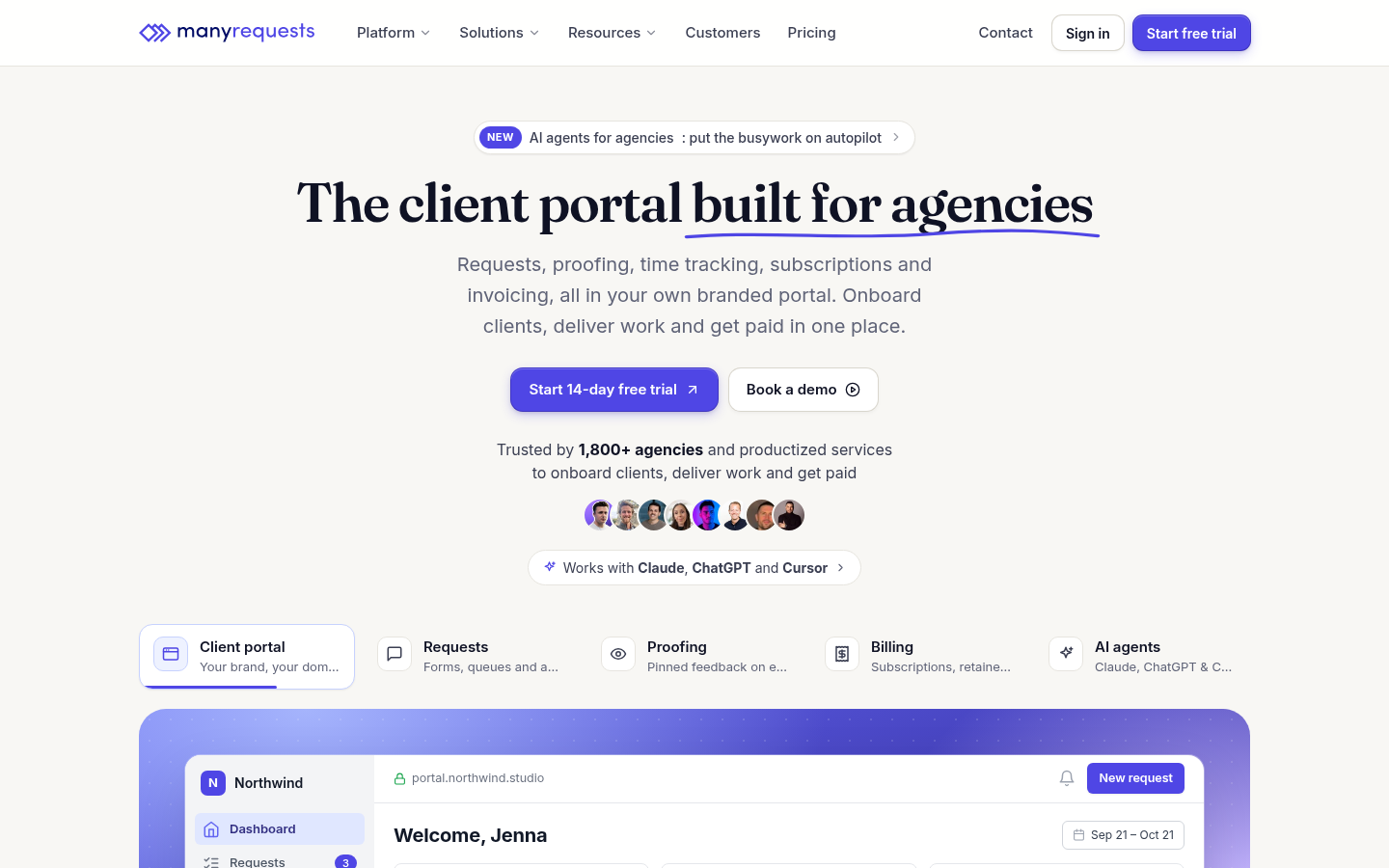
Quick verdict: ManyRequests is a white-label client portal built for agencies and productized services, and it bundles the client-facing work — requests, proofing, time tracking, subscriptions and invoicing, CRM and reporting — under your own domain and branding
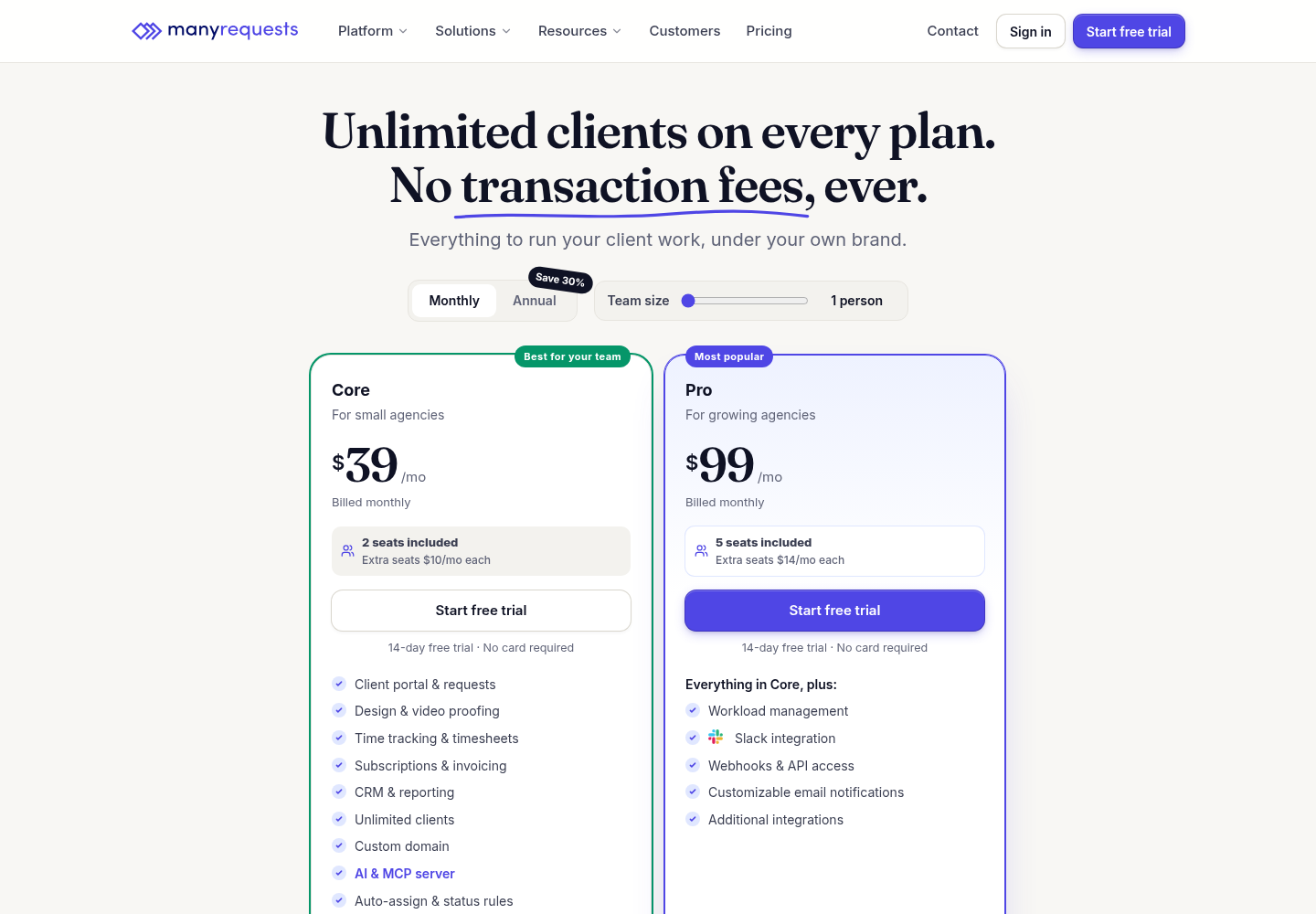
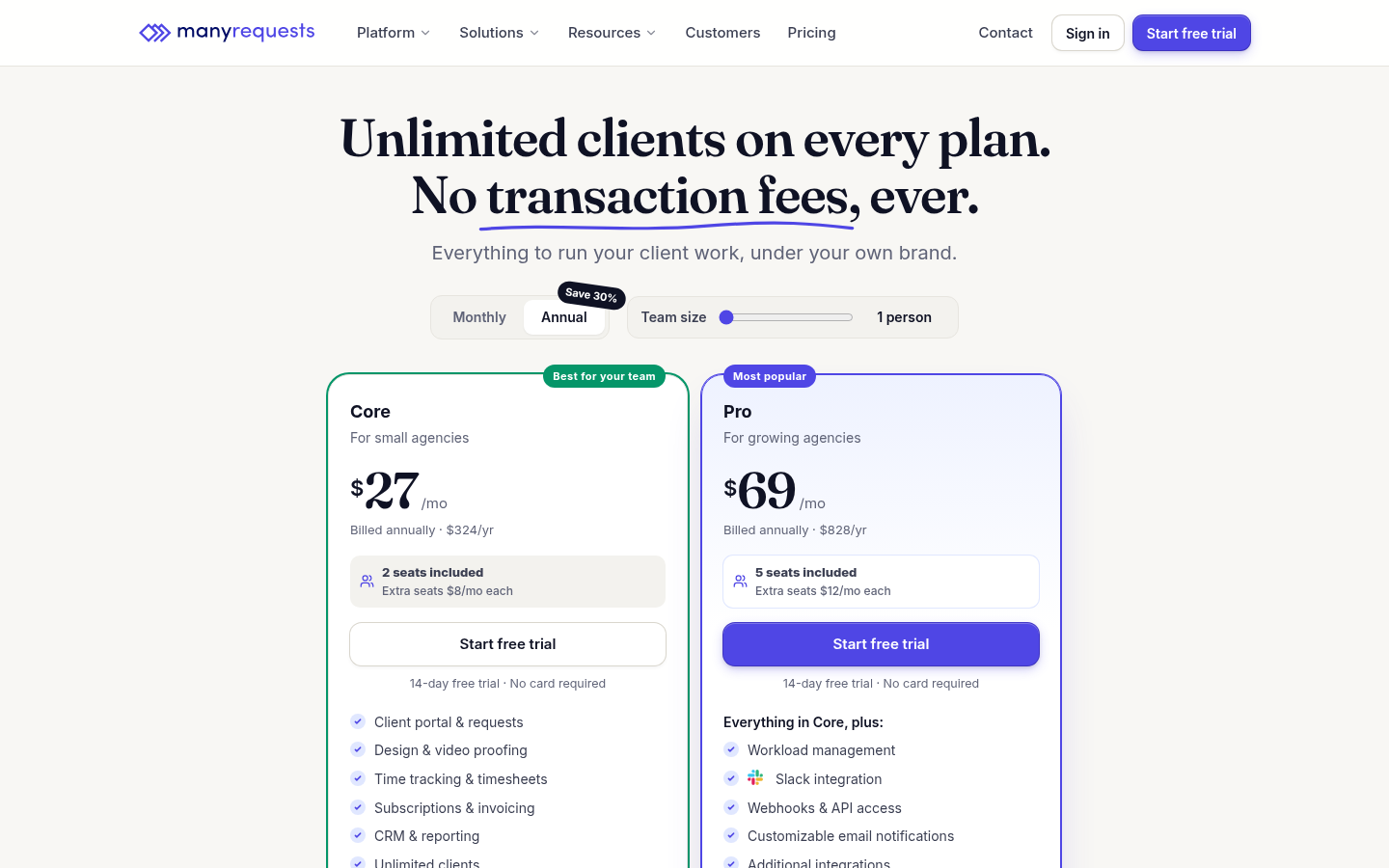
My recommendation: Core at $39/mo monthly ($27/mo annual, $324/yr), 2 seats, extra $10/mo ($8 annual).
Rating: 3.7/5 Figures come from the live site or aggregator-reported ratings, not a vendor deck.
The Short Version
ManyRequests is an agency backbone rather than a generic project board. A client logs into a branded portal on your own domain, submits requests through custom forms, reviews and approves design and video assets with inline comments, and you can track time, send invoices and collect recurring subscriptions through Stripe without the software adding a transaction fee. After working the live calculator and the plan comparison, I think it is a strong fit for a client-service agency that wants to kill the email-thread chaos and present one professional, white-labeled hub. The catch is value: the entry Core plan is $39 a month for two seats, and the white-label perks that matter — removing the “Powered by” link, Slack, webhooks, workload management — sit behind the $99 Pro plan, so a small team pays for a lot before it gets the full branded experience.
Here is what I actually checked. I loaded the live pricing page in a real browser, switched between Monthly and Annual, moved the team-size slider, and read the full plan comparison and the feature rows, then captured real screenshots of the homepage and both pricing views. I cross-checked ratings against the aggregators and secondary roundups I could access. The inside of a working workspace sits behind a signup, so my read of the in-app screens is grounded in the live calculator, documented features and reviewer reports rather than a portal I ran with paying clients.
The short version: if you run a repeatable service with recurring clients and care about a clean, branded portal with no per-client caps and no transaction fees, the model is genuinely well targeted. If you are a solo operator who mainly needs a cheap task board, the seat-based pricing and the Pro-gated white-label features will feel like overpaying.
Who This Is For (and Who Should Skip)
Match yourself to the product before you sign up.
- ✅ Agencies and productized services This is the center of gravity: a white-label portal on your own domain where clients submit requests, proof assets and pay invoices, replacing scattered email and spreadsheets.
- ✅ Teams billing retainers and subscriptions Recurring billing, checkout forms, hourly and credit-based services and Stripe invoicing live in one place, with no added transaction fee beyond Stripe’s own.
- ✅ Design and video shops Inline design and video proofing with comments maps directly to the revision loop that drives those businesses.
- ❌ Solo operators on a tight budget Two seats on Core still cost $39 a month, and the headline white-label features are Pro-only, which is a lot for a one-person workflow.
- ❌ Teams that only need a task board If you have no client-facing portal or invoicing need, the agency-specific modules are overhead a simpler project tool won’t charge you for.
Score Breakdown
What Actually Matters: Features, Reviewed
Rather than recite the marketing page, I focused on the four things that decide whether you buy, skip, or upgrade.
🔐 The white-label client portal and custom domain
The portal is the core of the product: clients reach a hub under your own domain (such as portal.youragency.com), with your logo and brand colors, onboarding flows, file sharing, messaging and multi-language support. Every plan includes unlimited clients and a custom domain, so there is no per-client pricing to manage. The honest split is that fully removing the “Powered by ManyRequests” link is a Pro and Enterprise feature, not Core — so a white-label that shows no vendor at all is part of the higher tier even though the portal itself is branded from day one.
📝 Requests, proofing and the revision loop
Clients submit work through customizable request forms with conditional rules and auto-assignment, and you move tasks through Kanban, list and queue views with custom statuses and internal comments. Design and video proofing lets people leave comments directly on the assets, which is where agencies lose the most time in email. Website proofing is still marked as coming soon, so I would not assume that piece is live. For a design or video shop this is the feature set that actually maps to how revisions happen.
🕑 Time tracking, billing and the no-fee promise
Time entries can be automatic or manual, with timesheets and utilization that feed retainers and invoices. Billing covers subscriptions, hourly and credit-based services, hours that roll over, discount codes, free and paid trials, top-ups and client balances, all processed through Stripe. The notable promise is that ManyRequests charges no transaction fee of its own — you pay only Stripe’s fees — and the billing module can be disabled if you don’t need it. That is a genuine difference from portals that take a cut of every invoice.
🔗 CRM, reporting and the Pro-gated automation
The CRM holds client profiles, notes, tags, brand profiles and activity and satisfaction history, while reporting covers time, usage and revenue with response and resolution insights. The automation gap is the key upgrade decision: Slack integration, webhooks, customizable email notifications, additional integrations and workload management for capacity planning are all Pro-only. Core still includes Zapier and the Extensions embed layer, so you can wire some automation without upgrading, but event-driven webhooks and native Slack are not on the entry plan.
What Real Users Actually Say
The major review platforms restrict automated access, so I am separating what I could verify from what is only reported by secondary aggregators.
The Scores I Could Check
Across the aggregators and secondary roundups I could access, ManyRequests is reported at 4.5 out of 5 on G2, with the recurring praise aimed at the clean, uncluttered interface, the branded client experience and responsive support. The important caveat is sample size: this is a focused product with a relatively small number of reviews rather than a widely measured platform, so I am treating 4.5 as directionally positive, not a settled statistical verdict. I could not independently open the individual G2 threads because automated access is disallowed.
— Accessible aggregators and secondary roundups; individual G2 and Capterra threads disallow automated access, last checked November 2026
The Recurring Criticism
The praise is consistent: agencies say the portal professionalizes how clients request work and pay, and that migrating off scattered tools is quick. The complaints cluster around cost and tiering. First, full white-labeling — removing the vendor branding — is not available on Core, and at least one reviewer notes that makes the custom branding feel expensive. Second, Slack, webhooks and workload management are gated behind Pro, so a team that wants the complete automation stack starts at $99. Third, pricing has shifted repeatedly, which makes older figures on the web unreliable. There is no evidence of a service or data-trust crisis; the debate is whether the tier structure fits a small agency’s budget.
— Accessible review platforms and aggregator-tagged feedback, November 2026; individual G2 and Capterra threads were not opened directly
Read the split correctly. The strong feedback comes mainly from agencies that value the branded portal and got clients off email, and it is not a claim that the entry plan delivers the full white-label. Count your seats and decide whether you need the Pro-gated features before you commit, rather than judging the product on the trial alone.
User feedback sourced from G2 reviews and secondary roundups.
Pricing: Every Plan, Laid Bare
ManyRequests uses seat-based pricing with a 14-day free trial and no credit card required, and annual billing lowers the monthly rate. The figures below are exactly what the live calculator returned in my browser today; confirm them at checkout because the company has repriced before.
| Plan | Monthly | Annual (billed yearly) |
|---|---|---|
| Core | $39/mo — 2 seats included, extra seats $10/mo each | $27/mo ($324/yr) — extra seats $8/mo each |
| Pro (popular) | $99/mo — 5 seats included, extra seats $14/mo each | $69/mo ($828/yr) — extra seats $12/mo each |
| Enterprise | $799/mo flat, unlimited seats | Custom price per seat; API access, branded mobile app, concierge onboarding |
Every plan includes the client portal, requests, time tracking, billing, CRM, reporting, unlimited clients, a custom domain, design and video proofing, Zapier and Extensions. Pro adds Slack, webhooks, customizable email notifications, the option to remove “Powered by,” additional integrations and workload management. Storage is 1TB on Core and 2TB on Pro, with extra storage at $25 a month per 500GB.
A few honest caveats before you pick. First, the real white-label and automation cost is the Pro price, so decide early whether you need those features. Second, treat any figure quoted from older blog posts with suspicion and rely on the live calculator. Third, use the 14-day trial on a real client workflow to see whether the portal replaces your current tools. For category context, see our best client portal software roundup.
The Unfiltered Pros & Cons
Pros
- ✓ Purpose-built white-label portal on your own domain with unlimited clients and no per-client caps
- ✓ No transaction fee beyond Stripe, with subscriptions, invoices and flexible billing in one place
- ✓ Design and video proofing plus requests and time tracking cover the real agency revision loop
- ✓ Reviewers consistently praise the clean interface and responsive support
- ✓ 14-day trial without a credit card and free migration support
Cons
- ✗ Removing the vendor branding and getting Slack, webhooks and workload management require Pro
- ✗ Seat-based pricing is expensive for a solo operator who mainly needs a task board
- ✗ Pricing has changed repeatedly and legacy figures still appear across the site
- ✗ Website proofing is not yet live and native automation is limited on Core
- ✗ Dedicated account manager and concierge onboarding are Enterprise-only
Final Verdict
ManyRequests is a focused, well-built answer for an agency or productized service that wants one branded hub for requests, proofing, time and billing, and the no-client-cap, no-transaction-fee stance is a genuine advantage. The reported user ratings are positive and the interface gets real praise. What keeps it from a higher score is the tier math: the white-label and automation features that make the portal feel truly yours are Pro-only, and the seat-based pricing is a hard fit for a solo budget. Buy it if you run a repeatable client service and want to replace email and separate invoicing with one portal; skip it if you only need a cheap task board or expect full white-labeling on the entry plan.
If you are testing for the first time, use the 14-day trial on a genuine client workflow and count exactly how many seats you need, because that decides whether Core covers you or pushes you to Pro. If you already know you need the vendor branding removed and event-driven webhooks, start on Pro rather than upgrading within weeks.
You can read more about how we test and why you can trust our calls on our methodology page.
Frequently Asked Questions
Is ManyRequests free?
There is no permanent free plan, but every plan starts with a 14-day free trial and no credit card is required. Paid plans start at $39 a month for Core on monthly billing, or $27 a month when billed annually.
Does ManyRequests charge transaction fees?
No. The company adds no transaction fee of its own; you only pay Stripe’s processing fees. The billing module can also be turned off if you handle invoicing elsewhere.
What is the difference between Core and Pro?
Core is $39 a month with two seats and covers the portal, requests, proofing, time, billing, CRM and reporting. Pro is $99 a month with five seats and adds Slack, webhooks, customizable email notifications, the option to remove the “Powered by” branding, additional integrations and workload management.
Is there a limit on clients?
No. Every plan includes unlimited clients, and invited clients do not count as seats; only your internal team members use seats. Extra seats are billed per month at the rate for your plan.
About the Author