The Short Version
If Synthesia is the safe corporate workhorse, HeyGen is the flashier cousin whose avatars actually make viewers do a double-take. Across four weeks of testing, the realism of HeyGen’s talking heads – the subtle hand movements, the natural head turns, the lip-sync – is visibly ahead of every competitor I tried. For videos aimed at an external audience, that gap matters.
HeyGen’s other standout is video translation. Translating an existing video into another language with matched lip movements is something it does better than any tool in this roundup, and it has become a genuine workflow for marketing teams shipping content globally. The platform also moves fast: frequent updates, a Video Agent beta, instant avatar creation from a selfie, and a clean, beginner-friendly editor.
The cost is twofold. First, the credit model: every small script edit re-renders and consumes credits, and G2 reviewers consistently note that credits “drain fast.” Second, pricing: the Creator plan is approachable at $29/mo, but 4K, heavier credits, and team features push you into Pro and Business tiers that climb quickly. A vocal minority of paid users also report instability after frequent updates. HeyGen is excellent – you just have to watch the meter.
Who This Is For (and Who Should Skip)
HeyGen rewards users whose videos go in front of real people. If realism and reach matter, it leads.
- ✅ Marketers and sales teams shipping customer-facing video The avatar realism is worth it when prospects are the audience. This is HeyGen’s sweet spot.
- ✅ Global teams needing translated, lip-synced video Video translation with matched mouth movements is best-in-class here.
- ✅ Solo founders wanting a photorealistic spokesperson Instant avatar creation from a selfie plus voice cloning gives you a digital double in about an hour.
- ❌ Budget solo users who edit constantly The credit model punishes iteration, and lower tiers feel restrictive to frequent creators.
- ❌ Enterprise L&D teams needing deep compliance tooling Synthesia’s SCORM, SSO, and audit features are more mature; HeyGen is catching up but leads elsewhere.
Score Breakdown
What Actually Matters: Features, Reviewed
HeyGen ships a lot, but three features define whether it is right for you. Everything else is secondary.
👨🎤 Photorealistic avatars and voice cloning
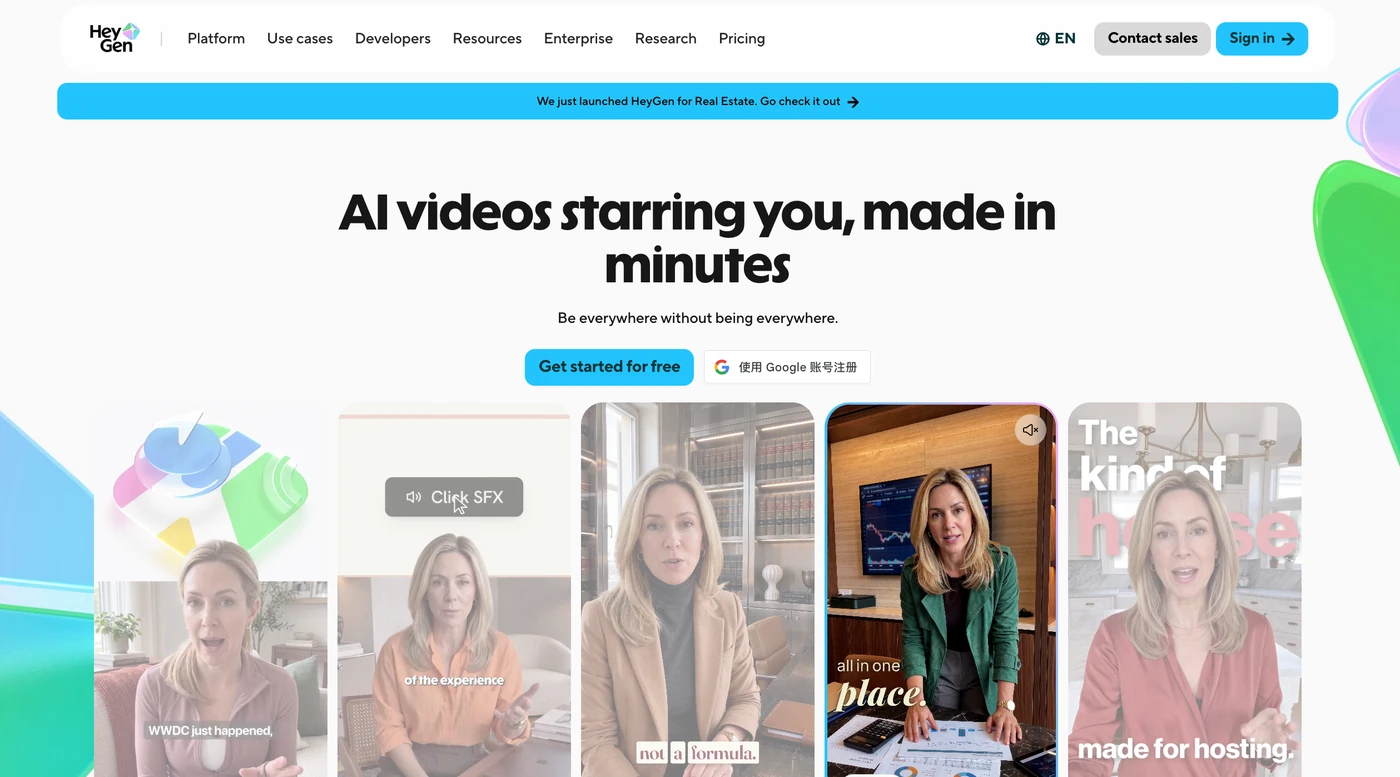
This is the reason to pick HeyGen. The 700+ stock avatars look modern and natural, with subtle gestures and eye movement that hold up better on camera than Synthesia’s more formal presenters. Creating your own instant avatar from a handful of selfies takes about five minutes, and pairing it with a cloned voice is genuinely eerie in the best way. The limitation is that fine emotion and gesture control are still limited, and on long, complex scripts the avatar can start to feel repetitive. But for a 30-to-90 second spokesperson clip, it is the best realism you can buy.
🌐 Video translation with lip-sync
This is HeyGen’s secret weapon and the feature no competitor matches as cleanly. You upload an existing video, pick a target language, and HeyGen re-renders the speech with matching lip movements while preserving the speaker’s voice and tone. For marketing and product teams shipping the same message across ten markets, this collapses what used to be a re-shoot into a few clicks. The quality is strong in major languages and slightly uneven in long-tail ones, but it is a workflow that genuinely saves production budgets.
💰 The credit model that punishes iteration
HeyGen sells credits rather than flat minutes, and the billing model is its single biggest weakness. Roughly one credit equals one minute of avatar video, but here is the catch that keeps coming up in reviews: making even a small script edit re-renders the affected video and consumes credits again. You cannot tweak an existing render without spending more. G2’s own summary puts it plainly – credits drain fast because small edits mean re-renders. Plan your videos in the script before you hit generate, and budget a buffer for the first couple of takes.
🚀 Velocity vs. stability
HeyGen updates constantly – new avatars, the Video Agent beta, image generation, and export options land frequently. That pace is a pro and a con. Most users love the innovation, but a consistent thread of negative reviews describes instability: platform bugs after an update, slower processing on larger footage, and one reviewer who had a three-day project break after a harmless text edit introduced stray sound effects. The support team is generally responsive, but if you are a team running production-critical pipelines, test updates on a throwaway project first.
What Real Users Actually Say
I dug through verified G2 and Capterra reviews to find what real subscribers experience day to day. HeyGen sits at 4.7 on Capterra across 315 reviews, with 96% rating it above four stars. The praise is about realism and speed; the complaints are about cost and credit burn.
The Good
“It has become an important part of our content workflow because it allows us to create high volumes of professional video content quickly and efficiently.”
– CEO, verified review on Capterra
“I’m really impressed with HeyGen, especially how it automatically adjusts avatar hand movements and emotions to match the generated…”
– Verified user, verified review on Capterra
The Complaints
“The price is to my taste a big handicap for people to stay with it. In many countries the amount charged is much to high and not important enough to make people stay with it.”
– Customer Service lead, verified review on Capterra
“Credits drain fast, since small script edits mean re-rendering, and gesture control stays limited.”
– Verified user, verified review on G2
User feedback sourced from G2 and Capterra reviews.
Pricing: Every Plan, Laid Bare
HeyGen uses a free trial tier plus four paid rungs, all billed on credits. The entry price is reasonable, but the real cost surfaces when you need 4K, more credits, or team seats. Here is the current public pricing in USD.
| Plan | Price | What You Get |
|---|---|---|
| Free | $0 | 3 watermarked videos/month, 720p export, no download, limited avatar engine. A hands-on taste, not a production plan. |
| Creator | $29/month (~$24/mo billed annually, $288/yr) | 600 credits/month, 1080p export, watermark removed, videos up to 30 min, unlimited voice cloning, 700+ stock avatars, photo avatars, 175+ languages, 1 user seat. |
| Pro | from $49/month | 1,000+ credits/month, 4K export, faster processing, script translation and video-translation editing, priority rendering. |
| Business | $149/month + $20/seat | ~1,500 credits/month, team workspace with commenting and co-editing, 5 digital twins, SSO, SCORM/LMS export, business brand controls. |
| Enterprise | Custom pricing | Custom credit volumes, dedicated onboarding, advanced security, and tailored support for large organizations. |
The per-minute reality is the story. On Creator, 600 credits buys roughly 15 to 30 minutes of avatar video depending on the avatar engine, but every small edit re-renders and consumes credits again – so your effective minutes shrink the more you iterate. The leap from Creator to Pro is about 4K and heavier credit volume, and Business at $149 plus $20 per seat is where teams start to feel the bill. Most solo creators are well served by Creator; move to Pro only if you consistently exhaust your monthly credits or need 4K. Watch the credit meter from your first take, because that is where HeyGen quietly charges you most.
The Unfiltered Pros & Cons
Pros
- ✓ Most photorealistic avatars and lip-sync on the market
- ✓ Best-in-class video translation with matched lip movements
- ✓ Fast instant-avatar and voice-cloning workflow for solo creators
- ✓ Clean, beginner-friendly editor with 4K export on Pro
- ✓ Rapid product velocity with frequent meaningful updates
Cons
- ✗ Credits drain fast because every small edit re-renders
- ✗ Pricing climbs quickly once you move past solo use
- ✗ Limited fine gesture and emotional control on avatars
- ✗ Frequent updates occasionally introduce new bugs
- ✗ Free tier is a tease: 720p, watermarked, no download
Final Verdict
HeyGen builds the most photorealistic AI avatars and the best video-translation-with-lip-sync workflow on the market, full stop. If your videos are meant for prospects, customers, or the general public, the realism gap over Synthesia is real. The trade-off is a credit-based billing model that drains fast on every small edit, and pricing that climbs quickly once you move past solo use.
If your videos are customer-facing marketing, sales outreach, product explainers, or global content that needs translated and lip-synced versions, HeyGen is the best realism you can buy short of a real shoot. Pick the Creator plan, learn to write your script well before you hit generate, and you will get results that make viewers forget they are watching an AI avatar.
If you are a budget solo creator who revises constantly, or an enterprise L&D team that needs mature SCORM, audit, and compliance tooling, the credit model and pricing will wear on you. In those lanes, Fliki offers better value and Synthesia offers deeper enterprise tooling. But for the creator or marketing team that prioritizes realism and reach, HeyGen earns a strong 4.4.
Frequently Asked Questions
Is HeyGen free?
There is a free trial tier that generates up to three watermarked videos per month at 720p with no downloads. It exists to show you the workflow, not to ship production content. Paid plans start at Creator.
Can I create my own AI avatar and voice?
Yes. HeyGen offers instant avatar creation from a set of selfies, and voice cloning is included on the Creator plan and above. Pairing your own avatar with your cloned voice produces a convincing digital double for spokesperson videos.
How does HeyGen’s credit system work?
Roughly one credit equals one minute of avatar video, and credits are consumed when a video renders. The important caveat is that editing a rendered video – even a small script change – triggers a re-render and consumes credits again, so effective minutes shrink the more you iterate.
HeyGen vs. Synthesia: which should I choose?
Choose HeyGen if your videos are customer-facing and realism, multilingual translation, and avatar photorealism are the priority. Choose Synthesia if you are an L&D or HR team that needs SCORM export, brand kits, SSO, and mature enterprise compliance for internal training content.
About the Author