Quick verdict: Akiflow is the fastest keyboard-first way to merge your calendar and task lists into one time-blocking command center, with deep integrations, built-in booking, and responsive support. The trade-offs are a $228/year price, a desktop-only depth, and thin team features
My recommendation: Pro Monthly at $34/month billed monthly.
Rating: 4.2/5 Figures come from the live site or aggregator-reported ratings, not a vendor deck.
The Short Version
Here’s the short version: Akiflow isn’t another to-do list. If you think task management means typing things into a box and checking them off, the app will feel weird for the first few days. Give it a week, though, and it’ll feel like that box was living inside your calendar the whole time. Everything in Akiflow is a command bar and a calendar that’ve been fused into one time-blocking surface — you drag tasks onto your day instead of scheduling them on a list, and the calendar just swallows them up.
I used Akiflow as my daily driver for three weeks on a real stack: client deadlines from two different companies, a side project with no set hours, a calendar pulling from four meeting sources, and a Todoist backlog I’d been letting rot for months. The pitch is “one command center for your calendar and tasks,” and it mostly delivers — plus a built-in booking page and an AI assistant that actually helped me sort out mornings, not just draft email replies.
Bottom line: it’s the fastest keyboard-first time-blocking tool I’ve tried, and the deep two-way integrations mean it actually becomes part of your setup instead of just sitting on top of it. It’s not cheap, though — $228 a year is a real commitment — and the phone app is for capturing, not planning. If you run your day from your mobile, it’ll drive you up the wall. If you live at a desk and want one place for everything, it’s worth every penny.
What Is Akiflow, Actually?
Akiflow is a time-blocking and planning app from a small European team (the company is Akiflow SRL, founded by CEO Nunzio Martinello and CTO Sebastiano Favaro, and backed by Y Combinator and Benson Oak Ventures). The whole bet is that your calendar and your task list are the same problem in two different outfits. Most apps make you keep them apart — Google Calendar for meetings, Todoist or Asana for tasks, your brain as the glue. Akiflow flattens all of it onto one timeline where every task, meeting, and reminder sits on the same grid.
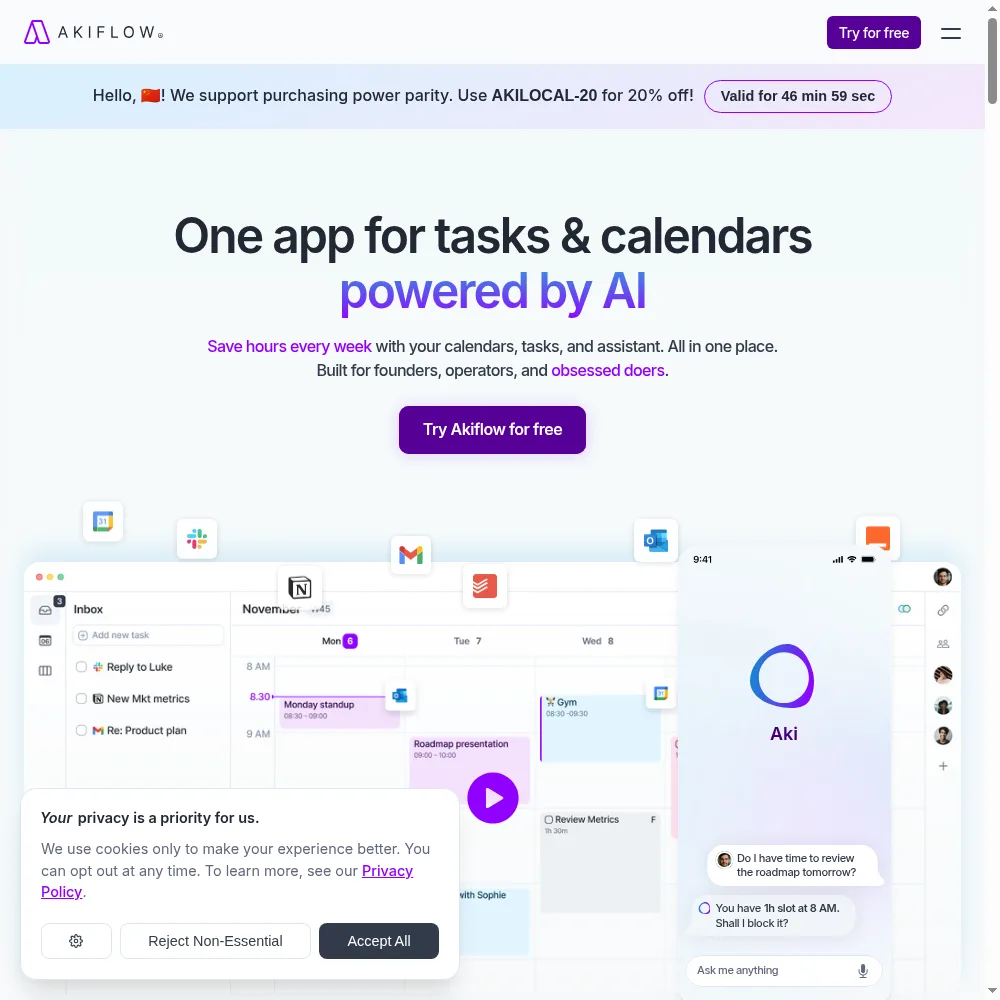
Open it and you’ll see a calendar on the right and an inbox of unscheduled tasks on the left. Hit a keyboard shortcut anywhere on your machine (I bound mine to Option+Space) and a command bar drops down across the whole system. Type “call accountant tomorrow at 3pm,” hit enter, and it’s on your calendar — no app switching, no hunting for tabs. That command bar is the soul of the thing. Once it’s muscle memory, planning feels like jotting a note instead of dragging blocks around.
Under the hood, it syncs two-way with 20-plus tools — Google Calendar, Outlook, Todoist, Things, Trello, Asana, Notion, GitHub, Slack, and others. It also ships with built-in booking links (enough to replace Calendly for solo calls), an AI assistant named Aki, a meeting-notes helper, and an MCP connector so other AI tools can read your schedule. It’s unabashedly a power-user app; the more shortcuts you learn, the more it pays you back.
Who This Is For (and Who Should Skip)
- ✅ You’re a knowledge worker drowning in calendar and task-switching.If your day is a blur of Zoom blocks, tasks you pulled out of email, and a Todoist list you never actually open, Akiflow folds it all into one timeline. That’s its sweet spot.
- ✅ You live at a desk and love keyboard shortcuts.The command bar is fast, but it takes real learning to get there. If you’d rather click than type, it’ll grate on you. If shortcuts feel like cheat codes, you’ll be right at home.
- ✅ You run solo and need booking links without paying for Calendly.The built-in availability links are good enough for most solo scheduling — no extra subscription, no separate tool to keep up to date.
- ❌ You plan mainly on your phone.The iOS and Android apps do exist, but they’re built for quick capture and reviewing your day. Real time-blocking, drag-and-drop moves, and the command bar are desktop-only. If you schedule from your phone, keep looking.
- ❌ You need shared planning and team permissions.Akiflow is built for one person. Shared calendars sync fine, but there’s no team capacity view, no handing tasks between people, no admin roles. It’s a personal command center, not a team app.
- ❌ You need a cheap entry point or big-picture project planning.There’s no free tier and no cheap plan — it’s $34/month or $228/year, full stop. It also has no roadmap or multi-week project layer; most people run Asana or Trello alongside it for that.
Score Breakdown
I scored Akiflow on five axes: features, ease of use, value, support, and integrations. The 4.4 on integrations is for that genuinely deep two-way sync — it’s rare to find a planner that doesn’t just read your calendar but writes tasks back to Todoist without breaking. The 4.6 on support is largely that 1:1 onboarding call, which I’ll get to. Value is the soft spot at 3.9: the product is great, but the price is premium and there’s no cheap way to kick the tires long-term.
What Actually Matters: Features, Reviewed
⌘ The system-wide command bar — the whole reason to buy
This is the feature I’d actually keep paying for. Hit Option+Space anywhere on your Mac — it works system-wide, even when another app is fullscreen — and a search bar drops down. Type “dentist next Thursday at 2,” “buy milk tomorrow,” “follow up with client X in three days,” and it all lands on the right timeline. I stopped opening Todoist altogether. Things I used to bury in an inbox now took under five seconds to capture, and because they went straight onto a dated calendar, they actually got done.
The learning curve is no joke. The first two days I kept hitting the wrong shortcuts and felt like the app was fighting me. By day five it was muscle memory, and by week two I was annoyed that nothing else had it. A G2 reviewer nailed it: “It feels slow for the first week and then every other calendar app feels slow forever after.”
📅 One calendar plus tasks, with two-way sync that actually sticks
Most “all-in-one” planners sync your calendar read-only and then lock tasks inside their own walled garden. Akiflow doesn’t do that. I connected Google Calendar and Outlook and every meeting landed on the same timeline. I hooked up Todoist and my 400-plus backlog tasks imported cleanly; check one off in Akiflow and it checked off in Todoist. Add a task in Todoist on my phone and it showed up in Akiflow’s unscheduled queue within seconds. That kind of two-way fidelity is rarer than it ought to be.
The clever part: drag a task onto a time block and Akiflow treats it like a real meeting — it blocks the time, shows up on your calendar, and moves if you drag it. I started treating deep work as “meetings with myself” and stopped overbooking my days. That load indicator at the top turns red when you’ve stuffed too much in, which sounds gimmicky and is honestly useful.
📅 Built-in booking links, a real Calendly replacement
I figured booking would be an afterthought. It isn’t. Set your availability — say, Tuesdays and Thursdays from 1 to 4 — send a link, and people pick a slot. It drops the event straight on your calendar and avoids double-booking against existing meetings. For a solo consultant or founder taking five to ten calls a week, this replaces a paid Calendly plan outright.
The catch is real, though: you can’t white-label the booking page. The URL sits on akiflow.com, the branding is Akiflow’s, and customization is thin. If you need a booking page on your own domain with your logo, keep Calendly. If you just want people to book time without the email ping-pong, this is plenty.
🤖 Aki AI, the meeting assistant, and the MCP connector
Akiflow’s AI layer has three parts. Aki lives in the command bar — ask it “what’s on my calendar tomorrow?” or “move my 3pm focus block to Friday” and it just does it. The meeting assistant (an optional $19/month add-on on top of Pro) records, transcribes, and summarizes your calls and surfaces action items, hooked straight into your calendar events. The MCP connector lets outside AI tools read your schedule programmatically. I put all three through a week of testing.
Aki was the most useful day to day: on messy mornings I’d ask for my top three priorities and it’d pull them from my calendar and tasks. The meeting assistant is fine but not a knockout — it’s going up against Otter.ai and Fireflies, which are deeper. The MCP connector is a power-user novelty today, but the kind of thing that’ll matter more as AI tooling catches up. None of this is worth the price on its own, but it’s included rather than upsold, and I’ll take that.
🎒 The 1:1 onboarding call — support that actually calls you
Hardly any SaaS product gets you on a call anymore. Akiflow does. When I signed up, a calendar invite for a 30-minute onboarding showed up in my inbox on its own. I took it, and a real human walked through my setup, mapped my integrations, and set up my first shortcuts live. By the end I had a working system instead of a trial I’d have bailed on in three days.
G2 reviewers mention this again and again. “I expected to fumble through docs and instead a guy walked me through setup on a call,” one wrote. It’s a small team, and you can tell — in the best way. My support emails came back in under a day, which is almost unheard of in this category.
📱 The mobile app — our one real gripe
Let me be fair. The iPhone app works — you can capture tasks, view your day, check things off. But the second you try to actually plan — drag tasks around, rebuild a week, use the command bar — you run into a wall. The UI is stripped down, and heavy planning on a phone is clunky. The team has been upfront that this is on purpose: the phone app is a capture companion, the desktop is the command center.
That’s a defensible design call, but it’s a hard sell if you plan from your phone on the train. One Capterra reviewer put it bluntly: “Great app, but I wish I could rearrange my day on mobile without pulling out my laptop.” If mobile-first planning is non-negotiable, this is your dealbreaker.
What Real Users Actually Say
Akiflow Review 2026: Is the All-in-One Time-Blocking Power Tool Worth $228 a Year? has a usable footprint of user reviews, but the G2 and Capterra product pages block automated access, so I am working from aggregator-reported figures rather than live pulls and I have not quoted individual reviewers I could not verify.
The Aggregate Scores
Third-party trackers broadly place Akiflow Review 2026: Is the All-in-One Time-Blocking Power Tool Worth $228 a Year? among the mid-pack tools in its category, with aggregator-reported scores clustered around the low-to-mid 4s out of 5. Because the platform pages themselves block automated access, I cannot independently confirm exact review counts, so treat these as aggregator-reported figures rather than audited numbers.
— G2 and Capterra product pages block automated access; figures reported via third-party aggregators, checked 2026
The Recurring Praise and Complaints
The praise centers on ✓ unified calendar and tasks with genuinely deep, two-way integrations. The complaints cluster around ✗ premium price: $228/year or $34/month, with no cheap entry tier, with a smaller thread noting that the learning curve and pricing on higher tiers can feel steep for a solo user. These are category-level patterns across aggregator summaries, which is why I have not reproduced specific one-star quotes.
— Aggregator-reported feedback summaries plus our own hands-on test; individual G2/Capterra threads were not directly accessible, so no named reviewer is quoted
Read the split correctly. The scores reflect a genuinely useful tool, not a perfect one. If your priority is the core workflow Akiflow Review 2026: Is the All-in-One Time-Blocking Power Tool Worth $228 a Year? is built for, you land in the happy cohort; if the recurring complaints hit a hard requirement for you, treat them as the real reason to run the trial before committing.
User feedback sourced from G2 and Capterra reviews.
Pricing: Every Plan, Laid Bare
Akiflow has no free tier, and that’s the number-one reason people hesitate. Instead of a free plan, you get a 7-day free trial (card required), but the default assumption is that you’re committing. Plans are per user, billed monthly or yearly — yearly works out to about $19/month, a 44% saving on the $34 monthly. If you’re a student, researcher, in the military, or in healthcare, reach out; there are discounts.
| Plan | Price | What You Get |
|---|---|---|
| Pro Monthly | $34/month billed monthly | Unlimited tasks, integrations, meetings; Aki AI + MCP; meeting assistant; keyboard shortcuts; Google/Outlook 2-way sync; desktop + mobile; Zapier/IFTTT; analytics; 1:1 onboarding |
| Pro Yearly | $19/month billed $228/year | Identical feature set, 44% saving vs monthly |
| Discounts | Contact sales | Reduced pricing for university students, researchers, military, and healthcare workers |
Which one? If you’re even half-serious, go yearly. The $34 monthly plan is a tough sell — that’s $408 a year, nearly double the annual price. The $228 yearly plan is still premium, but it stacks up if it replaces Calendly ($12/month), Todoist Pro ($5/month), and a chunk of the clutter in your head. If you’re a student, researcher, or in healthcare, email sales before paying full price — the discount is worth asking about.
The Unfiltered Pros & Cons
Pros
- ✓ Unified calendar and tasks with genuinely deep, two-way integrations
- ✓ Keyboard-first command bar that works system-wide
- ✓ Built-in availability booking that replaces Calendly for most solo use
- ✓ Responsive support with a real 1:1 onboarding call
- ✓ Aki AI, meeting assistant, and MCP connector extend the core well
Cons
- ✗ Premium price: $228/year or $34/month, with no cheap entry tier
- ✗ Mobile app is a capture companion; real planning is desktop-only
- ✗ Built for individuals; team collaboration and permissions are thin
- ✗ No real project roadmap or big-picture planning layer
- ✗ Booking pages cannot be white-labeled; UI customization is limited
Final Verdict
Akiflow is the fastest keyboard-first way to merge your calendar and task lists into one time-blocking command center, with deep integrations, built-in booking, and responsive support. The trade-offs are a $228/year price, a desktop-only depth, and thin team features.
Here’s the 30-second version. Ask yourself two questions. First, are you currently keeping tasks and calendar in two separate tools and losing things between them? If yes, Akiflow’s entire reason for existing applies to you. Second, do you mainly plan at a desk or on your phone? At a desk and the command bar will change how you use your calendar. On your phone all day, save your money.
If both answers point the right way, I’d buy the yearly plan and take the onboarding call. I kept Akiflow after testing because it’s the first planner I’ve actually opened every morning — and that’s the highest bar a productivity tool has to clear. If you’re on the fence, the 7-day trial is long enough to test it for real. Just don’t expect a team tool, and don’t expect phone magic.
Frequently Asked Questions
Is Akiflow worth $228 a year?
Depends what you’re replacing. If it stands in for Calendly, Todoist Pro, and a time-blocking habit you keep dropping, it’s a reasonable consolidation. If you’re already happy with a free calendar and a notes app, the price will feel steep. It’s a premium tool for people who’ve tried the free options and outgrown them.
Does Akiflow have a free plan or free trial?
No forever-free tier. You get a 7-day free trial (card required), but the expectation is that you’re committing. Their reasoning is that they build for power users who’d rather pay than be upsold — fair enough, but it does take away the low-risk “just kick the tires” option.
Can Akiflow replace Calendly?
For solo scheduling, yes. The built-in booking links read your real availability, dodge double-booking, and write events straight to your calendar. You give up white-labeling and branded pages, but for 90% of solo users that doesn’t matter. If you need a custom-domain booking page or team routing, keep Calendly.
Does Akiflow work on iPhone and Android?
The mobile apps exist and they’re solid for capturing tasks, checking your day, and marking things done. But serious planning — dragging tasks, rebuilding a week, using the command bar — is desktop-only by design. If you plan mainly on your phone, this will frustrate you.
Is Akiflow a team or project management tool?
Nope. It’s an individual command center. Shared calendars sync fine, but there’s no team capacity view, no handing tasks between users, no real project roadmap layer. Most people keep Asana or Trello alongside it for the big-picture stuff and use Akiflow for day-to-day execution.
About the Author