
Here is the short version up front. A cheap, well-loved leave-and-absence planner for small UK teams that have outgrown a spreadsheet, but a poor fit if you need payroll, complex approvals, or a broader HRIS. On pricing, the short version: Business $1.50/user/mo; Pro $2.50/user/mo; Rota & Time Clock $5.50/user/mo. 30-day free trial, no credit card, month-to-month. UK GBP equivalent historically ~£1.20 and £2. 50% discount for charities, B Corps, Fair Tax Mark, 1% for the Planet, NHS Trusts. The current overall score is 3.2/5. Every number here comes from the live site or aggregator-reported ratings, not a vendor deck, so you can decide in one read whether it is worth the trial.
Someone on your team wants next Friday off, and the request lands in a WhatsApp message at 9pm. Then another in an email. Then a paper form on your desk. Before long you’ve got no real record of who’s off when, and you’re quietly understaffed on the busiest week of the month. Timetastic is built to make that specific chaos disappear, and it’s been around long enough that it’s not another shiny HR afterthought. I took it through its leave-planning workflow to see if it actually keeps a wall planner’s worth of information in one place.
The Short Version
If you are still tracking annual leave on a spreadsheet or a wall chart taped to the kitchen door, Timetastic is the tool most UK small businesses reach for first. It does one thing and does it cleanly: employees request time off from their phone, the approver gets an email with Approve/Decline buttons, and everyone can see who is out on a shared Wallchart. There is no payroll module, no performance reviews, no org chart. That narrowness is the point, and it is also the ceiling.
Let me be upfront about what I tested. I worked through the public marketing pages, the pricing page, the feature tour, and the integrations and Pro pages, and I cross-checked independent ratings on reviews.co.uk, Capterra, and G2. I did not register a live trial account in this environment, so I did not click through the actual Wallchart as a logged-in admin, configure departments, or approve a real leave request. Everything below about the in-app flow is based on the product screenshots on the site, the documented feature list, and what reviewers describe doing with it day to day.
Here is the short version. For a UK team of, say, 5 to 50 people that has outgrown a spreadsheet but does not want a full HR platform, Timetastic is cheap, fast to set up, and genuinely well liked. The tradeoffs are that it is a leave-and-absence tool and little more, the approval chain is one manager per department, and the deeper reporting and insights sit behind the Pro tier. If you need payroll, rostering, or a proper HRIS, keep looking.
Who This Is For (and Who Should Skip)
Match yourself to the product before you pay.
- ✅ UK small teams drowning in holiday emails If your current system is a shared spreadsheet plus a thread of “can I take Friday off?” emails, the Wallchart and one-click approvals map directly to that pain.
- ✅ Managers who just need to know who is out this week The daily digest email and the “who’s off this week” view are built for people who do not want to log into HR software every morning.
- ✅ Teams that already live in Outlook, Google Calendar, or Teams Timetastic syncs out to those calendars and has a Microsoft Teams app, so leave lands where your calendar already is.
- ❌ Companies that need a full HRIS, payroll, or complex approval chains There is no payroll, no multi-level approval routing, and no deep HRIS data model. This is a leave planner, not CharlieHR or Breathe.
- ❌ Frontline shift workers who need rostering and clock-in The new Rota & Time Clock add-on starts to cover this, but it is a separate $5.50/user tier and is still young; mature shift tools like Deputy or Humanity will be deeper.
Score Breakdown
What Actually Matters: Features, Reviewed
Here is what the product actually does, with the line between what I clicked and what I only read made clear.
📈 The Wallchart: who is out, at a glance
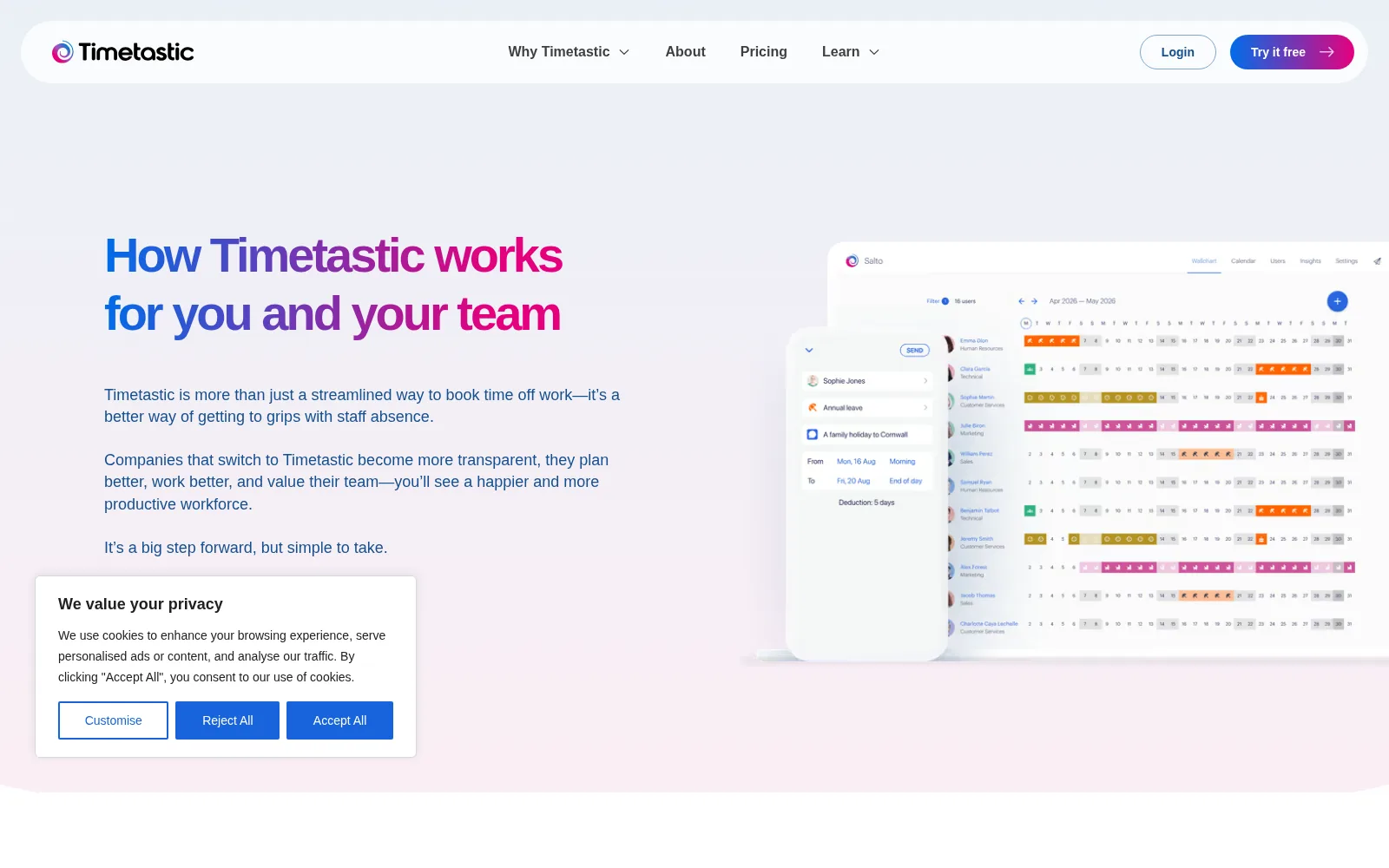
The Wallchart is the screen the product is named after, and it is the reason people keep paying. It is a month grid with each employee as a row and each day as a cell, colour-coded by leave type. You can filter by department, jump between months, and click a day to see who is out. On the public product tour I could see how the rows break down by department (HR, Technical, Customer Services, Marketing, Sales) and how different leave types get different colours. I did not log in and add a row myself, but the design is deliberately simple: no drag-and-drop complexity, no gantt chart, just a clean month view. For a team of 10 to 40, that is enough. For 200+, you will want the department filters and probably the Pro reporting.
📧 Book leave from your phone, approve from email
The employee flow is intentionally boring in the best way: open the mobile app, pick the leave type, pick the dates, add a note, send. The approver gets an email with Approve and Decline buttons and never has to log in. The screenshots on the site show the request card with the leave type, the date range, and the day deduction (“Deduction: 5 days”), which is the detail that stops the “wait, does this count a half day?” arguments. Each employee also gets a personal balance ring showing how many days they have left before the year ends, which removes a surprising number of HR emails. I did not send a real request, but the flow is documented well enough that I would expect it to work exactly as shown.
🌐 Leave types, balances, and 3,000+ regional holidays
Beyond annual leave, Timetastic tracks sickness, maternity and paternity, sabbatical, compassionate, doctor’s appointments, training, and seasonal shutdown. The balance card breaks out contractual allowance, time in lieu, and days remaining. The detail that matters for UK employers is the public-holiday database: the site lists holidays for over 3,000 regions, so if you have people in London, Manchester, and Edinburgh, their calendars reflect the correct bank holidays without you typing them in. That is the kind of thing that sounds trivial until you have to maintain it yourself in a spreadsheet. On the Business tier you get the basics; accrued leave, capped leave types, and burnout alerts are Pro-only.
📊 Pro: Burnout Board, insights, and Teams
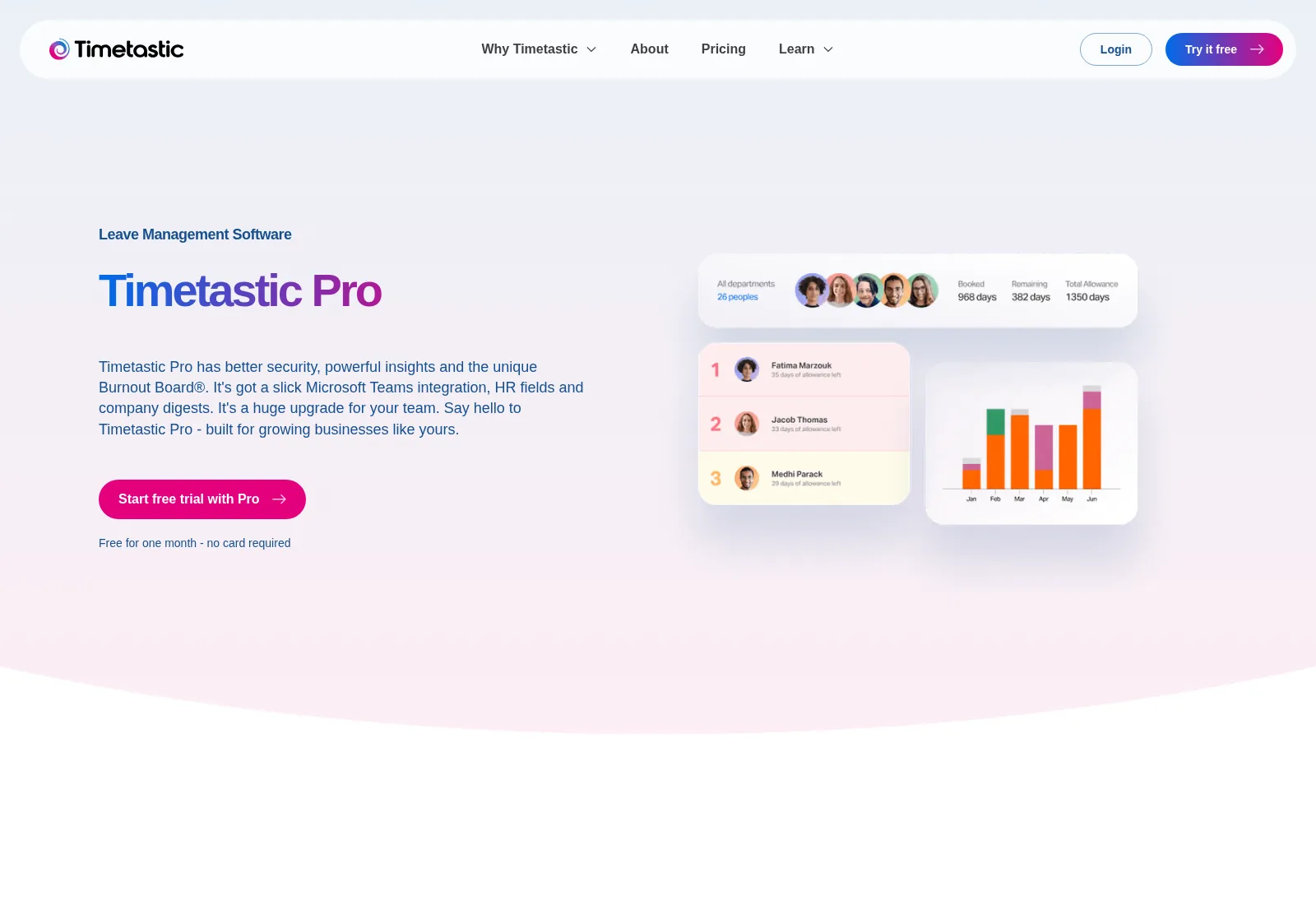
The Pro tier is where the product stops being a calendar and starts being a management tool. It adds absence trends and insights, a Burnout Board that flags team members who have not taken leave in a while, company-wide absence reports emailed to you, accrued leave policies, capped leave types, enhanced user profiles, single sign-on, and a Microsoft Teams integration. There is also a newer Rota & Time Clock tier at $5.50 per user per month for frontline teams who need clock-ins and timesheets. I would treat the rota module as young; it is clearly an expansion beyond Timetastic’s comfort zone, and the review base for it is thin.
What Real Users Actually Say
Timetastic has one of the largest review footprints in the narrow leave-management niche, so there is a real signal here. Here is what I found.
The Aggregate Scores
Timetastic sits at 4.6 out of 5 on reviews.co.uk across a large review base, with 97% of reviewers recommending it. On Capterra it is at 4.7 out of 5 from a solid mid-sized review base, with ease of use scored slightly higher than features. G2 lists it at about 4.6, though on a smaller review base. The Apple App Store scores 4.8 (per the Apple App Store listing), and the Microsoft Teams listing also scores around 4.8. Reviewers most often credit how easy it is to set up, how little training staff need, and how it finally killed the holiday spreadsheet.
— reviews.co.uk and Capterra opened directly; G2 ~4.6 via third-party roundups, October 2026
The Recurring Criticism
The negative feedback is narrow in the way the product is narrow. The most common complaint is that it only does leave and absence: if you want hourly scheduling, complex approval chains, payroll hooks, or a broader HRIS, you will outgrow it. A smaller thread asks for more flexibility around half-days and same-day changes, and a couple of reviewers note that reporting on the base Business plan is basic. Third-party roundups also flag that approval routing is limited to one manager per department, which matters if your org has a two-level sign-off.
— Reviewer patterns across reviews.co.uk, Capterra, and software comparison roundups, October 2026
Read the high score correctly: people love Timetastic because it does a small job very well. The complaints are almost all “I wish it also did X,” where X is a different category of software. If you buy it expecting a leave planner, you will be in the 97%; if you buy it expecting an HRIS, you will be the frustrated reviewer.
User feedback sourced from G2, Capterra, and reviews.co.uk.
Pricing: Every Plan, Laid Bare
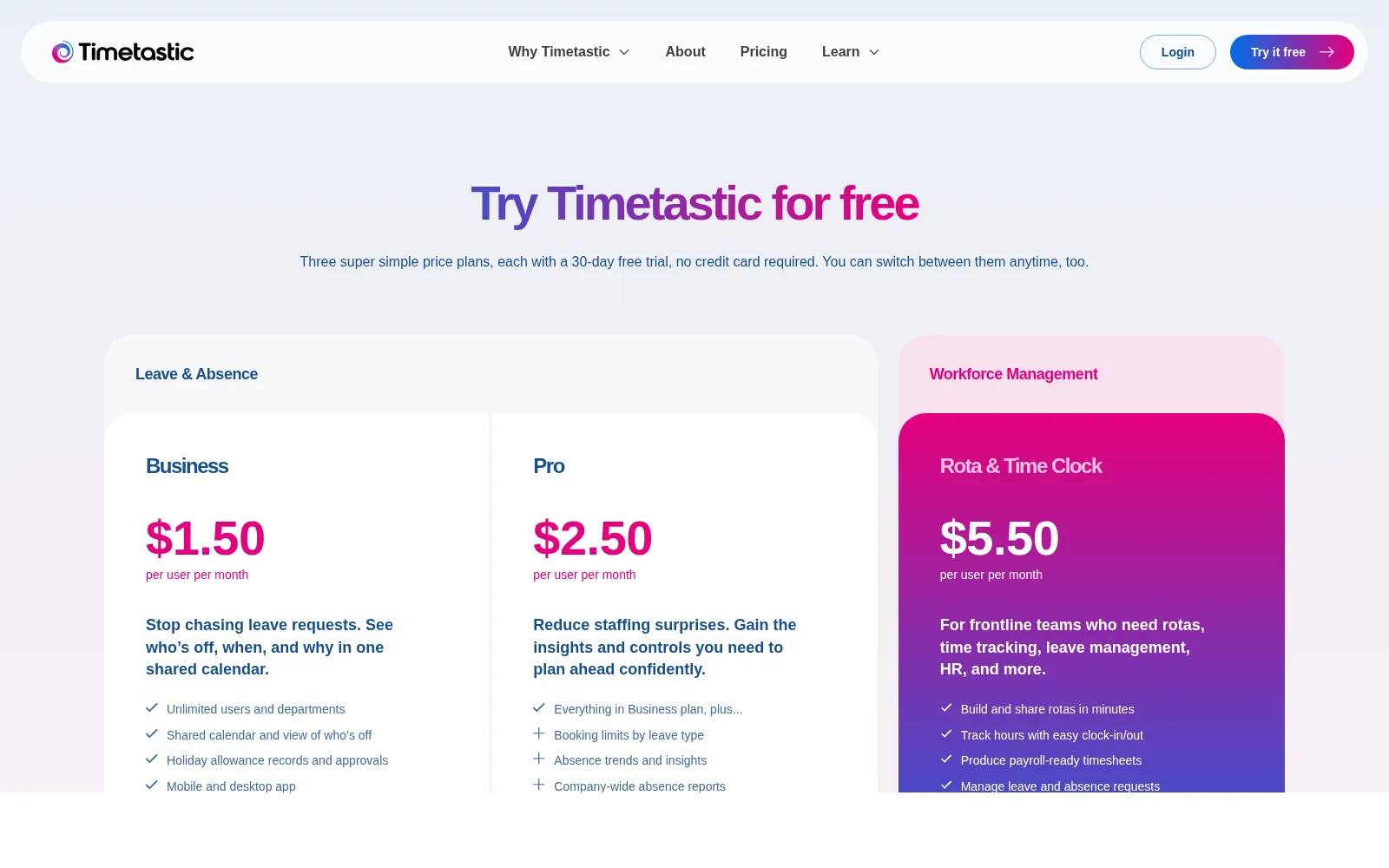
Timetastic prices per user per month, billed month to month with no minimum term. The pricing page I loaded showed three tiers in USD; the GBP view shows roughly £1.20 and £2 per user per month for the leave tiers. Every plan starts with a 30-day free trial that needs no credit card, and charities, certified B Corps, Fair Tax Mark holders, 1% for the Planet members, and NHS Trusts get 50% off.
| Plan | Price (per user, per month) | What You Get |
|---|---|---|
| Business | $1.50/user/mo | Unlimited users and departments, shared Wallchart, holiday allowance records, leave approvals, mobile and desktop app, calendar sync to Outlook/Google/Apple. |
| Pro (most popular) | $2.50/user/mo | Everything in Business, plus booking limits by leave type, absence trends and insights, Burnout Board alerts, company-wide absence reports to your inbox, enhanced profiles, Microsoft Teams integration, SSO, accrued leave, and capped leave types. |
| Rota & Time Clock | $5.50/user/mo | For frontline teams: build and share rotas, clock-in/clock-out tracking, payroll-ready timesheets, plus leave and absence management. |
A few honest caveats. There is no free forever plan; the 30-day trial is the free tier, and after that you enter a card and pay month to month, cancel any time. The prices shown exclude VAT, which is added at checkout for UK customers. The Business plan is enough for most small teams, but the features most people ask about after a month (burnout alerts, trends, Teams, SSO) are Pro-only, so budget for $2.50 rather than $1.50 unless you genuinely only need a Wallchart. The Rota & Time Clock tier is a separate product bolt-on; if you do not have hourly shift workers, skip it.
The Unfiltered Pros & Cons
Pros
- ✓ The Wallchart is one of the cleanest “who is out this month” views in the niche, and approvals happen straight from email
- ✓ Genuinely cheap at $1.50/user/month with a 30-day no-card trial and month-to-month billing
- ✓ 3,000+ regional public holidays preloaded, so UK bank holidays across the whole UK just work
- ✓ Huge, mostly positive review base: 4.6 on reviews.co.uk across a large sample, 4.7 on Capterra
- ✓ Syncs out to Outlook, Google Calendar, and Apple, and has a real Microsoft Teams app
Cons
- ✗ It is a leave-and-absence tool only: no payroll, no performance, no real HRIS data model
- ✗ Approval routing is one manager per department; no multi-level sign-off chains
- ✗ The useful insights, Burnout Board, SSO, and Teams integration are locked on the $2.50 Pro tier
- ✗ Integrations cover calendar sync, Slack, Teams, and payroll-data export to QuickBooks and Sage 50 on the Rota plan, but there is no Xero, BambooHR, or Personio sync and no deep two-way HRIS integration
- ✗ The new Rota & Time Clock tier is young and a separate $5.50 add-on, not a deep shift tool
Final Verdict
Timetastic is a specialist, not a platform. It replaces your holiday spreadsheet with a clean Wallchart, a mobile request flow, and email approvals, and it does that job about as well as anyone in the category. The 3.2 score reflects the narrowness of the bet: great at one thing, thin on everything else, and a poor fit once you need payroll, complex approvals, or a broader HRIS. For a UK small team that has exactly that one pain, it does the job cheaply and with minimal training.
If you are a UK team of 5 to 50 and your current system is a spreadsheet plus a Gmail thread, start the 30-day Pro trial. Import your leave types, point it at your department list, and let your staff book one round of holidays through it. You will know within a fortnight whether the Wallchart is enough. Most small teams should land on Pro rather than Business, because the absence trends and Burnout Board are the features that justify a recurring $2.50/user line item; Business is fine if you truly only need to see who is out.
Frequently Asked Questions
Is Timetastic free?
There is no permanent free plan. Every tier starts with a 30-day free trial that needs no credit card, and after that you pay month to month. The base Business plan is $1.50 per user per month, Pro is $2.50, and the Rota & Time Clock add-on is $5.50.
How much does Timetastic actually cost?
Billed month to month, Business is $1.50 per user per month and Pro is $2.50. UK visitors will see the equivalent in GBP (roughly £1.20 and £2). There is no minimum term, you can cancel self-service, and charities, B Corps, and NHS Trusts get 50% off.
Is Timetastic worth it for a small UK team?
If your problem is specifically tracking annual leave, sickness, and who is out on a given day, yes. It is cheap, fast to set up, and reviewers consistently say staff adopt it without training. If you also need payroll, contracts, performance reviews, or complex approval chains, you want a fuller HRIS like Breathe or CharlieHR instead.
Does Timetastic integrate with Slack, Teams, Google Calendar, and Outlook?
It syncs out to Outlook, Google Calendar, and Apple Calendar, and Timetastic lists Slack alongside those calendars on its integrations page. There is also a dedicated Microsoft Teams app on the Pro tier, and approvals arrive by email, so managers do not have to live inside the app. There is an API for deeper builds, and the official pricing page lists QuickBooks and Sage 50 payroll-data export (for the Rota & Time Clock plan’s payroll-ready timesheets), but there is no Xero, BambooHR, or Personio integration and no deep two-way HRIS sync.
About the Author
