The Short Version
Sunsama is the most polite productivity app I’ve ever used. It doesn’t dump you on a blank list and say “good luck.” Instead, when you open it in the morning, it walks you through a ritual: pull in your tasks from your other tools, estimate how long each one takes, pick the three that actually matter today, and let it push the rest to later. At the end of the day, it walks you through shutting down: what got done, what slipped, what tomorrow looks like. It’s less a to-do list and more a productivity coach that sits in your browser.
I tested Sunsama for three weeks as my daily planner, syncing it with Google Calendar, Todoist, and GitHub. The part that surprised me was the load cap: if I dragged ten tasks onto a day that only had six hours of free time, Sunsama gently refused. It would tell me “that’s too much — want to move two to tomorrow?” After years of overbooking my own calendar and feeling guilty by noon, that single behavior changed how I planned.
The honest verdict: it earns its Editor’s Choice badge for the guided ritual — the morning planning flow is the best in this category. But it’s expensive with no free tier, it’s intentionally weak at big-picture project planning, and the real-time collaboration on shared pages can feel buggy. If your problem is “I sit down to work and don’t know what to do,” Sunsama fixes that. If your problem is “I need to manage a six-month project across ten people,” look elsewhere.
What Is Sunsama, Actually?
Sunsama is a daily planning app built by a small team (the company is Sunsama, Inc., founded by Sam Tennant and Jonas Weigert). Its core idea is borrowed directly from the “planned day” productivity literature: you don’t manage tasks, you plan a day. Every morning you tell Sunsama what today looks like — your meetings, your energy, your priorities — and it builds a realistic schedule around them. Every evening, you close the loop.
It’s not a task manager that replaces Todoist or Asana. It’s more like a layer on top of them. You connect your existing tools — Asana, Todoist, Trello, Jira, GitHub, Google Calendar, Outlook, iCloud — and Sunsama pulls tasks out of them into today’s plan. When you mark a task done in Sunsama, it marks it done in the source tool. You keep your project systems; Sunsama just helps you decide, every morning, what actually gets attention today.
The product has a strong philosophical throughline: it assumes you can’t do everything in a day, and it makes you choose. That sounds obvious until you use a to-do list that lets you pile 47 items onto Tuesday and then blames you when you finish nine. Sunsama caps the load, pushes the rest to other days, and refuses to let you lie to yourself about how much fits.
Who This Is For (and Who Should Skip It)
- ✅ Knowledge workers who sit down and don’t know where to start. If your mornings are lost in email and Slack, the guided ritual gives you a 15-minute “here is today” routine. This is Sunsama’s core audience and it nails this.
- ✅ People who overbook themselves and then burn out. The load cap and time estimates force realism. If you’ve ever planned 12 hours of work into an 8-hour day, Sunsama will stop you.
- ✅ People who already live in Todoist/Asana/Trello and want a daily layer on top. The two-way sync means you don’t have to abandon your project tooling. Sunsama is the daily driver; your PM tool stays the source of truth for projects.
- ❌ People who want a free tool. Sunsama has no free forever tier by design. There’s a 14-day no-credit-card trial, and that’s it. If you’re not ready to pay $200+ a year, this isn’t for you.
- ❌ Teams that need serious project planning and roadmapping. Sunsama is intentionally weak here. It’s a daily planner, not Asana. People run it alongside Asana or Trello — it doesn’t replace them.
- ❌ People who want rock-solid real-time collaboration. Shared workspaces exist, but G2 reviewers — and I — found that live editing on shared pages can reload, drop edits, or feel janky. For solo planning it’s flawless; for co-editing it’s immature.
Score Breakdown
Sunsama scores highest on ease of use (4.7) — the guided ritual is the gentlest onboarding in the time-blocking category. It doesn’t hand you a blank canvas and expect you to know the method; it teaches the method as you use it. Features come in at 4.5 for the morning/shutdown ritual, weekly review, timeboxing, and analytics. Integrations are 4.3: the calendar and task-tool sync is solid, but the supported app list is narrower than Akiflow’s.
Value (4.0) is the drag: it’s premium-priced with no free tier. Support (4.5) is genuinely responsive. Overall 4.4 / 5 — our Editor’s Choice for the daily-planning ritual, with the asterisk that it’s a personal tool, not a team one.
What Actually Matters: Features, Reviewed
🌤 The morning ritual (the reason to subscribe)
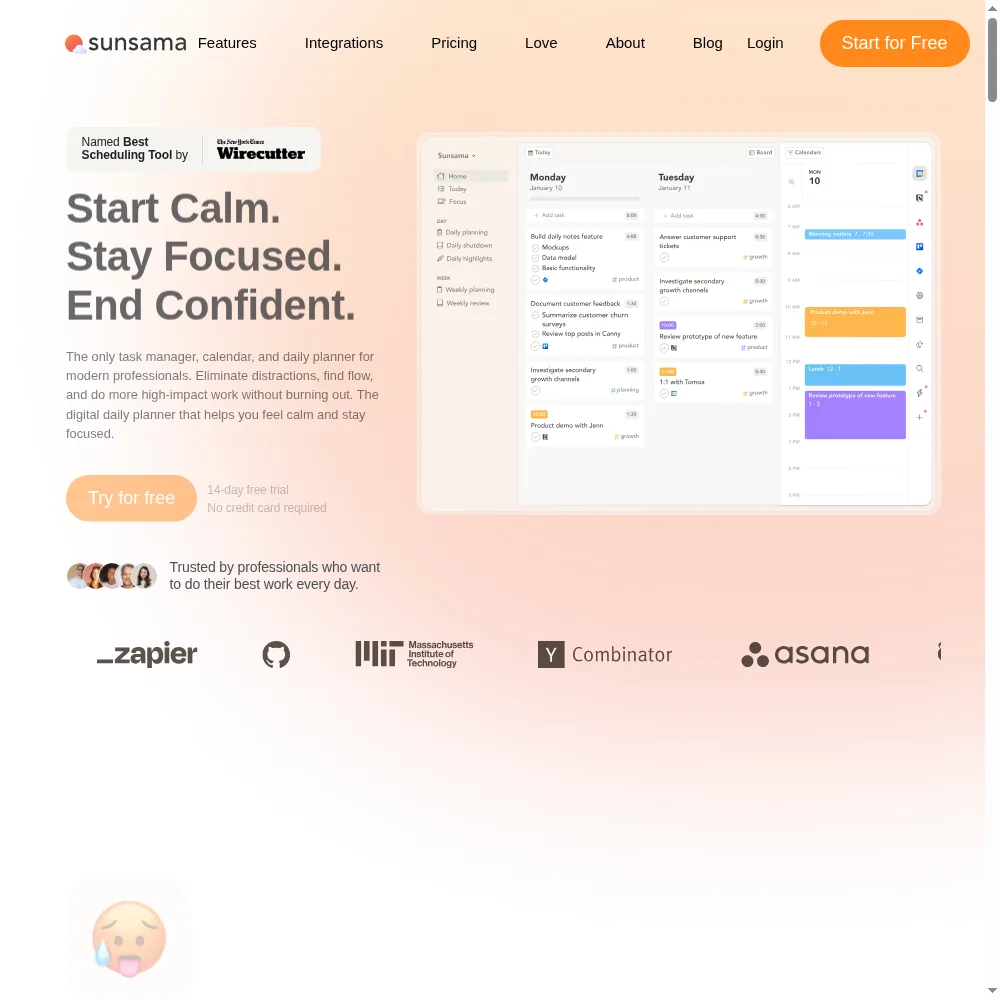
This is the heart of Sunsama, and it’s genuinely well-designed. Open the app and it asks, step by step: what’s on your calendar today? Pull in candidate tasks from Todoist/Asana/GitHub. Estimate how long each one really takes. Pick what you’ll actually do today. Drag them onto the timeline around your meetings. It caps the total — if you’ve put eight hours of tasks into a six-hour day, it tells you and makes you move something.
I’ve tried GTD, time-blocking spreadsheets, and half a dozen apps. The difference with Sunsama is that it enforces the discipline rather than just letting you perform it. On the third day, I caught myself reflexively overbooking, and the app pushed back. A G2 reviewer wrote: “It feels like a productivity coach that won’t let me lie to myself about how much I can do in a day.” That’s exactly right.
🌙 The evening shutdown ritual
At the end of the day, Sunsama walks you through closing up: what got done, what slipped (and why), and a preview of tomorrow. It sounds like a small thing, but it’s the part that keeps people coming back. Most planners leave you with a messy list of half-finished tasks and no psychological closure. Sunsama gives you a clean handoff to tomorrow.
For remote workers especially, this acts as a work/life boundary. You don’t close the laptop while a dozen open loops rattle around — you close them, move what didn’t fit, and explicitly stop. After three weeks I found myself reluctant to work late not because the app nagged me, but because I’d built the habit of a clean shutdown.
📈 Time estimates, the load cap, and daily realism
Every task gets a time estimate. Sunsama sums them up against your available hours (minus meetings, minus focus buffers) and shows you a load meter. If you’re over, it’s blunt about it. This is the feature that converts Sunsama from a pretty planner into a behavioral tool — it makes you confront the gap between what you want to do and what actually fits.
I started estimating every task honestly after about a week. The first few days I was wildly optimistic (“this email thread will take 15 minutes” — no it won’t). By the end, my estimates were within 20% of reality, which is the whole point. The app doesn’t just plan your day; it trains you to plan it accurately.
🔄 Two-way sync with your existing task tools
Sunsama connects to Google Calendar, Outlook, and iCloud two-way, plus Asana, Todoist, Trello, Jira, and GitHub for tasks. I tested the Todoist and GitHub sync and it held up: tasks I completed in Sunsama checked off in the source, and new tasks I added in Todoist appeared in Sunsama’s pull-in list. Email-to-task and Slack/Teams follow-up nudges round it out.
The honest caveat: the integration list is narrower than Akiflow’s. If you live in a more niche tool, you may not find it. But for the mainstream stack — Google Workspace, Microsoft 365, Todoist, Asana — it covers you. The sync is also two-way enough that you never feel like you’re maintaining a parallel database.
📅 Weekly review and time analytics (the reflection loop)
Once a week, Sunsama prompts you to review: what did you actually spend time on vs what you planned? The analytics show where your hours went by category. I expected this to be a vanity feature. It wasn’t — after two weeks, the report showed I was spending 11 hours a week on meetings and only 4 on deep work I said mattered. That conversation I had with myself (not with the app) is worth the subscription alone.
The weekly review is intentionally lightweight — 10-15 minutes — so you actually do it rather than treating it like a chore. It closes the loop between planning and reflection that most to-do apps leave open.
👁 Shared workspaces (promising, but rough)
Sunsama added shared workspaces so teams can see each other’s planned days and collaborate on shared pages. The idea is good — a team that can see what everyone’s actually working on has less standup overhead. In practice, during my testing, the real-time editing on shared pages was janky: edits would occasionally fail to save, pages would reload mid-type, and a colleague’s cursor would vanish and reappear.
It’s not broken enough to be unusable, but it’s not as polished as Notion or Google Docs. If you’re evaluating Sunsama for team collaboration specifically, test it hard before committing per-seat licenses — and remember per-seat pricing climbs fast once you add people. For solo use, this never comes up.
Pricing (and who should pick which tier)
Sunsama is premium by design: no free forever tier, a 14-day no-credit-card trial, and a single Pro plan. Billing is monthly or yearly — yearly works out to about $17/month (~$204/year) versus $22/month monthly, so annual saves roughly 23%. Workspace seats are added at the same per-person rate, prorated mid-month. Enterprise adds SSO/SAML, SCIM, and audit logs for larger orgs.
| Plan | Price | What You Get |
|---|---|---|
| Pro | $22/month monthly ($17/month billed yearly, ~$204/yr) | Unlimited usage and integrations; guided daily planning + shutdown; Google/Outlook/iCloud 2-way sync; Asana/Todoist/Trello/Jira/GitHub sync; email-to-task; Slack/Teams follow-ups; timeboxing, auto-scheduling, focus mode, weekly review, analytics; AI + MCP + Zapier; SOC2 |
| Workspace seats | Per person added | Same per-person rate prorated mid-month |
| Enterprise | Contact sales | SSO/SAML, SCIM + audit logs, custom privacy and data requirements |
Which should you pick? If you’re solo and convinced the ritual will stick, go yearly — the discount is meaningful and you’ll want the year to actually build the habit. If you’re unsure, run the no-credit-card trial for all 14 days and only upgrade when you’ve used the morning and shutdown rituals ten times. Don’t buy it for a team without testing the shared-workspace collaboration first; the per-seat math gets painful fast, and that feature is the roughest edge.
The Unfiltered Pros & Cons
One framing before the list: Sunsama’s strengths and weaknesses come from the same philosophy. It’s a deeply opinionated daily ritual — which means it changes your behavior, but also means it refuses to be a project manager or a team tool. If you want one app to do everything, this will frustrate you.
Pros
- ✓ Guided morning and shutdown ritual that genuinely changes daily behavior
- ✓ Time estimates and a load cap that stop you overbooking the day
- ✓ Clean two-way Google, Outlook, and iCloud calendar sync
- ✓ No-credit-card 14-day trial and SOC2-compliant professional tooling
- ✓ Weekly review and time analytics that close the reflection loop
Cons
- ✗ Premium price with no free forever tier, by design
- ✗ Weak at big-picture project planning; people keep Trello/Asana alongside it
- ✗ Real-time collaboration on shared pages can reload or drop edits
- ✗ Per-seat pricing climbs quickly once a team joins the workspace
- ✗ Mobile is lighter than the desktop; the ritual is best run on a computer
Final Verdict
Sunsama is a guided daily ritual that walks you into a focused morning plan, caps a realistic load, and closes your day with a shutdown routine. It is premium-priced with no free tier, intentionally weak at project planning, and its real-time collaboration can feel buggy.
The 30-second decision. Ask yourself: when you sit down at your desk in the morning, do you already know your three most important tasks — or do you spend 40 minutes drifting through email and Slack before you start? If it’s the latter, Sunsama’s ritual is worth the price of admission. It is the best daily-planning onboarding in this category, and the load cap will stop you overbooking.
If, on the other hand, you need a project roadmap, a team workspace with rock-solid real-time editing, or a free option, skip it. Sunsama is a personal behavioral tool, not a platform. I kept it for my own daily planning but kept Asana open alongside it — and that’s the intended setup. Run the 14-day trial, use the ritual every weekday, and decide based on whether you actually do it, not on how the screenshots look.
Frequently Asked Questions
Is Sunsama worth the money?
It’s one of the pricier personal planners, and there’s no free tier. But if you currently lose mornings to context-switching and overbook your days, the ritual saves more time than it costs. It’s not worth it if you already have a rock-solid planning habit — you’ll be paying for a coach you don’t need.
Does Sunsama replace Todoist or Asana?
No, and it doesn’t try to. It sits on top of them. You keep your project system in Asana/Todoist/Trello; Sunsama pulls from it each morning and helps you pick today’s work. People who try to replace their PM tool with Sunsama get frustrated — that’s not what it’s for.
Is there a free plan?
There’s a 14-day no-credit-card trial, but no forever-free tier by design. The team’s position is that they build for people who commit to the habit, and they’d rather not run a freemium meter. It’s a fair stance, but it means there’s no low-risk long-term test.
How is Sunsama different from Akiflow?
Akiflow is a keyboard-first command center: fast, power-user, drag-and-drop time-blocking with deep integrations and booking. Sunsama is a guided ritual: it walks you through planning and shutdown, caps your load, and is gentler. Akiflow rewards experts; Sunsama trains you into the habit. Pick based on whether you want a speed tool or a coach.
Can teams use Sunsama?
Shared workspaces exist and let teams see each other’s planned days, but the real-time collaboration on shared pages can feel buggy — that’s the most common team complaint on G2. For solo daily planning it’s excellent; for heavy team collaboration, test it thoroughly before buying per-seat.
User feedback sourced from G2 and Capterra reviews.
About the Author