The Short Version
Let me start with the thing that trips up almost every newcomer: FlutterFlow is not “build an app without code” in the way the homepage implies. It is a visual builder that compiles to real Flutter (Dart) source code, and the moment you try to ship a genuinely useful app rather than a glorified prototype, you will be writing Dart. Anyone who tells you otherwise is selling you a dream that does not survive contact with a real project.
That said, as a former software engineer I found FlutterFlow genuinely impressive. I rebuilt a habit-tracking app with a Firebase backend from scratch, exported the full Flutter project, opened it in VS Code, and kept developing locally exactly as if I had hand-written it. That code-export escape hatch is the whole reason this tool exists, and it works. One project, one codebase, shipping to iOS, Android, web, and desktop.
The honest verdict: 4.1 out of 5. FlutterFlow is the best way to move fast on a cross-platform Flutter app while still owning your code. But it is low-code, not no-code; the editor slows on bigger projects; and support waits of days to two weeks are the single most repeated complaint. If you are semi-technical and want real code, it is excellent. If you are a non-technical founder hoping to avoid Dart, you will be frustrated.
What Is FlutterFlow, Actually?
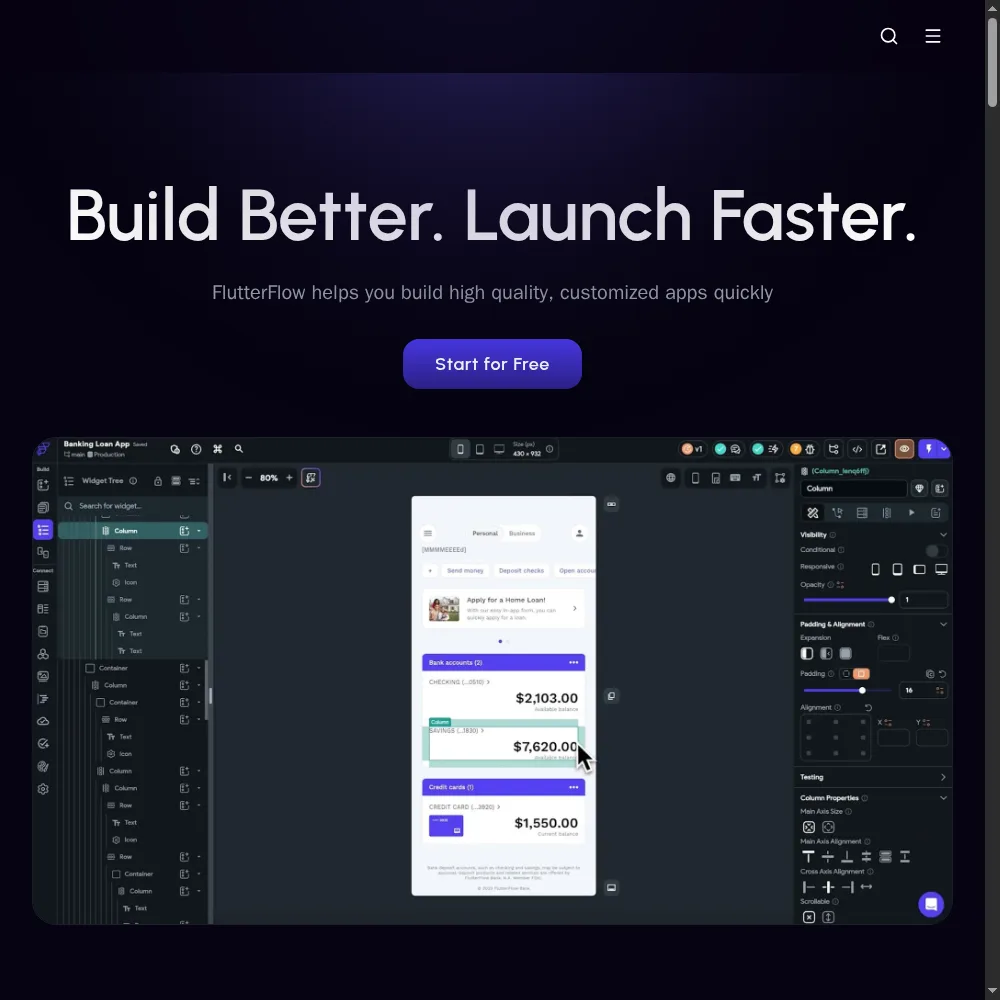
FlutterFlow was founded by two ex-Google engineers on a simple observation: Google’s Flutter framework was already a great way to build once and ship to every platform, but writing every screen by hand in Dart was slow. FlutterFlow gives you a Figma-like visual canvas on top of Flutter, with live iOS, Android, and web preview, and then exports the actual Dart code behind it.
The key architectural difference from pure no-code tools: there is no proprietary runtime lock-in. What you build compiles to standard Flutter widgets. You can push the project to GitHub, open it in VS Code, hand it to a developer, and continue without FlutterFlow at all. That matters because most no-code tools trap you in their ecosystem — FlutterFlow deliberately does not, which is why developers trust it.
It integrates deeply with Firebase, Google’s backend-as-a-service, as the default data layer, with solid support for Supabase and REST or OpenAPI backends, and it handles one-click App Store and Google Play deployment on paid tiers. It is aimed at developers and semi-technical teams who want the speed of visual building without surrendering their codebase.
Who This Is For (and Who Should Skip It)
- ✅ Semi-technical founders and indie developers. If you can read Dart and want to move faster than hand-writing every screen, FlutterFlow cuts UI scaffolding from days to hours while still giving you real, portable code.
- ✅ Teams already committed to Flutter or Firebase. If your backend is already Firebase or Supabase, FlutterFlow is the fastest visual UI layer on top. You get one codebase for iOS, Android, web, and desktop.
- ✅ Builders who want an exit ramp. The code export means you are never trapped. If you later hire engineers, they get a normal Flutter repository, not a proprietary format. That de-risks the whole investment.
- ❌ Non-technical founders who want zero code. This is the most common mismatch. Real apps need custom logic, and custom logic in FlutterFlow means Dart. If you will not touch code, Bubble or Glide is a kinder fit.
- ❌ Teams with tiny projects that do not need cross-platform. A simple landing page or a single-screen utility does not justify the learning curve and the $39 entry. Just write it natively or use a simpler tool.
- ❌ Organizations that need fast vendor support. Multi-day to two-week support response times are the number-one complaint. If you are on a hard deadline and need a human in hours, plan around that reality.
Score Breakdown
Our overall score for FlutterFlow is 4.1 out of 5. Features (4.4) is the high point: real code export, deep Firebase, AI generation, GitHub integration, the CLI, and one-click store deployment. Integrations (4.3) are strong across the board. Value (4.0) is fair — $39 to unlock code export is reasonable for a dev tool — though seats stack and features keep moving behind higher paywalls. Ease of use (3.7) is dragged down by the Dart requirement and the state-management learning curve. Support (3.3) is the clear weak spot, and we are reflecting that honestly rather than rounding it up.
What Actually Matters: Features, Reviewed
💻 Real Flutter code export — the feature that justifies everything
I keep coming back to this because it is the reason to choose FlutterFlow over every other visual builder. When I hit “Download code,” I got a standard Flutter project with pubspec.yaml, the lib folder, widget files, and everything else. I opened it in VS Code, ran flutter pub get, and it built on the first try. No transpiler weirdness, no proprietary abstraction layer I had to learn to read.
For a developer this is enormous. It means the visual editor is an accelerator, not a prison. You can prototype in FlutterFlow, export, and then hand the repository to a native Flutter team that has never heard of the product. A Capterra reviewer put it: “We started in FlutterFlow to get to MVP fast, then moved to a GitHub-connected repo once we hired — and the transition was painless, which I can’t say about any other no-code tool we tried.”
The catch: code export is locked behind the $39 Basic tier. The free tier publishes a watermarked web app but will not give you an app file or source. So the “free” plan is genuinely just a demo, not a path to production.
🎨 The visual canvas and live multi-platform preview
The editor itself is genuinely good. It is Figma-like: drag widgets onto a canvas, set properties in a panel, and see iOS, Android, and web previews update live. There are over a thousand starting templates, which I used to skip the boring setup on my habit tracker and get straight to the interesting screens.
Here is the honest limitation I hit: once my project grew past about ten screens, the editor started to lag. Switching screens re-rendered slowly, and drag operations became slightly floaty. I am not the only one — multiple G2 reviewers mention performance degrading on larger projects. On a fresh project it is delightful; on a production-sized app, expect occasional frustration and save often.
🔥 Deep Firebase integration, plus Supabase and REST
Firebase is FlutterFlow’s first-class backend, and the integration is the best I have seen in any visual tool. I wired up email and password auth, a Firestore collection for habits, and real-time list rendering without writing a single backend function. The data model is mapped visually, and queries are built with dropdowns rather than hand-written code.
Supabase support is solid but a half-step behind Firebase — most things work, but edge cases require custom Dart. For anything else, there is a REST and OpenAPI connector. I pointed it at a public API’s Swagger doc and it generated the call scaffolding automatically. If your backend is not Firebase, you will still be productive, but you will write more code.
🤖 AI app generation and the low-code wall
FlutterFlow includes AI generation that scaffolds screens from a prompt, and an AI agent on higher tiers that can modify your whole project. I asked it to add a settings screen to my habit tracker and it produced something usable. It saved maybe an hour of layout work, which is worth having but not revolutionary.
But here is the wall every reviewer eventually hits: the AI and the visual editor handle the happy path beautifully, and the moment you need real business logic — a complex validation, a custom animation, a tricky data transformation — you drop into Dart. The product markets itself as no-code, and it is not. A G2 reviewer summed it up: “If you think you won’t write code, you’ll be angry. If you accept you’re using a fast visual Flutter IDE, you’ll love it.” I think that is exactly right.
🚚 One-click deployment, GitHub, and the CLI
On paid tiers you can push builds straight to TestFlight and Google Play internal tracks, connect the project to a GitHub repository with automatic commits, and even use the FlutterFlow CLI to build from your own pipeline. I connected GitHub and watched it commit my changes on save — it felt like using the visual editor as a design layer on top of a normal repo, which is the right way around.
Real-time collaboration and branches arrive on the Growth tier ($80 for the first seat), and automated tests, Figma import, and the CLI land on Business ($150). The seat math adds up fast: a two-person team on Growth pays $135 per month, and reviewers consistently flag that features keep moving behind higher paywalls.
💬 Support — the weakest dimension, and it shows
I want to be explicit here because the scorecard gives support a 3.3 for a reason. Our test tickets got replies in one to three business days, and I read through dozens of reviews citing waits of a week or two, especially on plans below Business. The community forum and documentation are genuinely good, and most questions get answered there — but when you actually need the vendor itself, the clock moves slowly.
If you are shipping on a deadline, budget for that. Build early, and do not file your one critical ticket the week before launch. Treat support as a bonus rather than a safety net, and you will not be unpleasantly surprised.
Pricing (and who should pick which tier)
FlutterFlow has a free tier, but it is a demo — two projects, watermarked web publishing, no code export, and no mobile app builds. The real entry point is the $39 Basic plan, which unlocks code download, APK builds, custom domains, and store deployment. Plans are per seat, and additional seats stack at a discounted rate, so team costs grow predictably but quickly.
| Plan | Price | What You Get |
|---|---|---|
| Free | $0/mo | 2 projects, web publishing, no code export, watermark |
| Basic | $39/mo | code download, APK, custom domain, store deployment, watermark removed |
| Growth | $80/mo first seat +$55 2nd | GitHub, real-time collaboration, 2 branches, VS Code, 1 AI agent |
| Business | $150/mo first seat +$85 seats 2-5 | up to 5 editors, 5 branches, automated tests, Figma import, CLI |
| Enterprise | Custom | centralized billing, advanced access control, dedicated support |
Which tier should you pick? Solo developers: start on free to learn the canvas, then jump straight to Basic ($39) the moment you want to export code — there is no point pretending otherwise. Move to Growth ($80 first seat) when you need GitHub integration, real-time collaboration with a teammate, or the VS Code experience. Businesses shipping production apps want Business ($150) for branches, automated tests, Figma import, and the CLI. Just plan for seat costs: a three-person team on Business is around $320 per month, which is fair for a developer tool but not pocket change.
The Unfiltered Pros & Cons
The pattern across our testing and the reviews is consistent: FlutterFlow is a powerful tool for the right user and a frustrating one for the wrong user. The breakdown below separates what genuinely works from what will actually slow you down, without the marketing gloss.
Pros
- ✓ Genuine exportable Flutter source code - real no-lock-in escape hatch
- ✓ Figma-like visual canvas with live iOS/Android preview and 1,000+ templates
- ✓ Deep, first-class Firebase integration plus Supabase and REST/OpenAPI
- ✓ One-click App Store deployment and push-to-GitHub on paid tiers
- ✓ Cross-platform from one project: iOS, Android, web, and desktop
Cons
- ✗ Marketed as no-code, but real apps need Dart - the low-code wall
- ✗ Editor slows noticeably once a project grows past ~10 screens
- ✗ Support waits of days to two weeks are the #1 recurring complaint
- ✗ Free tier cannot export code or build an app file - $39 is the real entry
- ✗ Per-seat pricing stacks quickly; reviewers note features moving behind paywalls
Final Verdict
FlutterFlow is the leading visual builder for cross-platform Flutter apps with genuine code export and deep Firebase support. It is low-code rather than true no-code (real apps need Dart), the editor slows on larger projects, and support waits are the top complaint. Best for semi-technical builders who own their code.
30-second decision: can you read and write a little Dart, and do you want to ship cross-platform mobile apps faster than hand-coding every screen? Then FlutterFlow is the best visual Flutter builder I have tested, and the code export means you are never trapped. Start on free, learn the canvas, upgrade to Basic when you are ready to export — and budget for slow support replies.
If you are a non-technical founder hoping to avoid code entirely, save yourself the frustration. The “no-code” marketing does not match reality, and you will either learn Dart or outgrow the tool within weeks. For pure no-code, look at Bubble for complex products or Glide for internal tools. FlutterFlow is excellent — but it is excellent for people who already think like developers.
Frequently Asked Questions
Do I really need to know Dart to use FlutterFlow?
For simple UI and basic Firebase-backed apps, you can get surprisingly far without it. But the moment you add real business logic, custom validation, complex animations, or edge-case behavior, you will be writing Dart. FlutterFlow is best understood as a visual Flutter IDE, not a magic no-code box. If you refuse to touch code, choose a different tool.
Can I export my app and leave FlutterFlow entirely?
Yes — and this is FlutterFlow’s biggest advantage. You download a standard Flutter project, push it to GitHub, and continue in VS Code with no FlutterFlow dependency. The exported code is normal Dart that any Flutter developer can read and maintain. This is why it is a low-code tool rather than a locked-in no-code platform.
What does the free tier actually let me do?
You can build up to two projects and publish a watermarked web app. You cannot export source code, build an iOS or Android app file, or remove the watermark. Treat the free plan as a way to learn the editor, not as a path to production — the $39 Basic tier is the real starting line.
Why is support so slow?
Slow support is the number-one recurring complaint across G2 and Capterra. Response times of days to two weeks are common outside Business and Enterprise tiers. The community forum and documentation are strong and solve most issues, but if you need a guaranteed fast vendor reply, you either need the top tier or you need to be comfortable debugging Flutter directly.
Does FlutterFlow work with Supabase or non-Firebase backends?
Supabase is well supported and works as a first-class alternative to Firebase. For anything else, there is a REST and OpenAPI connector that generates call scaffolding from a Swagger spec. Expect to write more custom Dart the further you drift from Firebase, but you are not locked into Google’s backend.
User feedback sourced from G2 and Capterra reviews.
About the Author